Section 4 – Installation of Door Frames & Facades
Temp-Cast 2000 Installation Manual
47
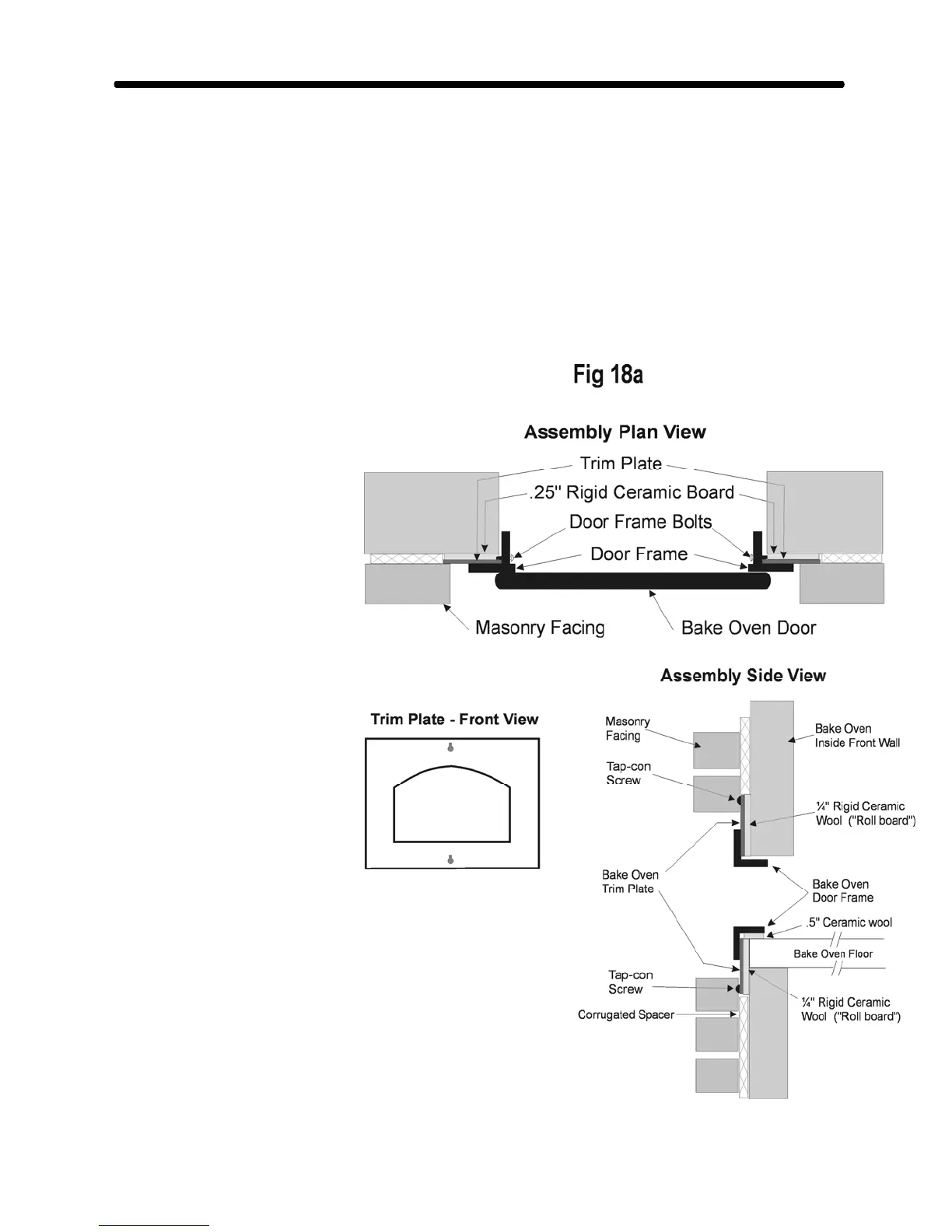
THE TRIM PLATE OPTION:
The Bake Oven Trim Plate option simplifies
the installation and creates a neater finished
appearance. With the trim plate in position,
the masonry facade can be set away from the
door frame without exposing the heater core.
To install the trim plate, cut out the opening
of the bake oven in the corrugated spacer.
Hold the trim plate in position and mark the
rectangle of the trim plate on the corrugated
spacer. Cut the spacer out of
this area.
Using the trim plate as a
template, cut a piece of 1/4”
rigid “coreboard” ceramic fibre
(supplied). Centre this fibre in
the opening and glue it to the
core with refractory cement.
Attach the trim plate to the core
with the tap-con screws
supplied.
Position the bake oven door
and attach it with the 4
machine screws supplied, which go behind
the trim plate. Check that it is level and
plumb. (Leave the door off or cover it to
keep it clean during masonry work.)
Note: when the masonry facing is
installed, a space of 1 to 1½” must be left
between the door and the masonry to allow
the door to fully open & for full movement
of the door handle. (See Fig 18a.)



 To Next Page