Edition 1.2 (0608) Page 5 of 16
Fan On Mode
By selecting “Fan On” or continuous fan mode on the TZT-701 thermostat, the indoor fan will operate continuously whilst
heating or cooling between the “Start” or “Wake” programs and the “Stop” or “Sleep” programs. The fan will turn on and off as
required with heating and cooling outside of those programmed events, if your TZT-701 is set as a Programmable thermostat.
Please Note – Your installer may have activated some of the advanced indoor fan management capabilities of the TZT-701
thermostat that work in partnership with the Fan On Mode. This may result in the fan operating differently than described above.
If you find this un-desirable, please contact your authorised temperzone service agent for advice on altering the function.
Fan Speeds
Single Fan Speed
If your air conditioning system has only one Indoor fan speed, the words “High”, “Med” or “Low” will be
absent from the TZT-701 Wall Control display, as shown in the picture to the left.
Press the FAN button to select either “Fan On mode” or “Auto Fan mode” as described above.
Three Fan Speed
If your air conditioning system has 3 fan speeds, the TZT-701 thermostat will indicate each fan speed in the
position shown in the picture to the left.
Pressing the FAN button will step the selected fan speed through “Low”, then “Med(ium)”, then “High”
and finally “Auto” fan speed, (indicated by all three fan speeds being shown on the LCD). If “Auto” fan
speed has been selected the TZT-701 thermostat will indicate the fan speed it has chosen for the best
performance by flashing the appropriate speed related word in the LCD.
Press and hold the Fan button for 3 seconds to toggle between Auto fan (where the fan turns on and off with heating and cooling)
and Fan On, where the fan will run continuously most of the time (as set by the system installer).
Please Note: If zoning is enabled. To protect the Air Conditioning ducting and other components the installer may have
selected the high fan speed to be locked out if only one zone is on.
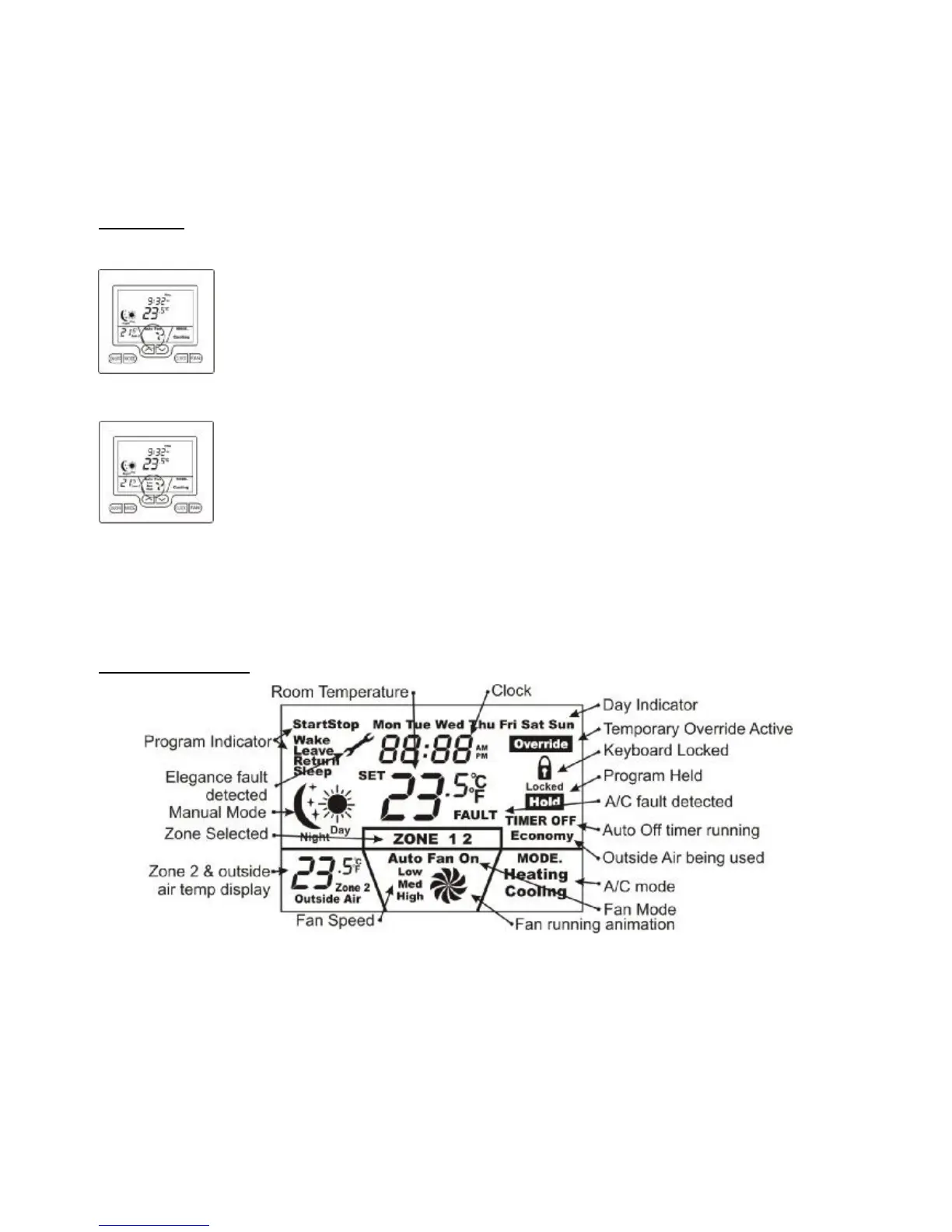
The LCD Explained
Program Event Indicator.
If “Wake”, “Leave”, “Return” or “Sleep” are shown, your TZT-701 thermostat is set as a programmable thermostat. This mode
of operation is perfect for those living a structured residential lifestyle. This is fully automatic mode where the occupant pre-
programs the home temperatures for 24 hours per day, 7 days per week. This is explained later on page 8 of this manual.
2 Program Event Indicator.
2 Event programming is typically used in commercial buildings where the Air conditioning is normally turns on in the morning,
maintains a single temperature all day, then switches off at the end of the day (or maintains a more economical overnight
temperature). The words “Start Stop” on the LCD indicate this mode is set. This function is described on page 10 of this manual.



 To Next Page