10
instrument to make automatic
deduction, facilitating measuring
reading.
Caution
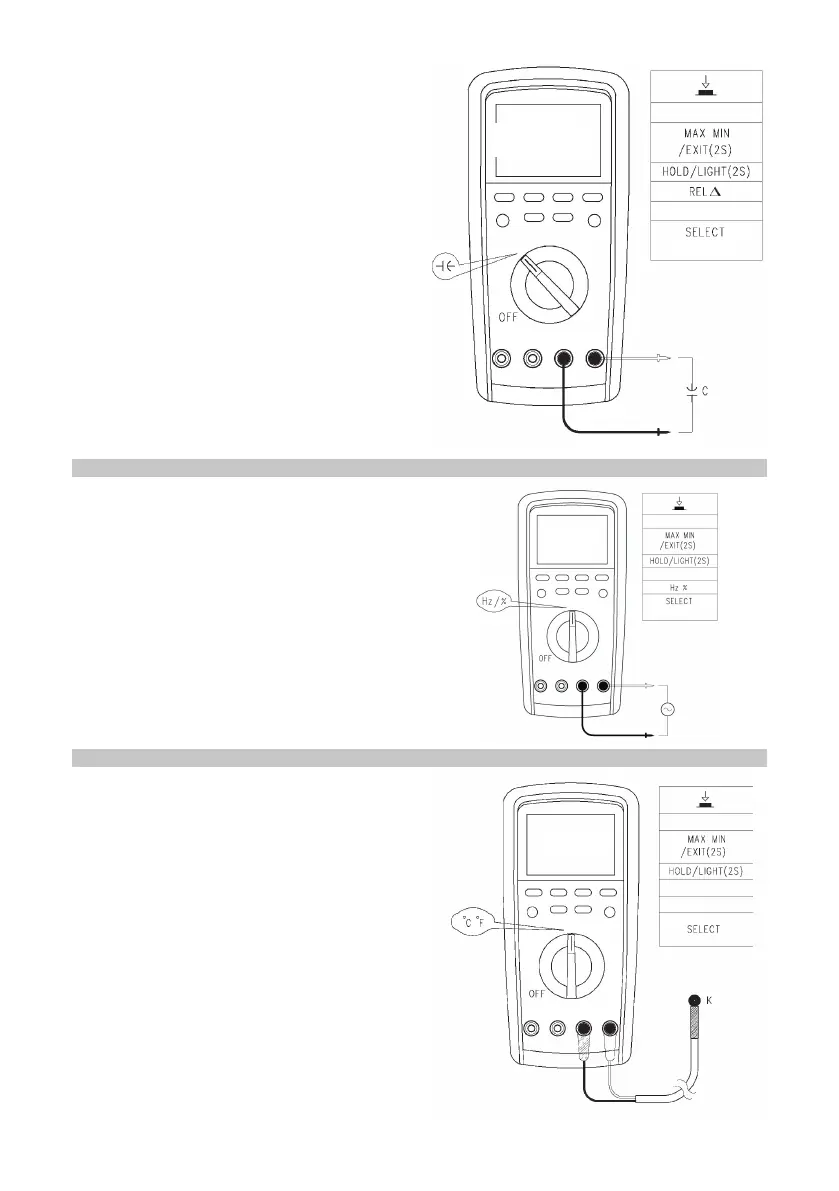
• If metered capacitance is in short
circuit, or capacitance is beyond the
maximum range of the instrument, the
LCD will display “OL”.
• When measuring large bulk
capacitance it is normal to take a few
seconds to measure.
• Before measuring, discharge all the
residual electric charge in capacitance,
particularly important for high-voltage
capacitance, preventing damage to the
meter and personal injury.
MEASURING FREQUENCY/DUTY RATIO
• In the gear of frequency measurement,
press the Hz% button to select the
mode of period for auxiliary display/
duty ratio measurement.
Caution
• Do not input voltage higher than DC
30V or AC 30V in order to prevent
personal injury.
MEASURING TEMPERATURE
• Press and hold SELECT in mV gear
to enter or exit the temperature
measurement function.
• Press SELECT under the temperature
measurement function to switch the
display between °C and °F.
• Temperature sensor: applicable to the
K-type thermocouple only.
• Boot up to display “OL” and plug in
the K-type temperature sensor to the
meter.
Caution
• The K-type thermocouple congured in
accessories is applicable to measuring
temperatures below 230°C/446°F only.


 To Next Page