11
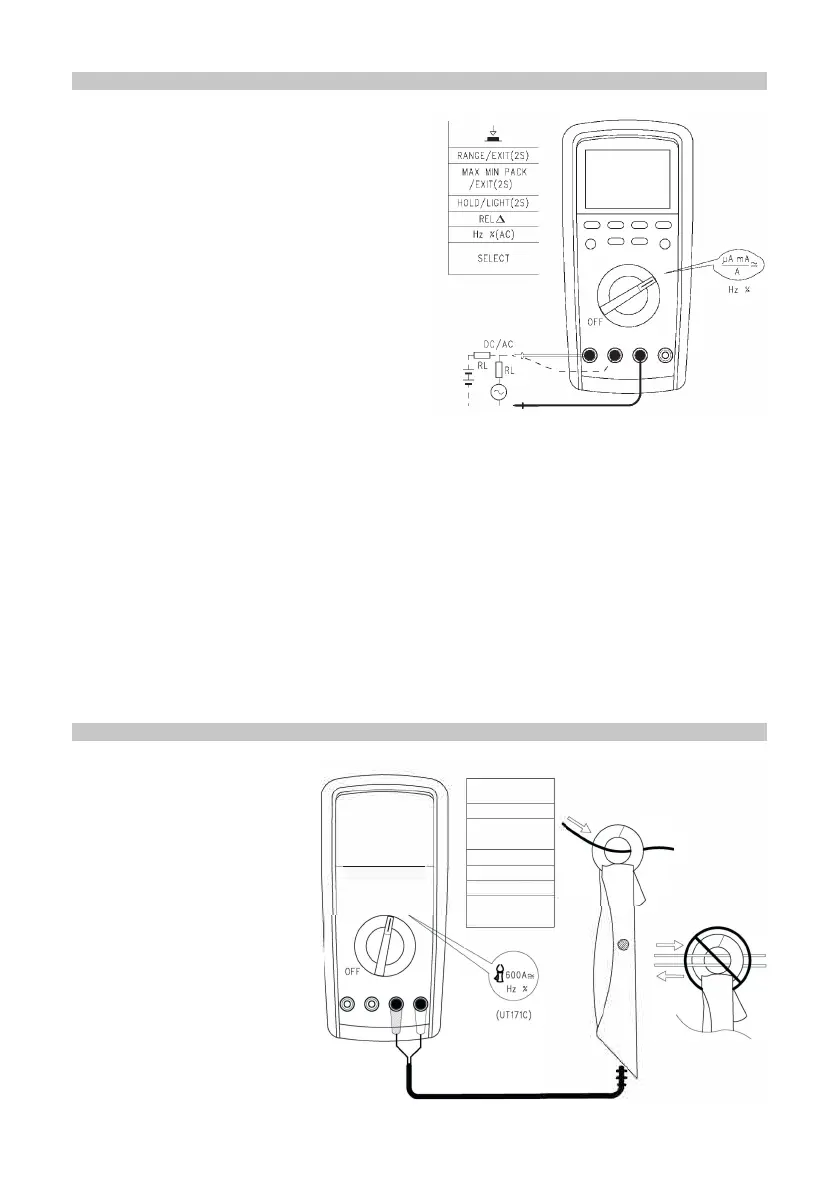
MEASURING AC/DC
• When measuring online AC, press the
Hz% button to select the auxiliary display
frequency/duty ratio measuring mode.
• Press SELECT to select the AC + DC
measuring mode and the “AC+DC” value
will be shown on the main display.
• When pressing the Hz% button, the
status on the auxiliary display is AC
component/DC component/frequency in
sequence.
• Press and hold SELECT in mA function
range to access the the % (4-20mA)
measuring function. The percentile
calibration of measured current will be
displayed: 4mA for 0%, 20mA for 100%.
Caution
• Before the instrument is connected in series to the circuit to be tested, cut off the
power supply to the circuit.
• When measuring, use the correct input terminal and function gear. In case of an
inability to estimate current magnitude, it is advised to start measuring from high-
gear range.
• The fuse is set inside 10A and mA/µA input jack. Ensure you do not parallel
connect the probe test pin to any circuit, in particular the power supply terminal, or
it will damage the instrument and personal safety will be at risk.
• In order for safe utilization, when the metered current is higher than 5A, each
measuring time will be less than 10 seconds and the interval will be more than 15
minutes.
60A/600A ACA/DCA EXTERNAL INPUT CURRENT CALIPERS MEASUREMENT
• Press RANGE to change
the
60A/600A measurement
and press the SELECT
button to select the
mode of the ACA/DCA
function.
D
====
o
==
o
MAX MIN
SELECT


 To Next Page