19
whole number, there will be different amplitudes at the start and nish, resulting
in transient interruption of high frequency at the connection point. In frequency
domain, this is known as leakage. To avoid leakage, multiply the original waveform
by one window function to set the value at 0 for start and nish compulsively. For
application of the window function, please see the table below :
FFT
Window
Feature Most suitable measurement item
Hanning
Frequency recognition rate is better than
the rectangle window, but amplitude
recognition rate is poorer.
Sine, cyclical and narrow-band random
noise.
Hamming
Frequency recognition rate is marginally
better than Hanning window.
Temporary or fast pulse. Signal level
varies greatly before and after.
Blackman
The best amplitude recognition rate and
the poorest frequency recognition rate.
Mainly for single-frequency signals to
search for higher-order harmonic wave.
Rectangle
The best frequency recognition rate,
the worst amplitude recognition rate.
Basically similar to a status without
adding window.
Temporary or fast pulse. Signal level
is generally the same before and
after. Equal sine wave of very similar
frequency. There is broad-band random
noise with slow moving wave spectrum.
Denitions:
FFT recognition rate: It means the quotient of the sampling and math points. When
math point value is xed, the sampling rate should be as low as possible.
Nyquist frequency: To rebuild the original waveform, at least 2f sampling rate should
be used for waveform with a maximum frequency of f. This is known as Nyquist stability
criterion, where f is the Nyquist frequency and 2f is the Nyquist sampling rate.
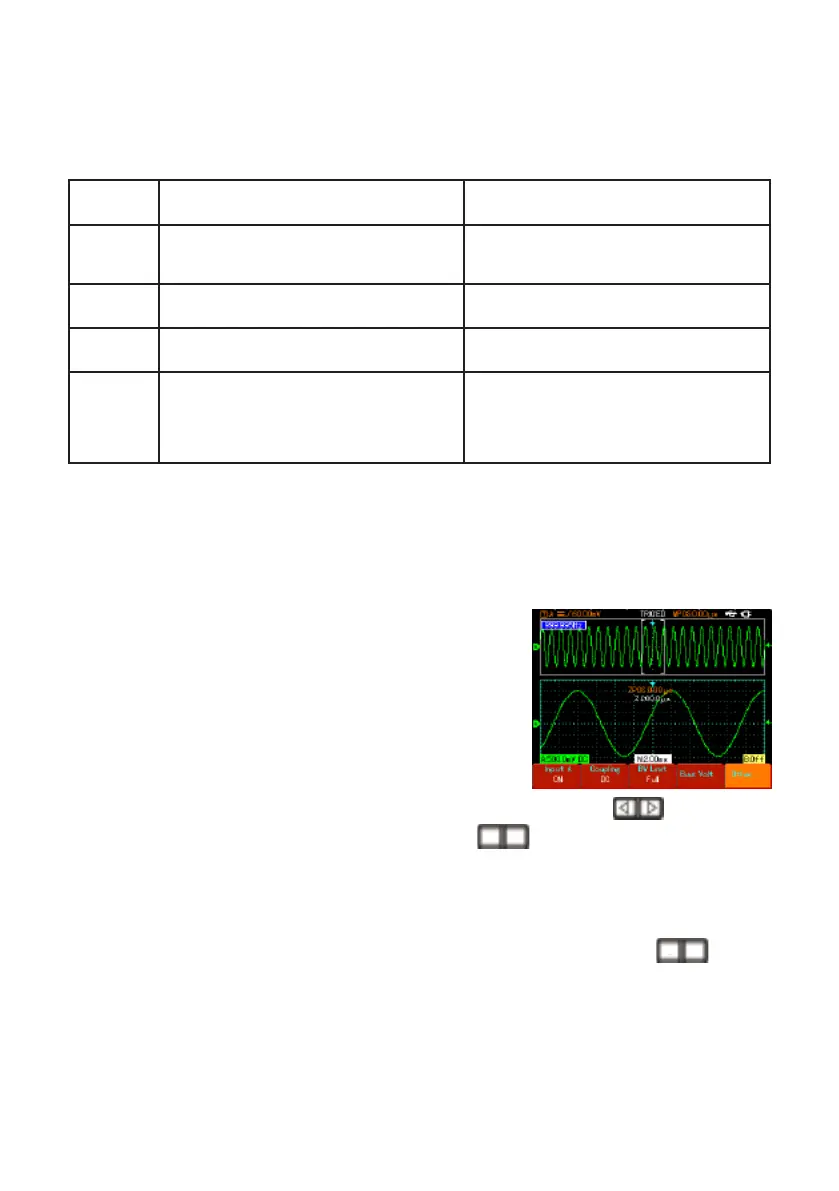
Window Extension
• Window extension can be used to zoom in a band
of waveform to check image details. The window
extension setting must not be slower than that of the
main time base as shown.
• In the window extension mode, the display is divided
into two zones as shown in Figure 2-28. The upper
part displays the original waveform. You can move
the horizontally extended part of this zone left and right with the
button, or
enlarge and reduce the selected zone with the
button.
• The lower part is the horizontally extended waveform of the selected original
waveform zone. Please note that the recognition rate of extended time base relative
to the main time base is now higher (as shown in the above gure). Since the
waveform shown in the entire lower part corresponds to the selected zone in the
upper part, you can increase the extended time base by pressing the
button
to decrease the size of the selected zone. In other words, you can increase the
multiple of waveform extension.
S
S
nS
nS
Hiding the Menus
• Use the [CLEAR/MENU] key to hide the current menu. To display a menu, press
any menu key.


 To Next Page