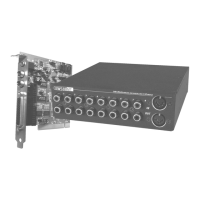
12 SoundSystem SiXPack 5.1 +
And here’s what to do, step by step:
· Switch off your PC and all connected peripheral devices, such as printer, monitor and so on.
Leave the AC cord connected for the time being, so that your computer is still grounded.
· Touch the metal chassis at the rear of the PC to ground yourself and discharge static. Now
unplug the cord from the AC mains socket.
· Remove the cover from the case of your PC.
· Search for two parallel free slots, where at least one of them is PCI format. Remove the
screw that holds the slot cover in place and remove the cover. In order to ensure that your
soundcard works optimally, choose, when possible, two slots that are not directly next to
any other installed cards, as some cards like graphic cards can emit signals that could have
a distorting effect on your soundcard.
· Carefully remove the sound card from its packaging and pick it up by the edges with one
hand while your other hand is resting on the metal of the PC case. This will ensure that your
body is completely discharged via your computer without affecting the sound card. Do not
touch the components of the card under any circumstances.
· Connect the MIDI/Gameport extention (as well as any wavetable daughterboards and other
internal audio devices) with the soundcard. Please follow the corresponding installation in-
structions.
· Align the holder at the rear of the sound card in the expansion slot in such a way that the
card’s gold-colored connectors are directly in line with the slot’s socket.
· Carefully seat the card in the slot. You might have to press the card firmly into the slot to
make a good contact. Take care to ensure that the contacts are precisely in line in order to
avoid damaging the sound card or the motherboard in your PC.
· Insert and tighten the screw from the slot cover to secure the sound card in its slot.
· Now connect the MIDI/Gameport extention in the second free slot and fasten it with the free
screw from the old slot cover.
· Then connect the analog or - if you have one - the digital audio Out from the CD-ROM
drive(s;-) to the appropriate connector on the soundcard (a cable for connecting the digital
In from the soundcard with the digital Out of the CD-ROM drive is included). (Also read the
section "The Analog CD Audio Connectors." on page 45 and "The Digital In." on page 41.)
· Reinstall the cover of your PC case.
· Connect the speakers or your stereo system to the soundcard (Also read the section "The
Card Connections and their Usage." on page 30).
· Reconnect the mains and all other cables. Make sure that your speakers or hifi system are
set to a low volume. Start your computer.
· Then proceed to the section "The Driver Installation." (page 13).



 To Next Page