Page 16 of 20
12.9 \/:
Pressing ‘down’ in distance mode will ‘nudge’ the hundredths down.
In menu items, ‘down’ is used to navigate or set various items.
13.0 MENU / EXIT:
Press MENU to enter the main menu. In most menu items pressing MENU a second
time will exit the menu. Please see the section 5.0 Menu Layout for a detailed
description of the menu.
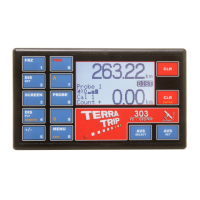
13.1 CLR:
Upper CLR is the top right hand clear key, and its primary function is to clear the total
distance counter in the DIST screen. CLR is also used to exit out of a setting or menu
item that requires the numeric keys for input.
To clear the total distance counter, press and hold the CLR key for 2 seconds.
303 only: In other screens, the key has slightly different functions:
DIST – Clear total distance counter.
TIME – Freeze/resume time of day.
TSD 1 – Operates stopwatch. Short press – Pause/Resume stopwatch, Long
press – Reset stopwatch.
TSD 2 – Freeze/resume time of day.
TSD 3 – Clear total distance counter.
TSD 4 – No function.
13.2 CLR / ENTER:
CLR / ENTER is the key in the bottom right of the display, and its primary function is
to clear the interval counter in the DIST screen. CLR / ENTER is also used as the
ENTER key to select or set various functions or menu options.
303 only: In other screens, the key has slightly different functions:
DIST – Clear interval distance counter (short press).
TIME – Operates stopwatch. Short press – Pause/Resume stopwatch, Long
press – Reset stopwatch.
TSD 1 – Clear interval distance counter (short press).
TSD 2 – Clear interval distance counter (short press).
TSD 3 – No function.
TSD 4 – Clear interval distance counter (short press).
13.3 AVS SELECT:


 To Next Page