21
5-14 To Disable Auto Power off Function
The meter enters sleep mode if no key is pressed for approx. 15
minutes.
1. Press
key to turn off the meter.
2. Press and hold down key then press key to turn on the
meter and the auto power off function will be disabled.
The auto power off mark “ ” will disappeared.
Auto power off mode is enabled each time you turn on the meter
and is automatically disabled in the MX/MN mode mode and
auto datalogging mode.
6. BATTERY CHECK-UP &
&&
& REPLACEMENT
1. As the battery power is not sufficient, LCD will display “
”
;
and, replacement of new batteries type 6×1.5V is required.
2. After turning off the meter remove used batteries from the
compartment and replace with new standard batteries (6 ×1.5V).
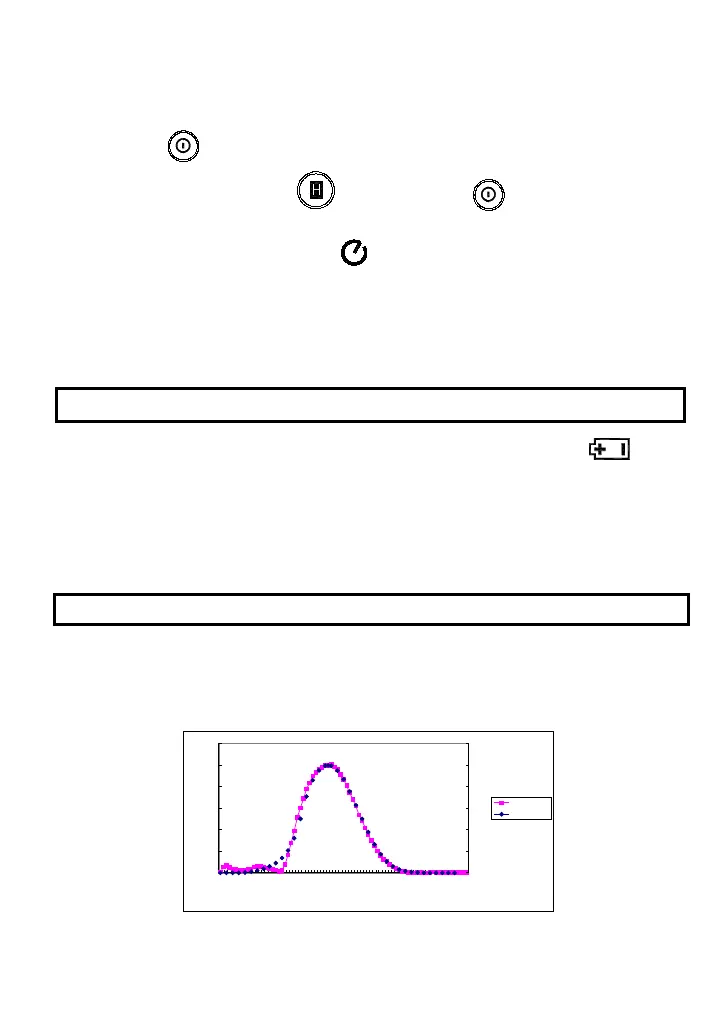
7. SPECTRAL SENSITIVITY CHARACTERISTIC
•
The sensor of this instrument together with its filter gives a spectral
sensitivity characteristic close to photopic curve V
λ
of C.I.E.
(
INTERNATIONAL COMMISSION ON ILLUMINATION
)
as
described in the following chart.
0
0.2
0.4
0.6
0.8
1
1.2
380
400
420
440
460
480
500
520
540
560
580
600
620
640
660
680
700
720
740
760
780
Wavelength in Nonometers
Relative Sensitivity (%)
0
0.2
0.4
0.6
0.8
1
1.2
Light Meter
CIE



 To Next Page