TI3500 GPU-24
10
2
Product Overview
2.9 – Input Voltage Selector Switch
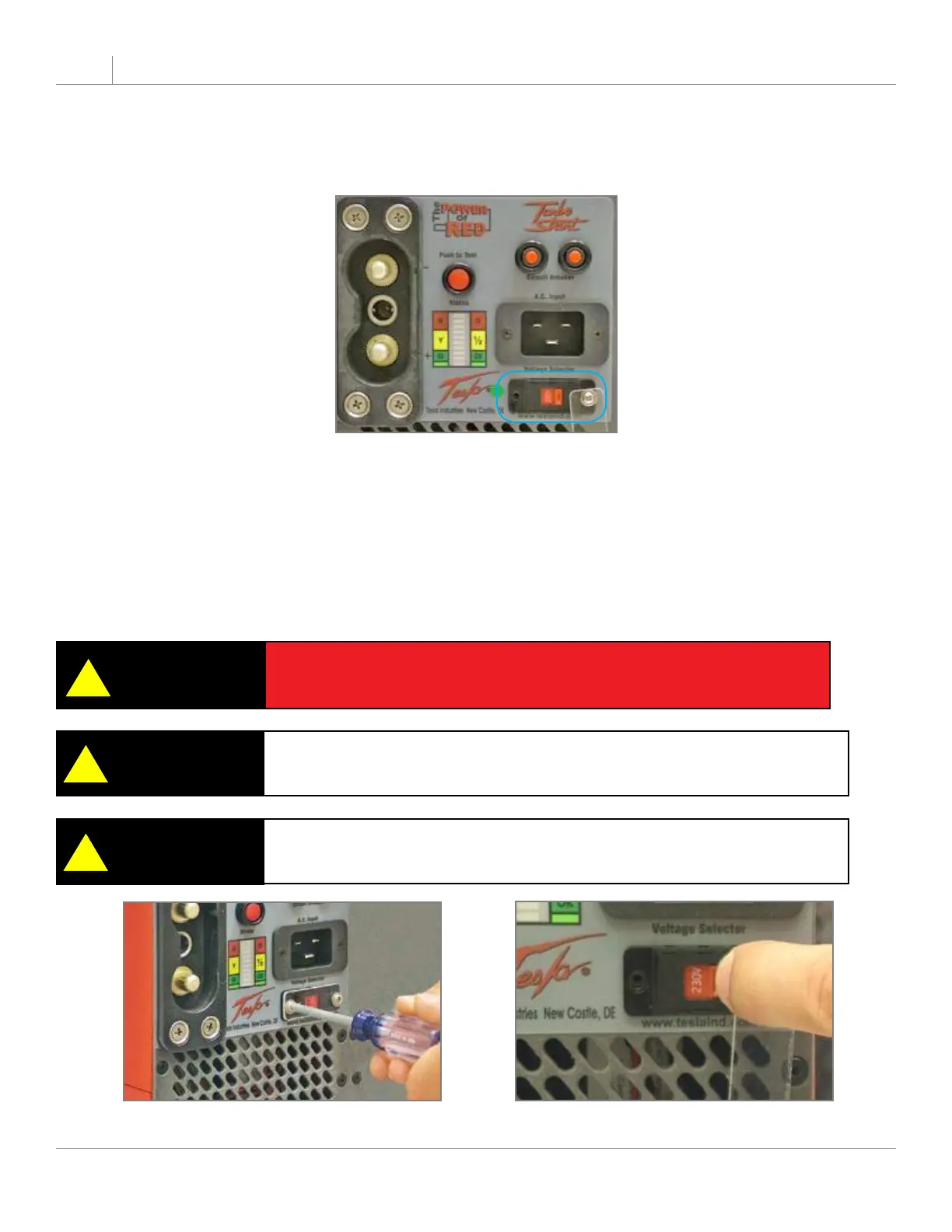
The Input Voltage Selector Switch allows the unit to operate safely within the expected voltage range of
either 100 - 130 Vac or 200 - 260 Vac.
Figure 2.9.1 Input Voltage Selector Switch (outlined in blue)
Changing Input Voltage Selector Switch
To change the input voltage from 115 Vac to 230 Vac, simply follow these steps:
1. With cross tip screwdriver, remove one screw and rotate the clear protective cover to one side.
2. Flip the switch to read 230V.
3. Rotate cover back into place. Replace and tighten screw.
Figure 2.9.2 Unscrew Protective Cover
Figure 2.9.3 Select Voltage
!
The 115 Vac setting accommodates the voltage range of 100-130 Vac.
The 230 Vac setting accommodates the voltage range of 200-260 Vac.
NOTE
CAUTION
!
Do not plug unit into 230 Vac when Input Voltage Selector Switch is
set on 115 Vac.
!
If the Unit has been modied with a Universal AC Input Receptacle, the
Input Voltage Selector Switch will not be incorporated on the front panel.
NOTE


 To Next Page