TI3500 GPU-24
17
3
Operating Procedures
3.10 – Regulated 28.5 Vdc Output Ground Power
Connecting DC Power Cable To Unit
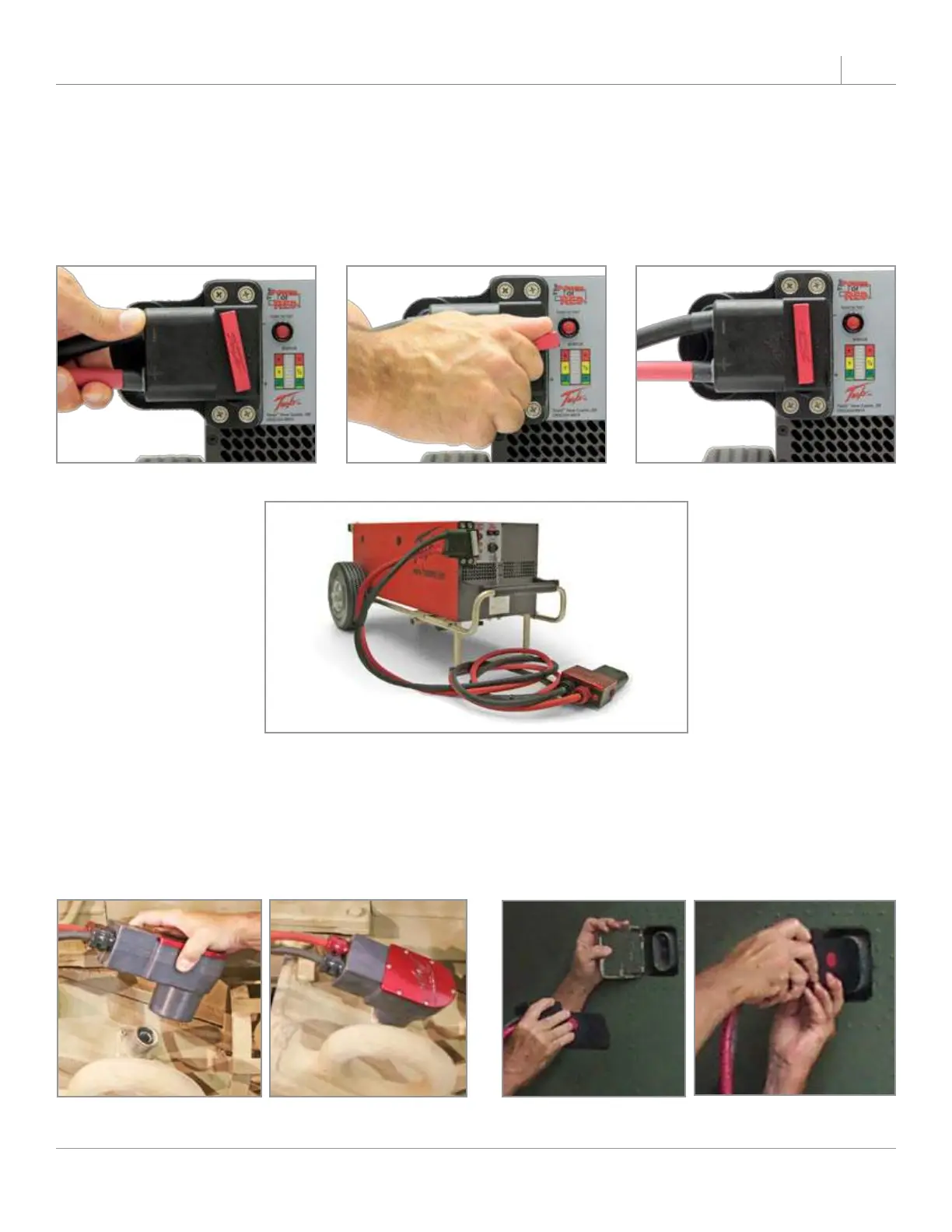
Line up the dc plug with the receptacle. Push forward while rotating the T-handle one full turn clockwise.
Ensure dc power cable plug is fully seated into the GPU’s DC Battery Receptacle. The unit is now ready to
safely transfer power.
Figure 3.10.1 Attaching DC Power Cable to TI3500 GPU-24
Connecting DC Power Cable To Vehicle or Aircraft
Line up the NATO plug or aviation dc plug pins and push it in. DC bus power should come on and aircraft
voltmeter should indicate 24 Vdc to 23.5 Vdc (23 Vdc minimum). Ensure dc power cable plug is fully seated
into the vehicle or aircraft’s dc receptacle.
Figure 3.10.2 DC Power Cable Attached
Figure 3.10.3 Attaching NATO DC Power Cable to
vehicle
Figure 3.10.4 Attaching an Aviation DC Power
Cable to aircraft


 To Next Page