16
EN
5min.
2sec.
INSTRUCTIONS FOR USE
LIGHTING FUNCTIONS
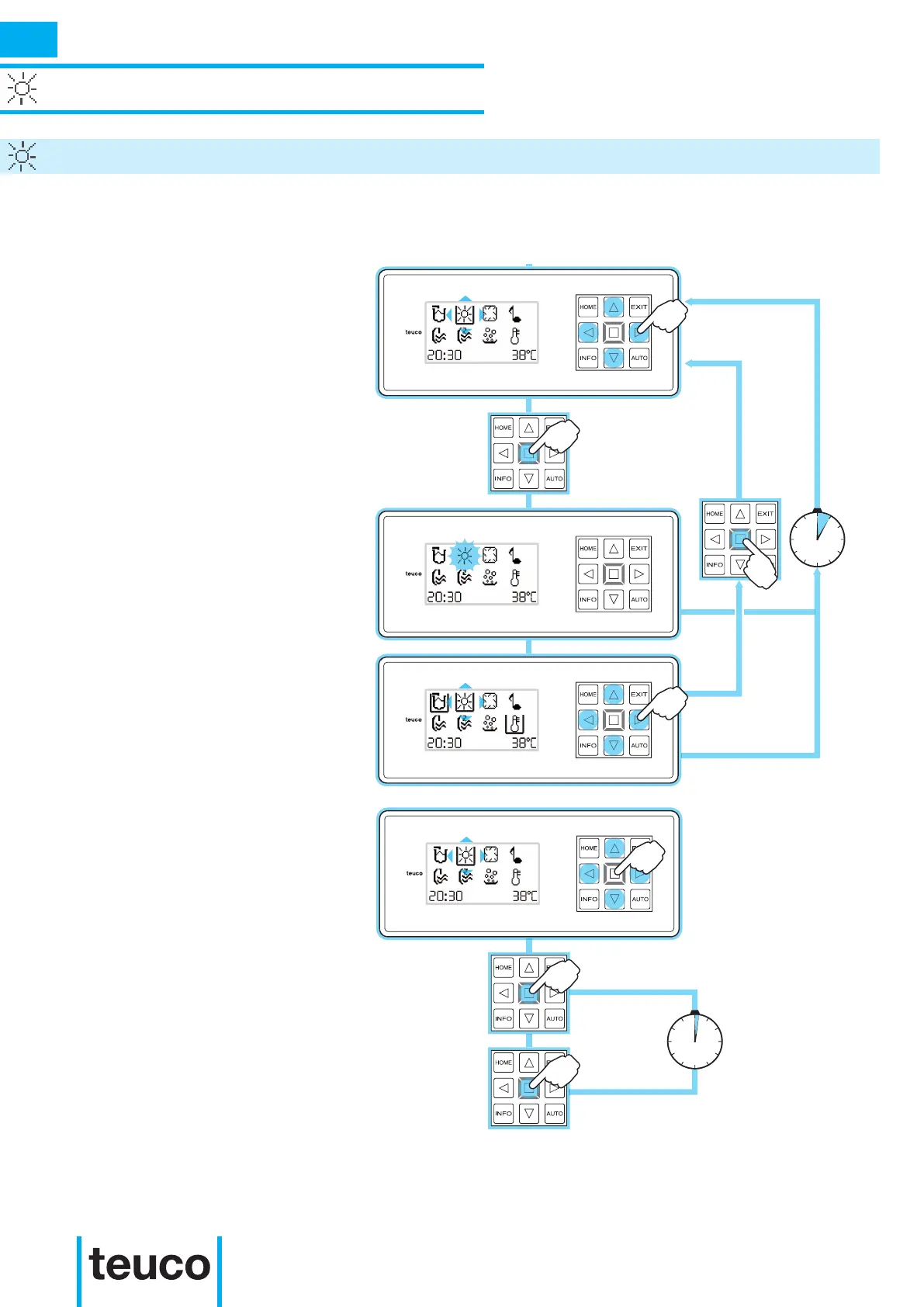
LIGHT / CHROMO EXPERIENCE
- From READY MENU select the LIGHT
icon, using the arrows to move the cursor
and pressing OK to conrm.
- The spot will switch on in the following
colours (continuous rotation): WHITE
– PINK - RED - ORANGE - YELLOW –
GREEN - CYAN - BLUE - PURPLE.
- The ashing icon indicates that the
function is active.
- If no buttons are pressed for 5 minutes
the panel will return to MAIN MENU
mode.
- If you wish to select xed lighting in the
required colour and for an unspecied
period of time, switch the light off and
then on again (within 2 seconds) while it
is the required colour.
-To switch off the lighting source, select
the LIGHT icon, using the arrows to
move the cursor and then press OK to
conrm.
Alternatively, press the EXIT key
- The spotlight in the tub will switch off.
- If no buttons are pressed for 5 minutes
the panel will return to the MAIN MENU.
There could be one or more light sources installed on the product.



 To Next Page