31
EN
x3
15sec.
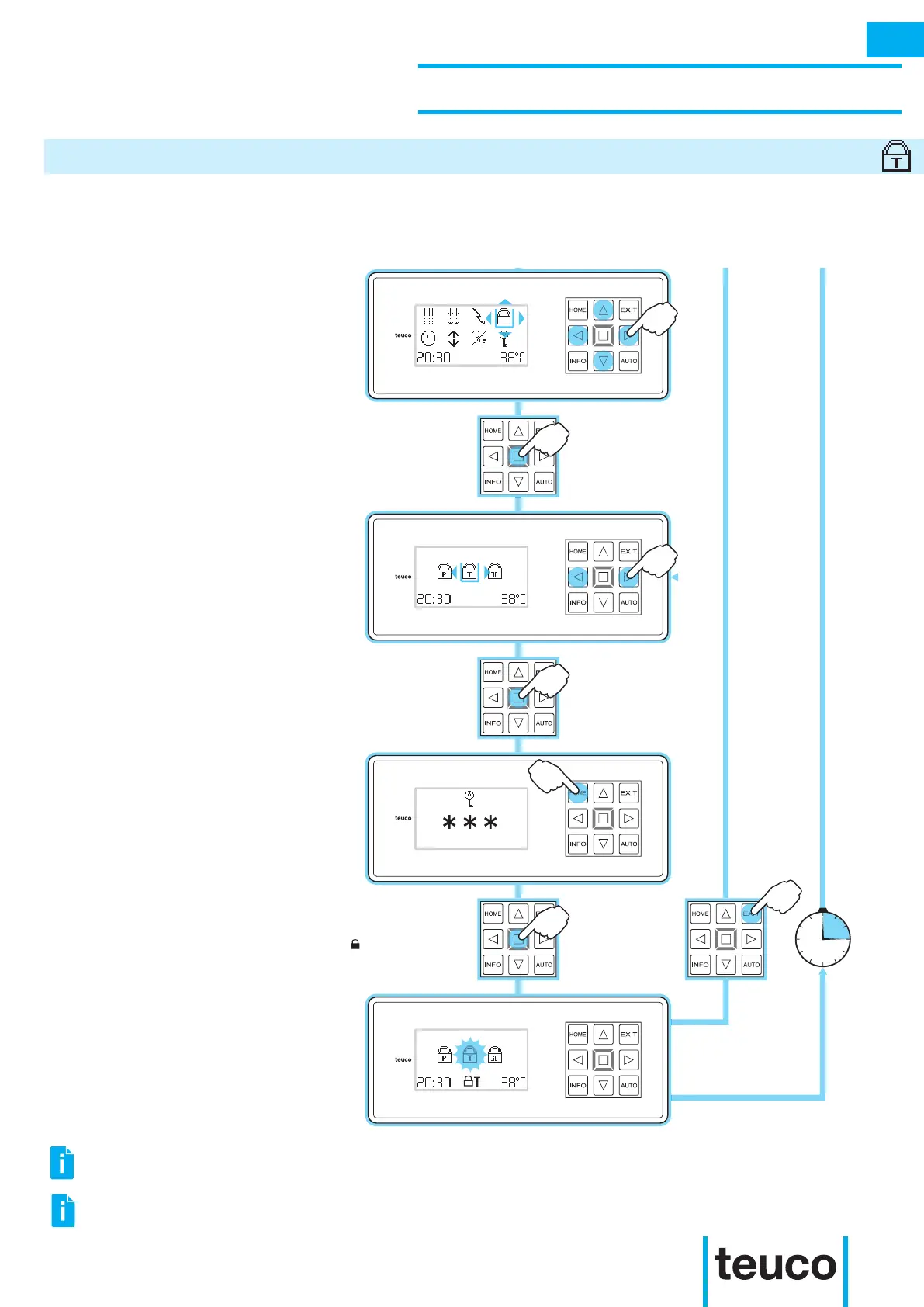
- From the INFO MENU select the LOCK
icon, using the arrows to move the
cursor.
- Press OK to conrm.
- From the LOCK MENU select the LOCK
T icon, using the RIGHT-LEFT arrows to
move the cursor.
- Press OK to conrm.
- Press HOME three times to enter the
activation/deactivation key of the LOCK
T function.
- Press OK to conrm.
- The display will pass to the LOCK
MENU.
- The ashing LOCK T icon and the T
symbol show that the LOCK T function
is on.
- Press EXIT to return to READY MENU
mode.
- If no buttons are pressed for 15 seconds
the panel will return to READY MENU
mode.
Setting the LOCK T function blocks all functions with the exception of the INFO MENU, thereby stopping
the use of the product by unauthorised persons.
INSTRUCTIONS FOR USE
SECONDARY FUNCTIONS
LOCK T
INFO
IT IS NOT POSSIBLE TO ACTIVATE TWO LOCK FUNCTIONS AT THE SAME TIME.
TO DISACTIVATE “LOCK T” PRESS “INFO” TO RETURN TO THE “LOCK MENU” AND RE-ENTER THE
ACTIVATION/ DISACTIVATION CODE.



 To Next Page