18
EN
INSTRUCTIONS FOR USE
SOUND FUNCTIONS
AUDIO
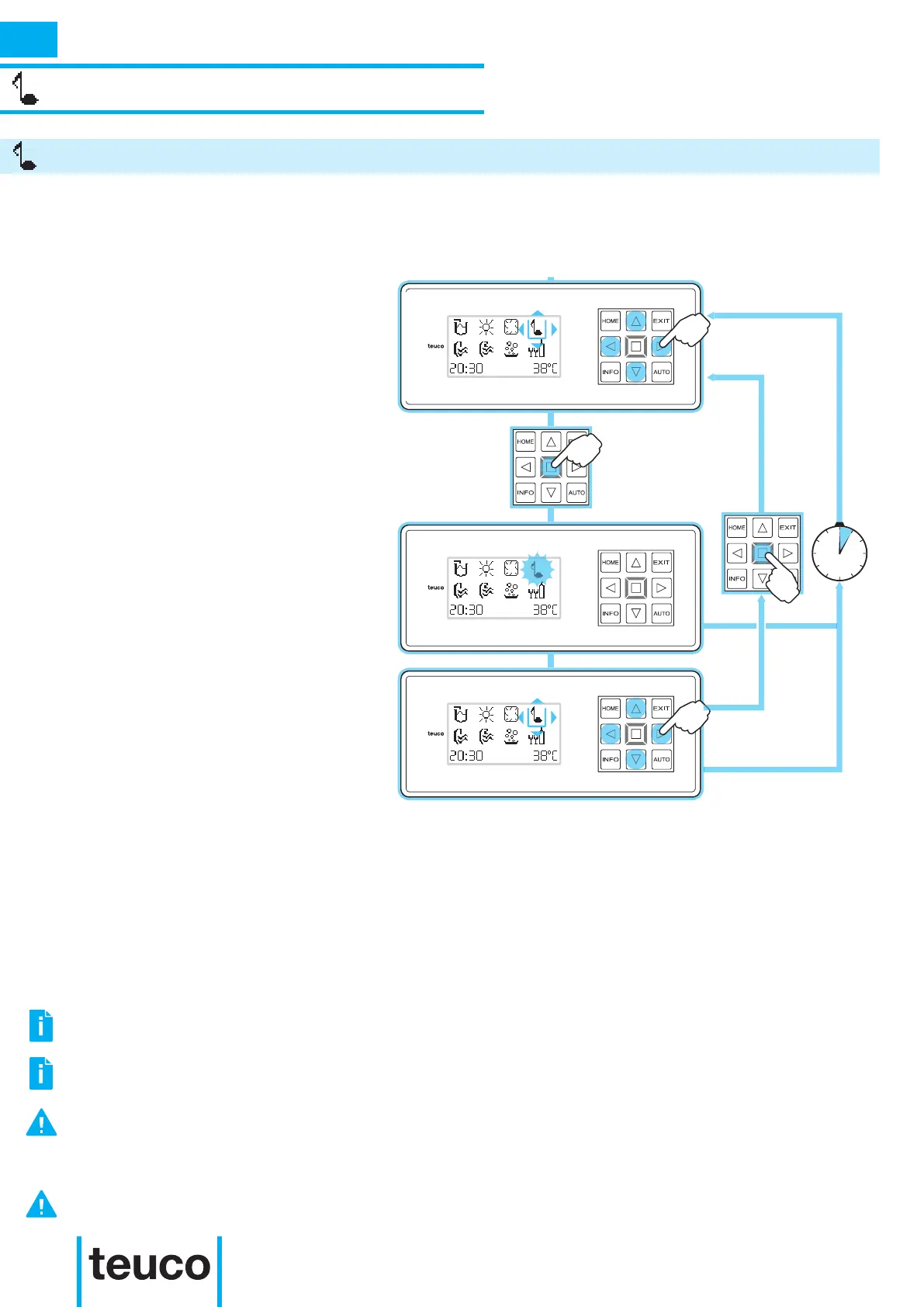
- From the READY MENU, select the
AUDIO icon by utilising the arrow keys
to shift the cursor. Press the OK key to
conrm.
- The amplication system switches on.
- The icon that ashes indicates that the
function is active.
- If no keys are pressed for more than 5
minutes, the panel returns to the MAIN
MENU.
- To deactivate the amplication system,
select the AUDIO icon using the arrow
keys to shift the cursor. Press the OK
key to conrm.
- The amplication system switches off.
- If no keys are pressed for more than 5
minutes, the panel returns to the MAIN
MENU.
The AUDIO function activates the amplication system of the audio signal coming from external sources
/e.g., ipod) connected by the aux interface or Bluetooth®.
5min.
THE AMPLIFIER DOES NOT HAVE A VOLUME CONTROL THEREFORE THE SOURCE DEVICE TO WHICH IT IS
CONNECTED MUST HAVE A VOLUME CONTROL.
IF THE SOURCE DEVICE DOES NOT HAVE A VOLUME CONTROL, THE SOUND EMISSION WILL BE AT MAXIMUM
VOLUME WITH CONSEQUENT DISTORSION AND POSSIBLE DAMAGE TO THE SPEAKERS.
THE SOUND FUNCTION IS EQUIPPED WITH A SELF-CANCELLING DEVICE THAT ACTIVATES THREE HOURS AFTER
THE SOUND SYSTEM HAS BEEN SWITCHED ON.
THERE IS NO VOLUME ADJUSTMENT OF THE MINIPOOL’S SOUND SYSTEM. ALWAYS USE AN EXTERNAL SOUND
SOURCE EQUIPPED WITH A VOLUME ADJUSTMENT.
THE AUX CONNECTION BETWEEN THE AUDIO SOURCE AND THE AMPLIFICATION SYSTEM IS MADE USING THE
CABLE SUPPLIED WITH A MINI-JACK THAT IS SUPPLIED AS STANDARD WITH THE PRODUCT.



 To Next Page