8
EN
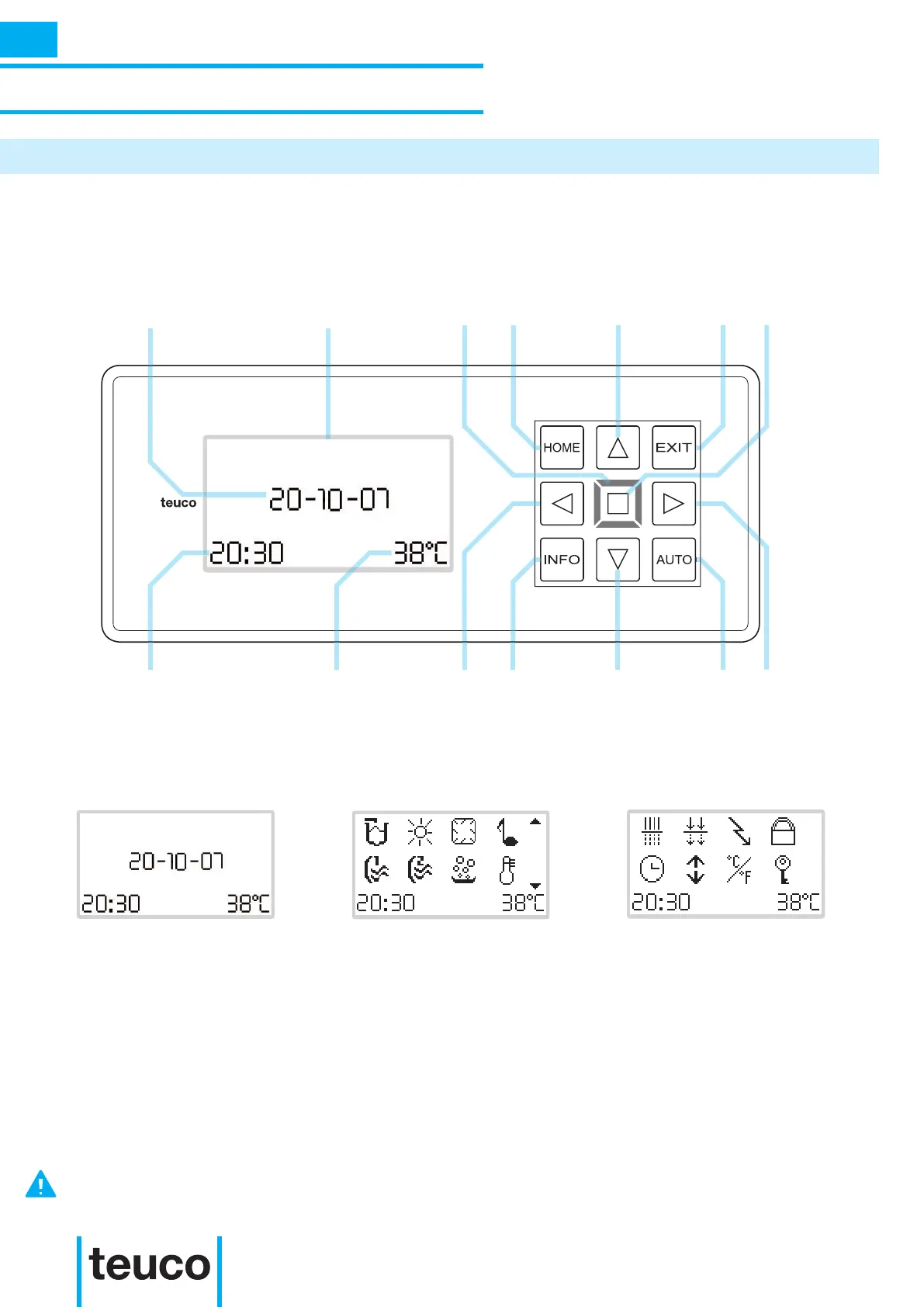
Date Display
Crown
Home
button
Up
button
Exit
button
OK
button
Time
Water
temperature
Left
button
Info
button
Down
button
Auto
button
Right
button
INSTRUCTIONS FOR USE
MAIN FUNCTIONS
DESCRIPTION OF THE CONTROL PANEL
The control panel is equipped with touch controls inserted under the covering: this means extremely clean
lines as well as enhancing the tub area’s style fusion with its surroundings. The touch control technology
used offers a simple and intuitive menu with icons.
The crown has three lighting conditions:
GREEN: This is the normal condition where the system is ready for use.
AMBER: This is a warning signal: some product functions could be limited or not available.
RED: The system requires a Technical Assistance intervention, there are signicant limits to use.
MAIN MENU READY MENU INFO MENU
AN OVERABUNDANCE OF WATER ON THE SURFACE OF THE CONTROL PANEL COULD CAUSE A TEMPORARY
REDUCTION IN THE SENSIBILITY OF THE KEY PANEL. TO RESET TO THE NORMAL SENSIBILITY CONDITION,
REMOVE THE DROPS OF WATER FROM THE SURFACE AND DRY CAREFULLY.



 To Next Page