33
EN
15sec.
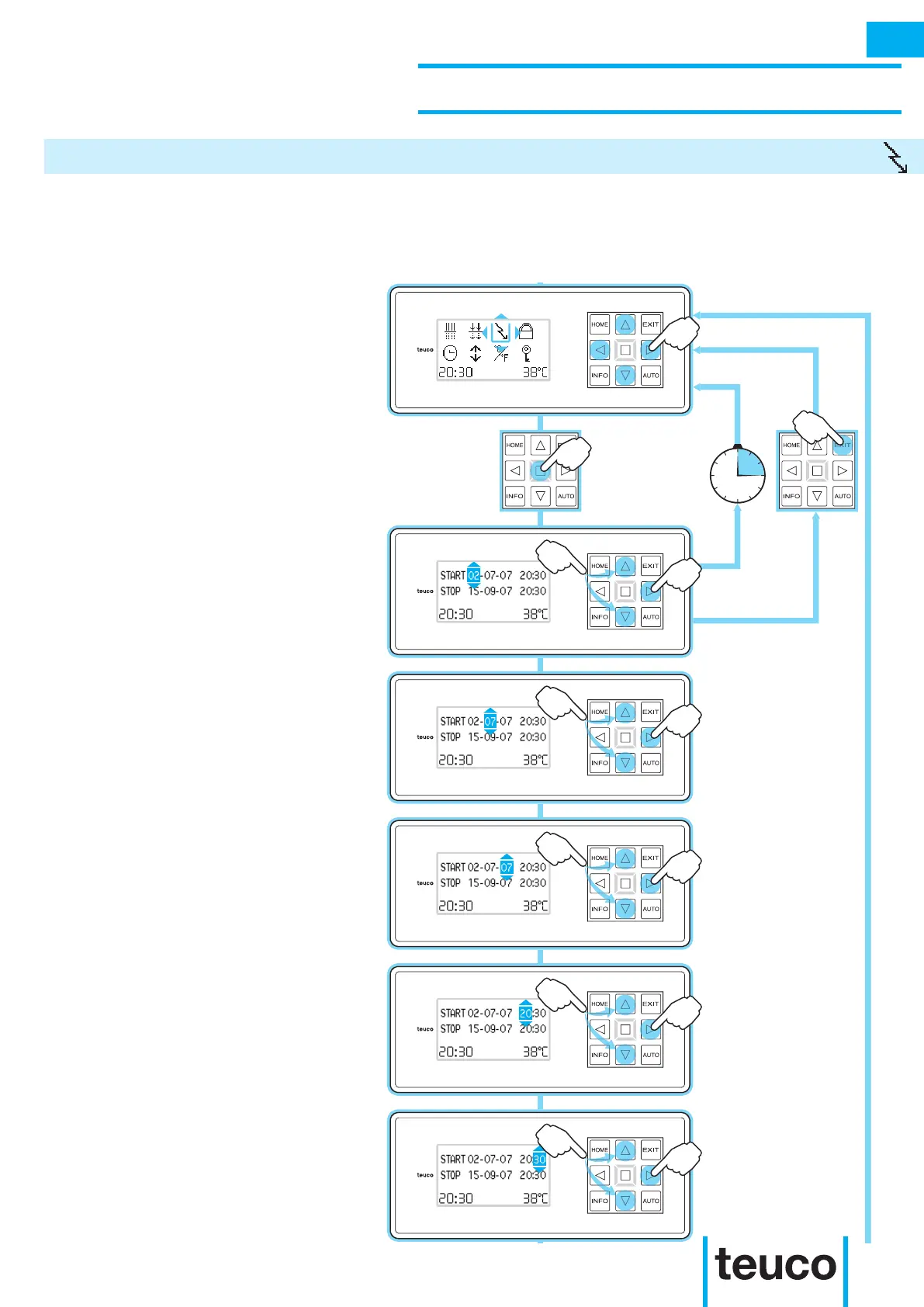
The ECONOMY function can be used to program the reduction in heater performance for a set period of time
(e.g. during holidays) with energy savings as a result. The ECONOMY function switches off when a function is
switched on (e.g., massage) and until the function has completed. In this case, the water temperature will be
below the set level.
- From the INFO MENU select the
ECONOMY icon, using the arrows to
move the cursor.
- Press OK to conrm.
- If no buttons are pressed for 15 seconds
the panel will return to READY MENU
mode.
- From the ECONOMY MENU select the
start date using the UP-DOWN arrows
to set the switching on date.
- Press RIGHT to pass to the month
setting.
- Use the UP-DOWN arrows to set the
year for switching on.
- Press RIGHT to pass to the hour
setting.
- Use the UP-DOWN arrows to set the
hour.
- Press RIGHT to pass to the minutes
setting.
- Use the UP-DOWN arrows to set the
minutes.
- Press RIGHT to pass to the switching
off day setting.
- Use the UP-DOWN arrows to set the
day for switching off.
- Press RIGHT to pass to the month
setting.
INSTRUCTIONS FOR USE
SECONDARY FUNCTIONS
ECONOMY
INFO



 To Next Page