-8-
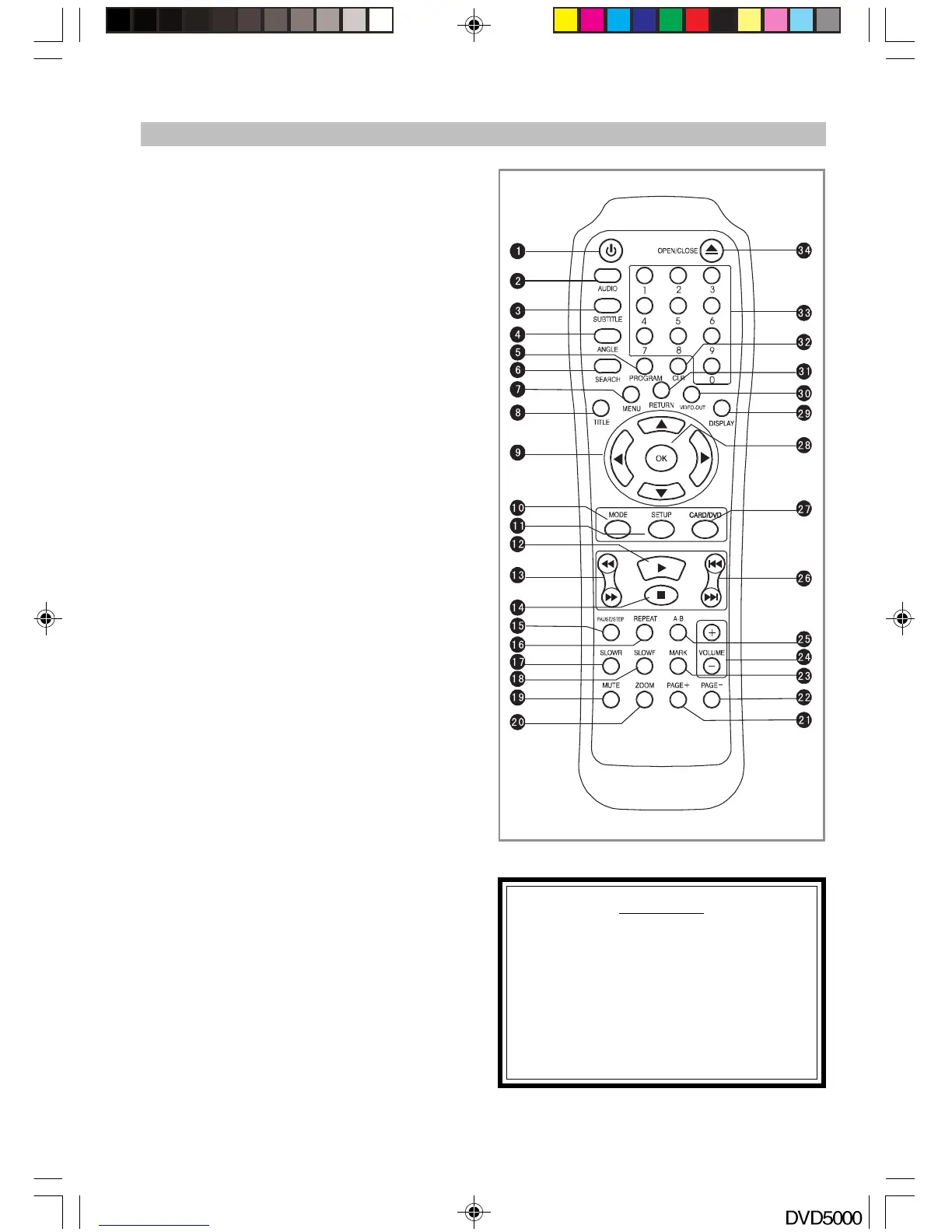
REMOTE CONTROL REFERENCE
1. STANDBY button
2. AUDIO button
3. SUBTITLE button
4. ANGLE button
5. PROGRAM button
6. SEARCH button
7. MENU button
8. TITLE button
9. Direction (Right/Up/Down/Left) Buttons
10. MODE button
11. SETUP button
12. PLAY button
13. FAST RWD/FWD button
14. STOP button
15. PAUSE/STEP button
16. Repeat button
17. SLOWR button
18. SLOWF button
19. MUTE button
20. ZOOM button
21. PAGE+ button
22. PAGE- button
23. MARK button
24. VOLUME+/- button
25. A-B button
26. SKIP+/- button
27. CARD/DVD button
28. OK (select) button
29. DISPLAY button
30. VIDEO OUT button
31. RETURN button
32. CLR (clear) button
33. Number (0-9) button
34. OPEN/CLOSE button
WARNING !
Before pressing the VIDEO OUT
button (#30), first read the <VIDEO
OUT> section.
This button is to select the output
signal mode; if you select the wrong
mode then no picture will be
displayed on the screen.
DVD5000_IB.p65 05-10-22, 23:168



 To Next Page