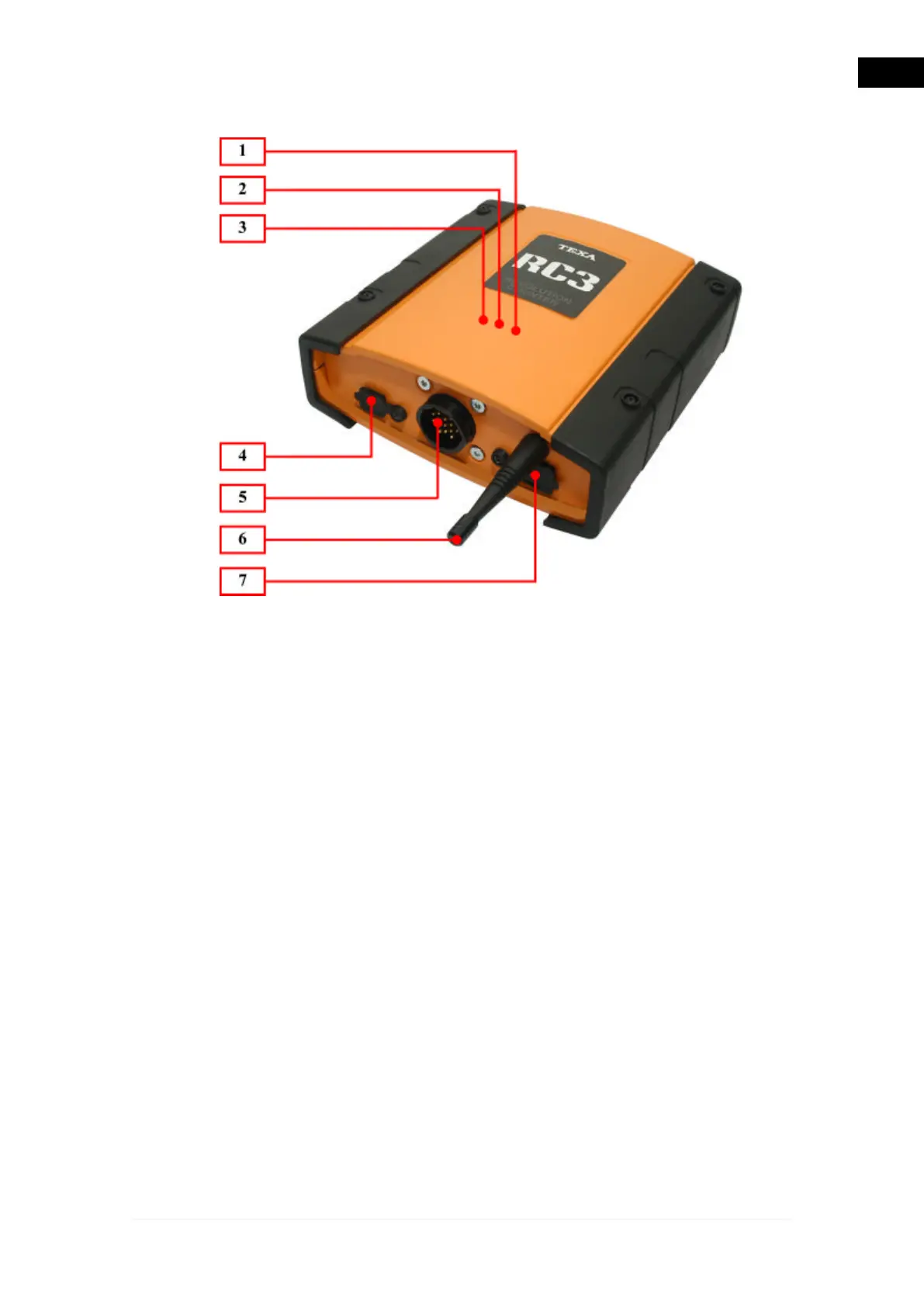
1.1 Image of the Tool
1.
Blue Led Bluetooth communication: This LED will turn on to indicate that
communication has been established between the RC3 and the processing
unit via Bluetooth wireless communication.
2.
USB communication red LED: This light comes on when the RC3 is
communicating with other devices via the USB cable.
3.
Green power LED: When it is on it means that the tool is being powered
correctly. When the tool is turned on, it enters an initialisation phase that can
last about 2 to 15 seconds. The led will come on only at the end of this phase
confirming that the RC3 is ready to communicate with the analysis device
and the viewing unit.
4.
USB connection: The connector that allows you to connect the RC3 to the
processing unit using the special serial cable.
5.
Signal detection connection: Connector AMP 16 used to connect the
diagnostic cables that allow you to acquire the various vehicle signals.
6.
Antenna Bluetooth: Antenna for wireless radio communication (bluetooth
technology).
7.
RS232 connection: The connector that allows you to connect the special
serial cable to the processing unit.
21
en


 To Next Page