
 Need help?
Do you have a question about the Texas Instruments EK-TM4C123GXL and is the answer not in the manual?
Details the key features of the Tiva C Series LaunchPad evaluation board.
Details the TM4C123GH6PM microcontroller and its core features.
Describes the USB device, host, and OTG capabilities of the board.
Explains the power supply options and the Hibernate mode functionality.
Explains the on-board ICDI for programming and debugging via JTAG/SWD.
Step-by-step guide for programming example applications using the ICDI.
Provides a detailed list of components used on the EK-TM4C123GXL evaluation board.
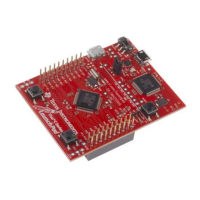
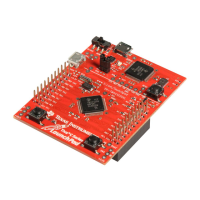
The Tiva C Series TM4C123G LaunchPad Evaluation Board (EK-TM4C123GXL) is a cost-effective evaluation platform designed for ARM Cortex-M4F-based microcontrollers. It highlights the TM4C123GH6PMI microcontroller's USB 2.0 device interface, hibernation module, and motion control pulse-width modulator (MC PWM) module. The board also incorporates programmable user buttons and an RGB LED for custom applications. Its stackable headers, part of the Tiva C Series TM4C123G LaunchPad BoosterPack XL interface, facilitate easy expansion of functionality by connecting to various existing BoosterPack add-on boards and future products.
The Tiva C Series LaunchPad includes a TM4C123GH6PM microcontroller and an integrated In-Circuit Debug Interface (ICDI). Most microcontroller signals are routed to 0.1-inch (2.54-mm) pitch headers, allowing different peripheral functions to be assigned to these GPIO pads via an internal multiplexer. The TM4C123GH6PM microcontroller is factory-programmed with a quickstart demo program residing in on-chip Flash memory, which runs upon power application unless replaced by a user program.
The EK-TM4C123GXL functions as a USB device without hardware modification. Its USB device signals (PD4 for USBODM, PD5 for USBODP) are dedicated and not shared with BoosterPack headers. The TM4C123GH6PM target device also supports USB embedded host and On-The-Go (OTG) functions. OTG can be enabled by populating R25 and R29 with 0-Ω resistors, connecting USB ID and USB VBUS signals to PB0 and PB1. Care must be taken to avoid conflicts with BoosterPack signals if these resistors are populated. USB embedded host operation can be enabled similarly for self-powered USB devices. Providing power as a USB host requires a BoosterPack with power switching and appropriate connectors. All USB host signals are available on the BoosterPack interface, except D+ and D-, which are only on the USB micro-A/-B connector and adjacent test points. When connected as a USB device, the board can be powered from either the ICDI or USB Device connectors, selectable via the POWER SELECT switch (SW3).
The EK-TM4C123GXL features Tiva C-Series Motion Control PWM technology with two PWM modules, capable of generating 16 PWM outputs. Each module offers flexibility for simple PWM signals (e.g., charge pump) and paired PWM signals with dead-band delays (e.g., half-H bridge driver). Three generator blocks can generate the full six channels of gate controls for a 3-phase inverter bridge. Two quadrature encoder interfaces (QEI) provide motion control feedback.
The board includes an RGB LED used in the preloaded quickstart application and configurable for custom applications. Two user buttons (SW1 on PF4, SW2 on PF0) are used in the quickstart application to adjust the RGB LED's light spectrum and control hibernation. These buttons can also be repurposed for custom applications. A green power LED is also present.
Two double rows of stackable headers (J1, J2, J3, J4) map to most TM4C123GH6PM GPIO pins. J3 and J4 are located 0.1 inches (2.54 mm) inside J1 and J2. All 40 header pins form the Tiva C Series TM4C123G LaunchPad BoosterPack XL Interface. Shaded cells in the connector tables indicate MSP430 LaunchPad compatibility. The Tiva C Series Pinmux Utility (www.ti.com/tool/lm4f_pinmux) provides an intuitive graphical user interface for configuring device peripherals and alternate GPIO functions.
The LaunchPad can be powered from either the on-board ICDI USB cable (Debug, Default) or the USB device cable (Device). The POWER SELECT switch (SW3) selects the power source; only one source should be selected at a time.
An external 32.768-kHz crystal (Y1) clocks the TM4C123GH6PM Hibernation module. Current draw in Hibernate mode can be measured by removing the VDD jumper (connecting 3.3V pin and MCU_PWR pin) and placing an ammeter between them. Wake signals to the Hibernate module can be generated by an RTC match or assertion of the WAKE pin. The second user switch (SW2) is connected to the WAKE pin. VDD, HIB, and WAKE pins are accessible via breakout pads. If the board doesn't power on, the microcontroller might be in Hibernate mode, requiring a programmed wake condition and power connection to turn on.
The Tiva C Series LaunchPad uses a 16.0-MHz crystal (Y2) for the TM4C123GH6PM microcontroller's main internal clock circuit. An internal PLL, configured in software, multiplies this clock for higher core and peripheral frequencies. The Hibernation module is clocked by an external 32.768-KHz crystal (Y1).
The RESET signal connects to the RESET switch and the ICDI circuit for debugger-controlled resets. External reset (active low) is asserted by power-on reset (filtered by an R-C network), holding down the RESET switch, or by the ICDI circuit (debugger-dependent).
The evaluation board includes an on-board ICDI for programming and debugging the TM4C123GH6PM using LM Flash Programmer or supported tool chains. The ICDI supports JTAG debugging. An external debug interface can be connected for Serial Wire Debug (SWD) and SWO (trace). Pins used for JTAG and SWD (PC0 for TCK/SWCLK, PC1 for TMS/SWDIO, PC2 for TDI, PC3 for TDO/SWO) are mapped to breakout pads and headers.
When connected to a PC, the device enumerates as a debugger and a virtual COM port. The COM port connects to PA0 (U0RX) and PA1 (U0TX) on the microcontroller.
 General
| Brand | Texas Instruments |
|---|---|
| Model | EK-TM4C123GXL |
| Category | Motherboard |
| Language | English |





 To Next Page