TIp 9: Sending and Receiving Data between Calculators
Fundamental Topics in Science © 2001 Texas Instruments
TIp 9-3
Try-It!
Ë
on Your TI
83 Plus
Transfer
L
1
and
L
2
from one calculator to another one. Use
L
1
and
L
2
as defined in
TIp 6:
Using Lists
.
•
L
1
={80
,
85
,
90
,
75
,
85}
•
L
2
={85
,
70
,
75
,
95
,
100}
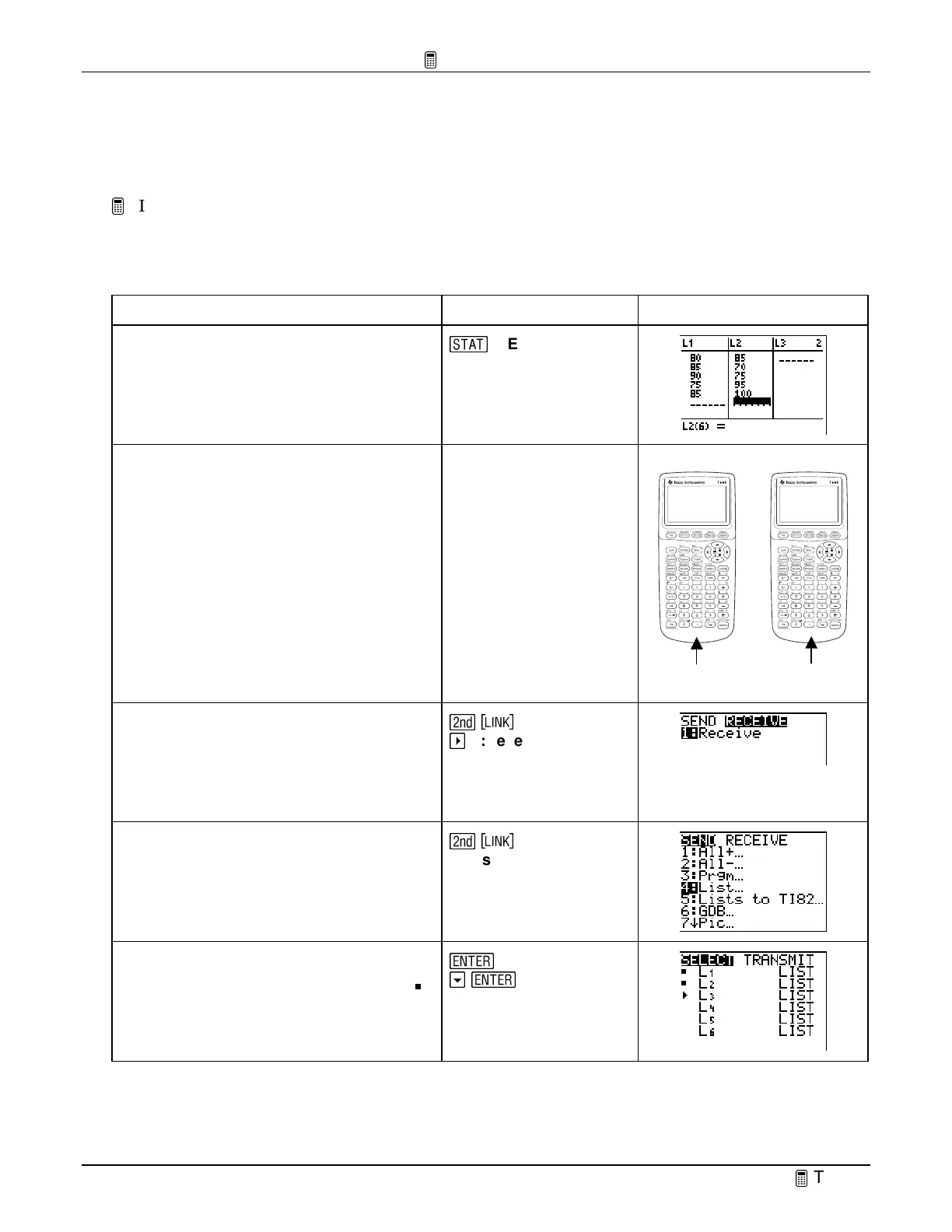
To Do This Press Display
1. On the sending calculator, enter the
lists above in the list editor.
g
1:Edit
2. Link the two calculators using the
unit-to-unit cable.
Sending unit Receiving unit
Connect the calculators with
the cable using the I/O ports.
3. On the receiving calculator, select
Receive
.
Confirm that
Waiting…
is displayed
on the screen. Your calculator is now
ready to receive the lists.
\
"
1:Receive
4. On the sending calculator, display the
SEND
menu, and then select
List
.
\
4: List
5. Select
L
1
and
L
2
.
Note:
The selected lists are marked with a box (
).
b
#
b



 To Next Page
 Loading...













