— 11 —
1
2
3
4
4
5
Operation
Playing Songs from the USB
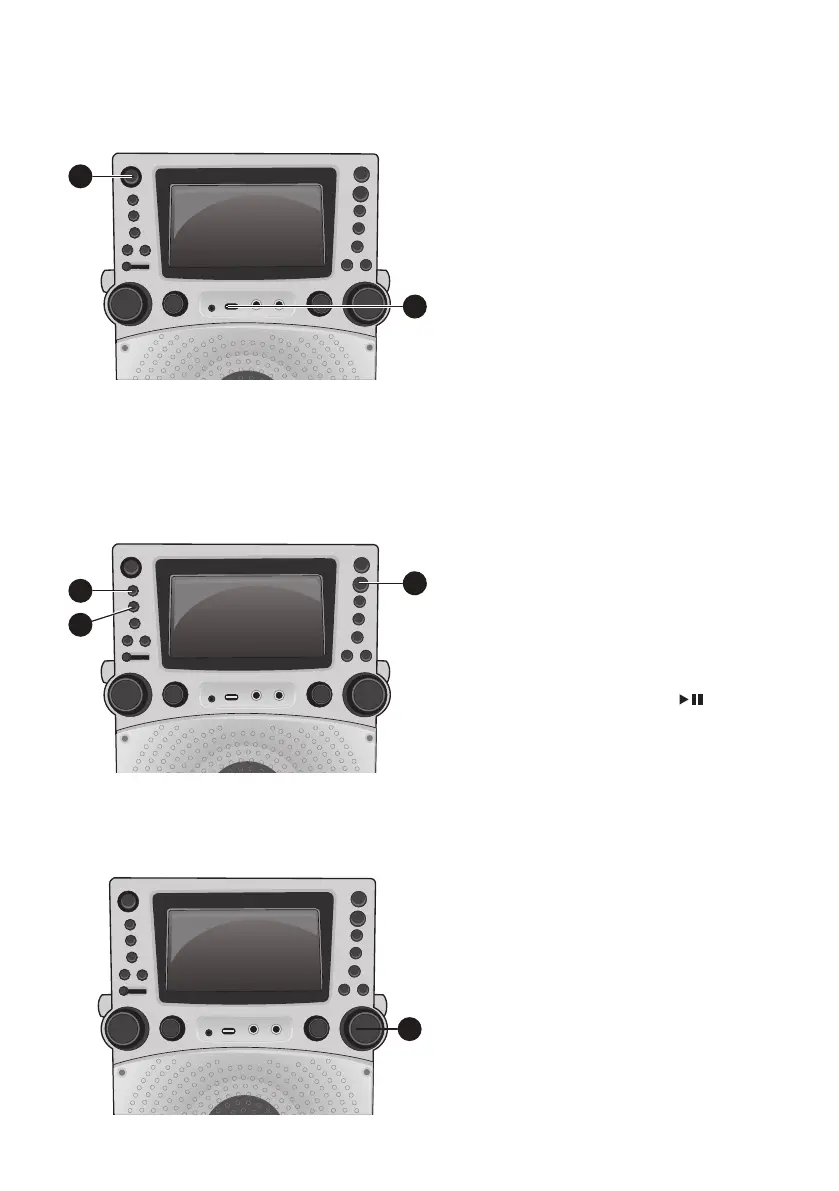
1
Connect the unit as described
previously. Press the ON/STANDBY
button to turn the unit on.
2
Insert a USB flash drive into the USB
port on the unit so it faces upward.
Make sure to download music from
the Karaoke store, see page 19.
3
Repeatedly press the FUNCTION
button to select the USB mode;
“READ USB” will appear when
searching the drive and then the total
number of files will appear.
4
Press the Play/Pause /
ENTER button to start playback; if
listening to an MP3+G file, press the
MONITOR ON/OFF button to view
the image and lyrics on the screen.
Note
:
On the screen, folders that contain
recordings and songs appear to the left
and the list of tracks from a selected
folder will appear to the right. To navigate
these folders see page 13 “SKIP” section.
5
Adjust the volume to a comfortable
level using the MASTER VOLUME
control.
Note: If connected to a TV or other audio
source, adjust the volume of the TV using
its own volume control.



 To Next Page