— E6 —
Connection
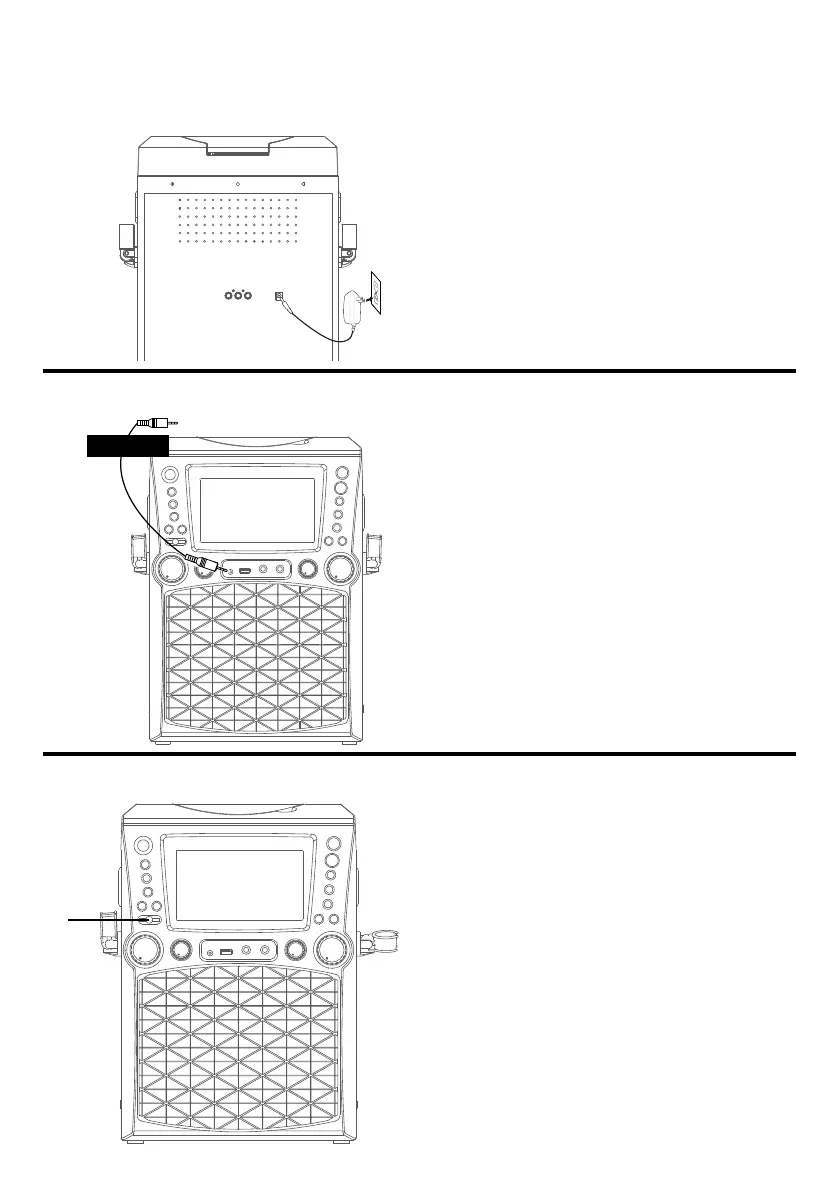
Connecting to AC Power
Connecting to Line In Jack
Insert the small end of the AC adapter
into the DC IN jack on the rear of the unit.
Insert the other end (with the 2 blades)
into a conveniently located AC outlet
having 120V AC, 60Hz.
Note: Make all connections before
connecting to AC power.
Connect an external device by using an
appropriate cable (3.5mm audio cable not
included) as shown.
Note: See page E18 to select and use the
Line In function.
To External Unit
AUDIO OUTPUT
/ HEADPHONE JACK
Light Mode
1
For lighting effects, slide the LIGHTS
switch from the OFF position to your
desired mode.
MODE 1: The unit will synchronize
to the music being played or the live
singing performance.
MODE 2: Lights will glow but will not
pulse with microphone.
OFF: To turn off lights.
u








 To Next Page