8 Appendix
8.1 Display symbol description
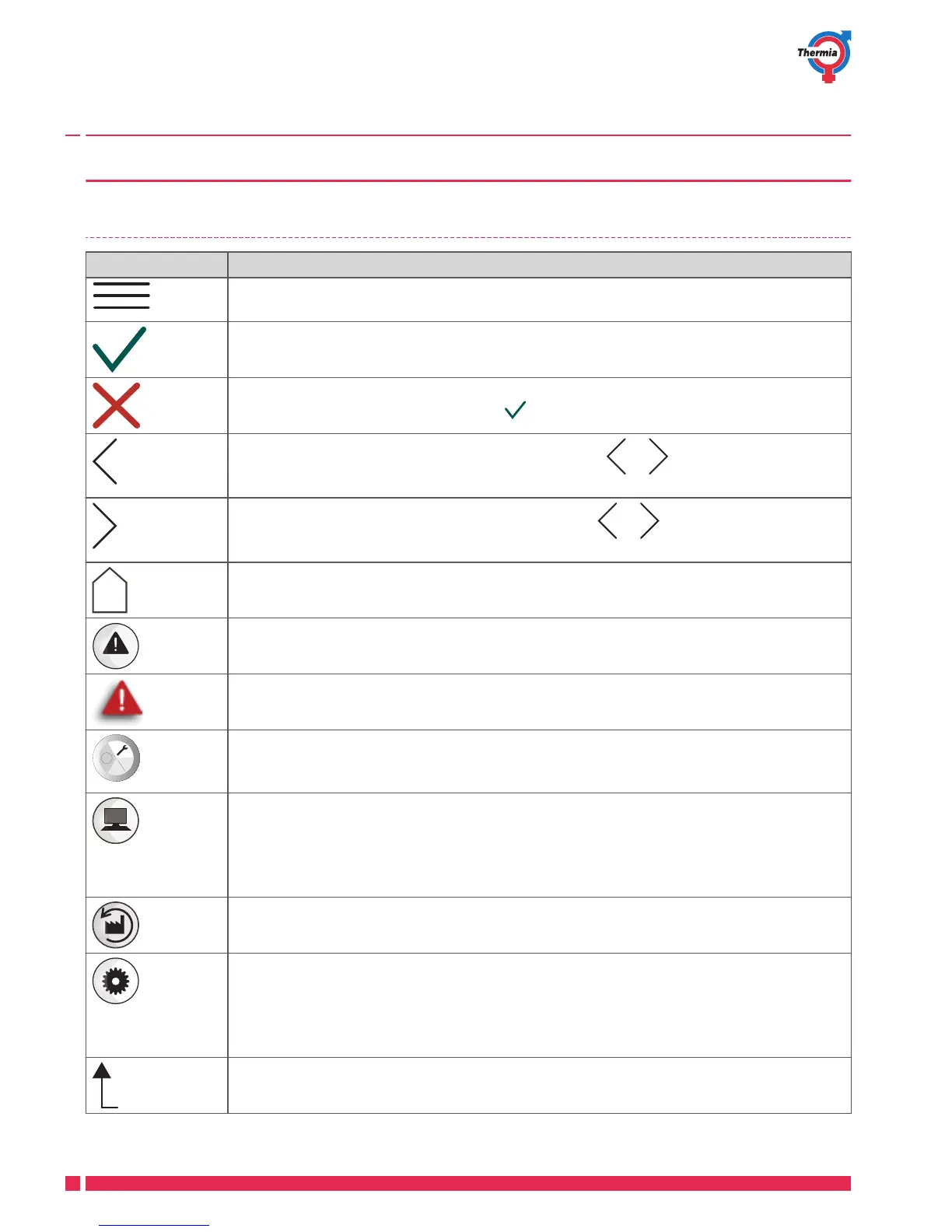
Symbol Description
Opens the menu screen from the start screen.
Return to the menu screen from any sub-menu.
Confirm setting.
A change which has been made is confirmed and becomes the new setting.
Ignore change.
Changes which are not confirmed with are reset to the previous value.
To browse backwards through pages and sub-menus. 2/3 means that you are on
page 2 of 3.
To browse forwards between pages and sub-menus. 2/3 means that you are on
page 2 of 3.
Home.
Back to start screen.
Alarm. Press on the symbol to go to the alarm window.
The window displays the alarm history.
Alarm. Indicates that there are active class A or class B alarms. Press on the symbol to go
to the alarm window.
Select operating mode.
Press on the symbol to select operating mode. A new window opens for selection of op-
erating mode.
Operating data.
Opens a number of sub-menus which show current operating data such as:
▪
Outdoor temperature
▪
etc.
Factory reset.
Resets values on the current menu page to factory values.
Settings.
Opens a number of sub-menus such as:
▪
Language
▪
System settings
Back.
Back in the menu tree
User Guide Mega
VUJSC302 Thermia Värmepumpar
26





 To Next Page