5.3 Heating Settings
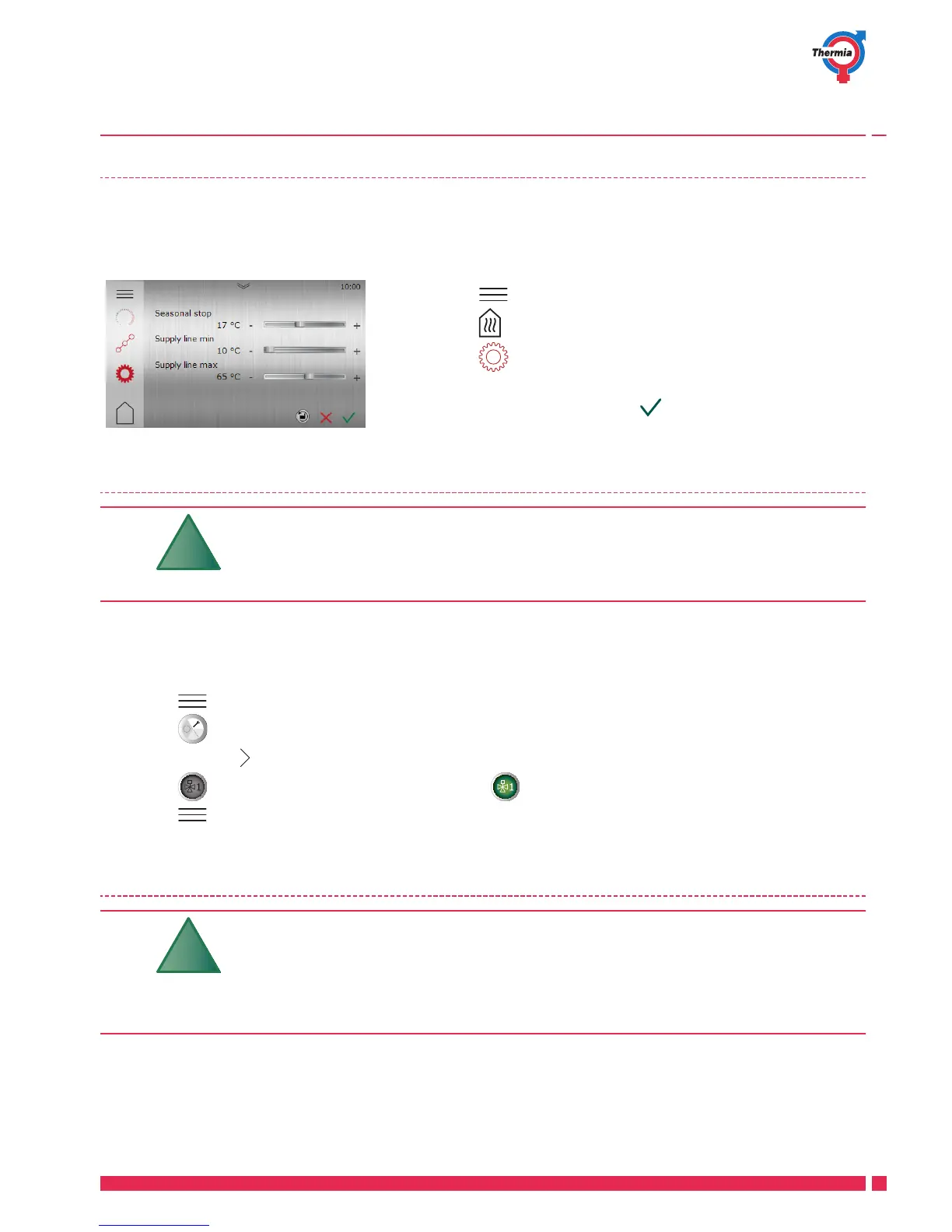
In Heating settings, you can set seasonal stop and min/max supply line temperature.
Default value is 1x.
1. Press on the Start screen to open the Menu screen.
2.
Press
3.
Press if the Heat settings window is not shown.
4. Make the desired changes.
5.
Confirm settings by pressing
5.4 Activate / deactivate functions
Functions not activated/enabled from factory
must be enabled and activated in the control
system before they can be used.
Below is an example where the Distribution Circuit function is deactivated.
Other functions are activated in a similar way.
1. Press in the upper left corner of the Start screen.
2.
Press .
3.
Continue with
to the menu page to activate/deactivate Distribution Circuit 1.
4.
Press to activate Distribution Circuit 1 or press to deactivate Distribution Circuit 1.
5. Press to return to the Menu screen.
5.5
Selecting operating mode
The heat pump has a starting time of about 5 -
10 minutes.
The delay does not apply to the auxiliary oper-
ating mode.
User Guide Mega
Thermia Värmepumpar VUJSC302
13





 To Next Page