Set the heat pump to the desired operating mode in the menu:
1. Press on the Start screen to open the Menu screen.
2.
Press . A new window opens.
3. Press the appropriate symbol for the desired operating mode.
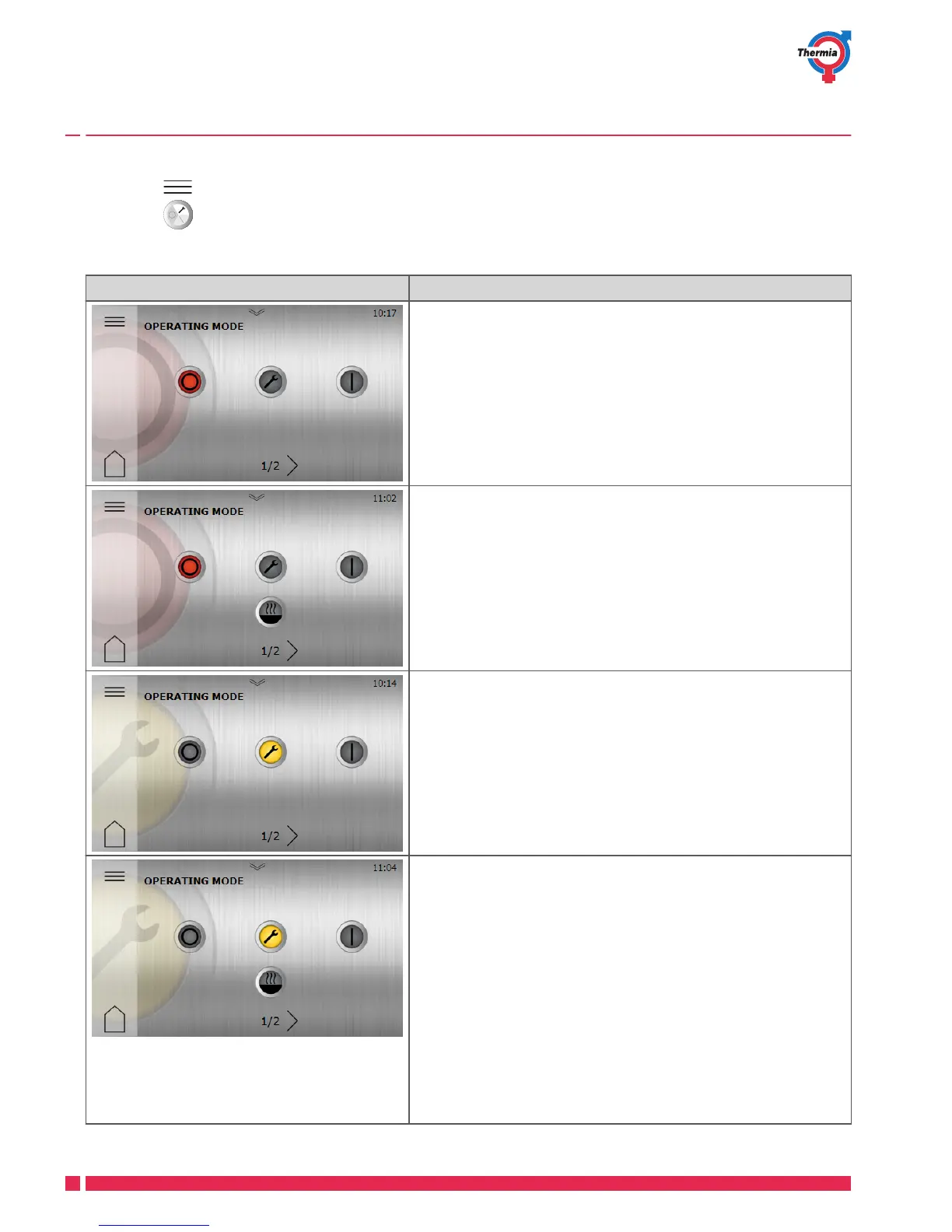
Symbol Description
Operating mode Off. All functions off.
Components inside are still current carrying.
Operating mode Off. All functions off.
Auxiliary heater enabled but not activated.
Components inside are still current carrying.
Operating mode Service. All internal functions off.
Components inside are still current carrying.
External functions are on.
In this operating mode the heat pump is deactivated and will
not produce hot water or heating.
Operating mode Auxiliary heater + service.
External functions are on.
Auxiliary heater enabled but not activated.
In this mode the heat pump (compressor) is disabled, but the
unit can produce heating and hot water with the internal im-
mersion heater (and/or external auxiliary heater if activated).
This operating mode must be used if heating and/or hot water
is needed, but the compressor must be disabled e.g. when the
brine circuit is not available or installed.
User Guide Mega
VUJSC302 Thermia Värmepumpar
14





 To Next Page