Switching functions
Press - Key (page 19 (17)) to select the individual switching functions as required.
The indicator lamp "control" (page 19 (16)) indicates when one of the switching functions specified
below is selected:
Acoustic alarm ON/OFF
Humidification ON/OFF
Manual zero calibration of CO
2
measuring system
Setpoint lock-in ON/OFF
Door heater ON/OFF
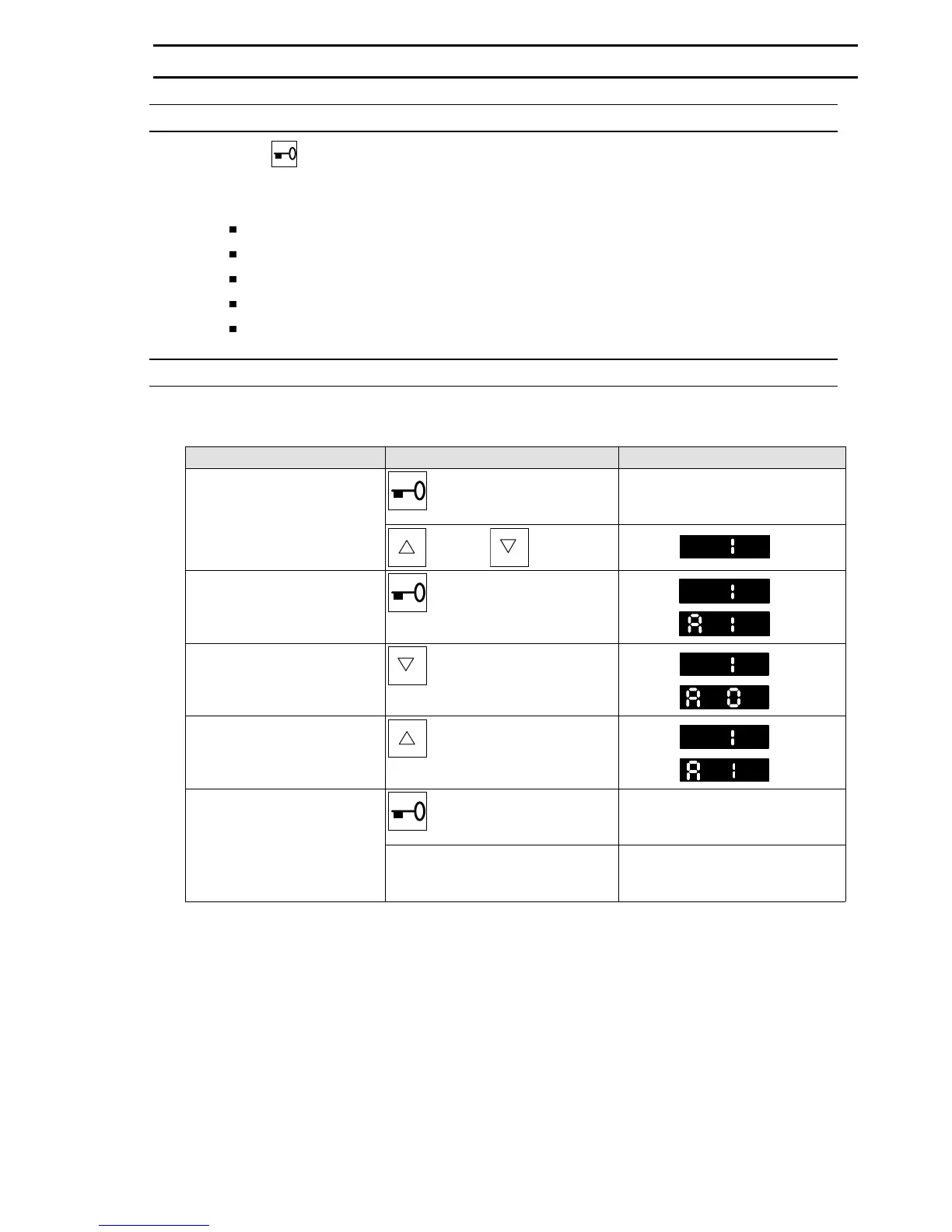
Switching function: acoustic alarm ON/OFF
Factory setting: acoustic alarm switched on.
Instruction Entry / Keys / Remarks Display / Remarks / Status
Select function level 1
Press
Indicator lamp "control" flashes
and current function level is indi-
cated by a flashing display
+
or
Press
°C
Circuit status display and
factory setting:
Acoustic alarm ON
Release and press again
°C
CO
2
Change circuit status:
acoustic alarm OFF
Press
°C
CO
2
Change circuit status:
acoustic alarm ON
+
Press
°C
CO
2
Exit function level
Release
Actual temperature, CO
2
, O
2
and
rel. humidity values are displayed
again after 1 minute
Press any setpoint key Actual temperature, CO
2
, O
2
and
rel. humidity values are displayed
again immediately
6. OPERATE
50 079 041 27/45


 To Next Page