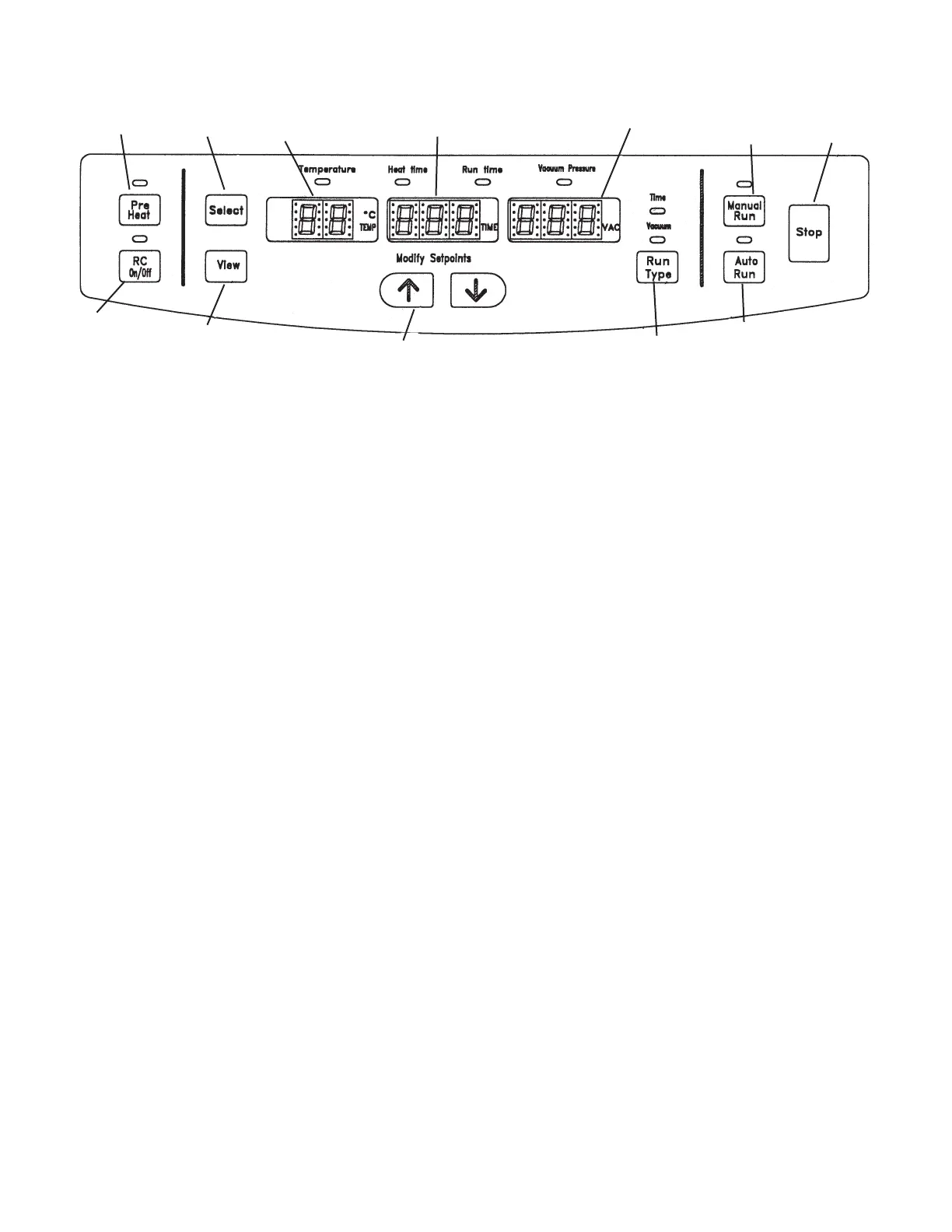
1. PRE-HEAT - use to pre-heat chamber to 45 °C prior to or between runs.
Once run is initiated the pre-heat stops.
2. RC ON/OFF - Use to add radiant heat to chamber. Manual activation ON/OFF
at any point during run. Also will turn off at end of run.
3. SELECT - Press this button to select the parameters to be modified.
Selection is from left to right. GREEN light indicates the parameter to be
modified.
NOTE: To select “VACUUM PRESURE”, “RUN TYPE” light should
light under “VACUUM”.
4. MODIFY SETPOINTS UP/DOWN - Modifies selected parameter.
5. RUN TYPE - Selects a “Time” or “Vacuum” run.
6. AUTO RUN - Starts an automated “TIME” or “VACUUM” run (See page 5).
7. MANUAL RUN - Starts a “Manual” run (See page 4).
8. STOP - Terminates “Manual” or “Auto” run.
9. VIEW - Press to view. Displays preset parameters all at once.
10. TEMPERATURE DISPLAY (RED DISPLAY) - Indicates set temperature or
actual temperature during a run in
°C.
11. TIME DISPLAYS (GREEN DISPLAY) - Indicates heat timer or run timer set-
points. In the process of a run it indicates elapsed time or time left.
12. VACUUM PRESSURE DISPLAY (AMBER DISPLAY) - Displays chamber
vacuum in torrs or microns by shifting a decimal point. “Hpr.” represents
atmospheric pressure. No decimal point indicates microns.
1
3
2
4
5
6
7
8
11
10
9
2.0 SPD121P Control Panel
2.1 Description of SPD121P Control Panel
4
12



 To Next Page
 Loading...





