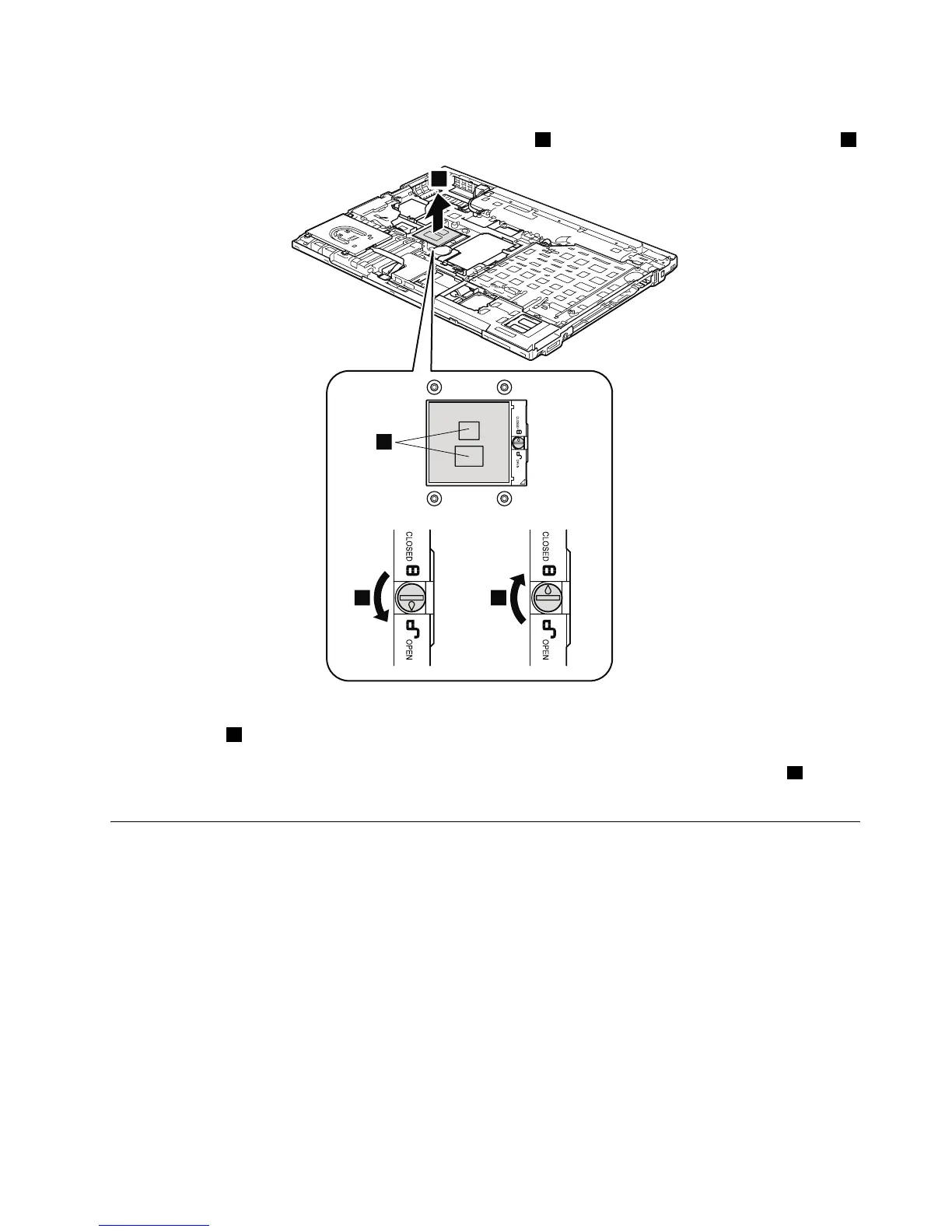
Wheninstalling:PlacetheCPUontheCPUsocket,andthenrotatetheheadofthescrewinthedirection
shownbyarrow
3tosecuretheCPU.
Note:BeforeyouinstallanewCPU,applytheinsulationsheetontheCPU,onthepartsmarked
aas
showninthedrawing.
1190Basecoverassembly,I/OsubcardwithUSBconnectorand1394
connector,andI/Osubcardcable
Foraccess,removetheseFRUsinorder:
•“1010Batterypack”onpage66
•“1020ExpressCardblankbezel”onpage67
•“1030SerialUltrabaySlimdeviceortravelbezel”onpage68
•“1040Harddiskdrive(HDD)andsolid-statedrive(SSD)”onpage69
•“1050DIMMslotcover”onpage70
•“1070PCIExpressMiniCardforwirelessWAN”onpage72
•“1080Keyboard”onpage74
•“1110PCIExpressMiniCardforwirelessLAN”onpage81
•“1120Keyboardbezelassembly,FPCcable,andBluethoothdaughtercard(BDC-2.1)”onpage83
•“1150Speakerassembly”onpage89
•“1160LCDunit”onpage91
•“1170Fanassembly”onpage95
Chapter8.RemovingandreplacingaFRU99



 To Next Page