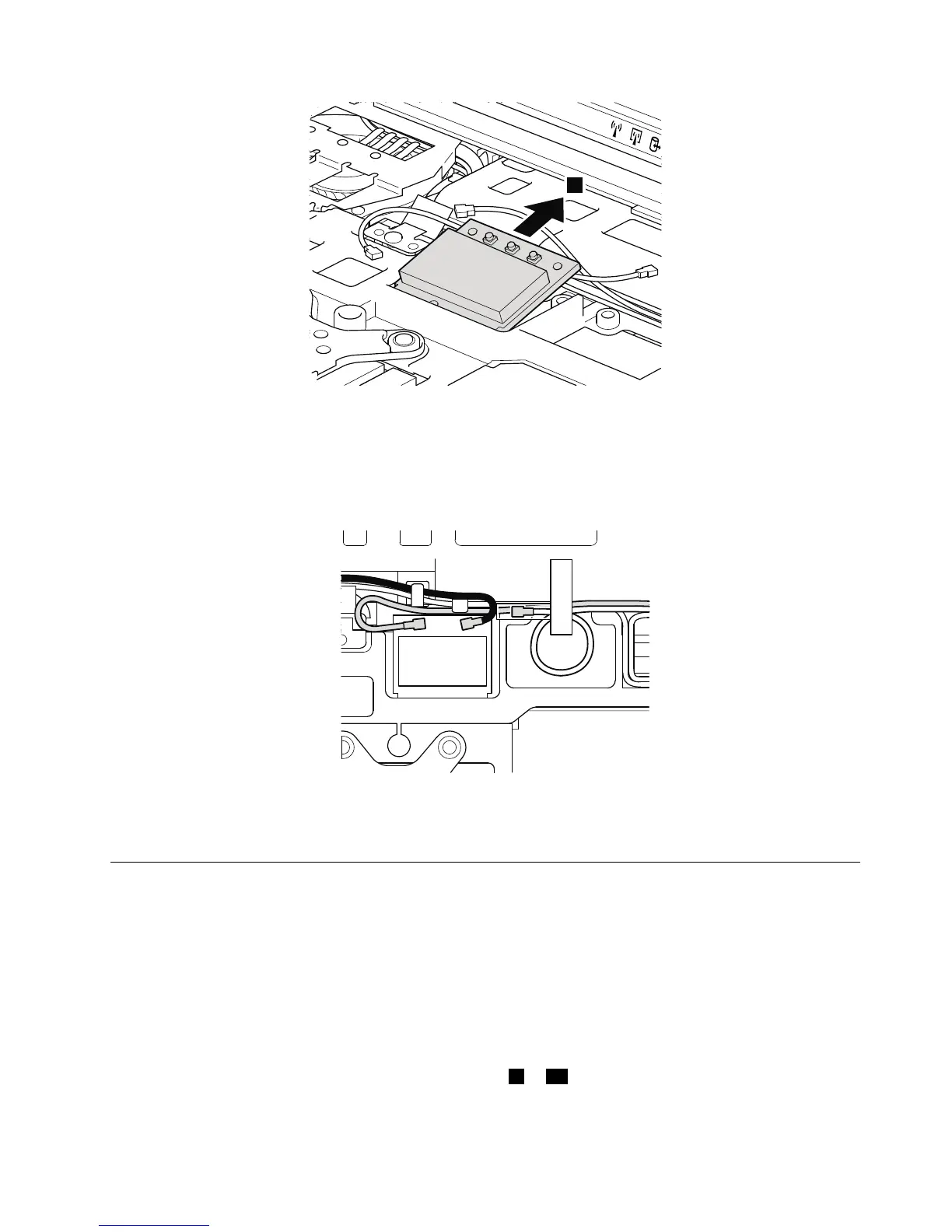
Wheninstalling:
•InmodelswithawirelessLANcardthathastwoantennaconnectors,plugthegraycableintothejack
markedMAINorM,andtheblackcableintothejackmarkedAUXorAonthecard.Ifthecomputer
youareservicinghasthreecables,putthewhitecableinthecableprotectiontubeandsecureitwitha
tapeasshowninthisgure.
•InmodelswithawirelessLANcardthathasthreeantennaconnectors,plugthegraycable(MAIN)into
thejackmarkedTR1,thewhitecable(third)intothejackmarkedROorTR3,andtheblackcable(AUX)
intothejackmarkedTR2onthecard.
1120Keyboardbezelassembly,FPCcable,andBluethoothdaughter
card(BDC-2.1)
Foraccess,removetheseFRUsinorder:
•“1010Batterypack”onpage66
•“1020ExpressCardblankbezel”onpage67
•“1050DIMMslotcover”onpage70
•“1080Keyboard”onpage74
Note:TheFPCcableisattachedontheundersideofthekeyboardbezelassembly.Insomemodels,the
Bluetoothdaughtercardisalsoattachedontheundersideofthekeyboardbezelassembly.Formodels
thatdonothavetheBluetoothdaughtercard,skipsteps
8to10.
Chapter8.RemovingandreplacingaFRU83



 To Next Page