10
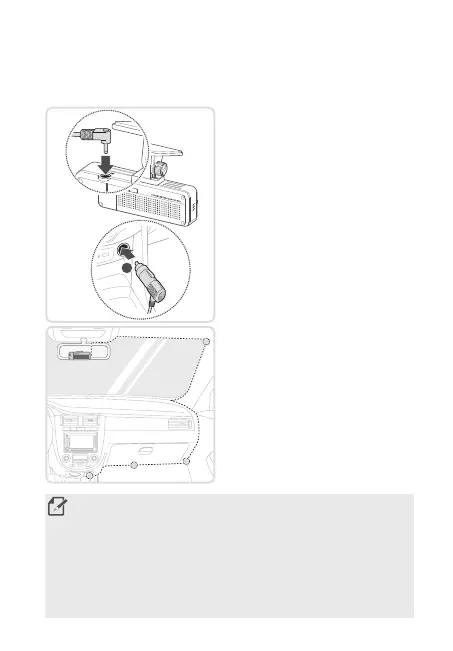
Connecting and arranging the power cable
When the engine and electrical accessories are turned off, connect the
car charger.
2
➊➊
➋➋
1. Connect the cigar socket power
cable to the product’s DC-IN power
connector and insert the cigar jack
into the vehicle’s power socket.
2.Arrangeandxthepowercable
using the adhesive cable holders.
Refertothegureontheleftfor
the recommended locations for the
adhesive cable holders.
• The hardwiring cable (optional) must be professionally installed to the
vehicle by a trained mechanic.
• Use the authentic THINKWARE cigar socket power cable (optional). If
you use another manufacturer's cable, the product may be damaged or
electricalreorelectrocutionmayresultduetothevoltagedifference.
• Do not cut or modify the power cable yourself. Doing so may damage the
product or the vehicle.
• For safe driving, arrange the cables to prevent the driver's vision from
being obstructed or interfering with driving.
F200PRO_QSG.indb 10F200PRO_QSG.indb 10 2021-08-09 오후 1:30:252021-08-09 오후 1:30:25



 To Next Page