Need help?
Do you have a question about the Thinkware F50 and is the answer not in the manual?
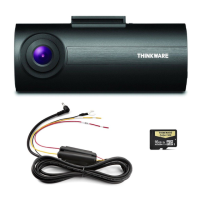
Lists items included in the dash cam package.
Lists optional accessories available for the dash cam.
Provides a detailed visual and descriptive breakdown of the dash cam's components.
Explains the process of inserting and managing the MicroSD card.
Guides the user through the physical installation process in the vehicle.
Details how to power the dash cam on and off automatically with the vehicle.
Explains the road safety warning feature, requiring an optional GPS accessory.
Describes how video files are saved, organized, and managed on the memory card.
Covers continuous and incident recording modes during driving.
Explains parking surveillance features, requiring hardwiring.
Details how to manually start recording for specific events or scenery.
Explains how to enable or disable the voice recording feature.
Guides the user on how to format the MicroSD card.
Describes the process for updating the device's firmware.
Introduces the PC viewer software for reviewing recorded videos.
Guides the user through the installation of the PC viewer software.
Explains how to select the correct drive for the dash cam's storage.
Provides a guide to the user interface and controls of the PC viewer.
Demonstrates how to view and navigate video playlists within the PC viewer.
Details configuration settings for the dash cam within the PC viewer.
Covers general settings and system configurations available in the PC viewer.
Lists the technical specifications and features of the F50 dash cam.
 General
| Product color | Black |
|---|---|
| GPS (satellite) | Yes |
| Number of cameras | 1 |
| Main camera sensor | CMOS |
| Maximum frame rate | 30 fps |
| Main camera resolution | 1920 x 1080 pixels |
| Main camera sensor resolution | 2.12 MP |
| Built-in display | No |
| Built-in storage media | - |
| Compatible memory cards | MicroSD (TransFlash) |
| Maximum memory card size | 64 GB |
| USB 2.0 ports quantity | USB 2.0 ports have a data transmission speed of 480 Mbps, and are backwards compatible with USB 1.1 ports. You can connect all kinds of peripheral devices to them. |
| Quantity per pack | 1 pc(s) |
| Memory card included | MicroSD |
| Included memory card size | 8 GB |
| Operating voltage | 12 V |
| Power source type | Cigar lighter, DC |
| Input operation voltage (max) | 24 V |
 Weight and Dimensions
| Depth | 34 mm |
|---|---|
| Width | 78 mm |
| Height | 31.5 mm |
| Weight | 42 g |


 To Next Page