
 Need help?
Do you have a question about the Thinkware FA10 and is the answer not in the manual?
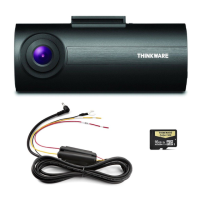
Lists all items included in the dash cam package for initial setup.
Details additional accessories available for purchase to enhance dash cam functionality.
Identifies and describes the various components and physical features of the dash cam.
Provides instructions on how to properly insert and remove the MicroSD card.
Guides users through the physical mounting and connection of the dash cam in a vehicle.
Explains how the dash cam automatically powers on and off with vehicle ignition.
Describes the feature that alerts drivers to traffic enforcement zones using GPS.
Explains how video files are saved by date/hour and managed on the MicroSD card.
Details continuous recording and incident recording during driving.
Explains motion detection and impact recording when the vehicle is parked.
Describes how to manually initiate video recording for specific events or scenery.
Explains how to toggle audio recording ON/OFF using the REC button.
Guides users on how to format the MicroSD card for optimal performance and data management.
Provides instructions for updating the dash cam's firmware for improved features and stability.
Introduces the PC software for viewing recorded dash cam videos on Windows and macOS.
Details settings for memory card management, recording modes, and impact sensitivity.
Covers system settings like language, time zone, and speed unit configuration.
Lists the technical specifications, dimensions, and operating parameters of the dash cam.
 General
| Field of View | 140 degrees |
|---|---|
| Night Vision | Yes |
| Wi-Fi Connectivity | Yes |
| GPS | Yes |
| Storage | MicroSD card (up to 128GB) |
| Parking Mode | Yes |
| G-Sensor | Yes |
| Bluetooth | No |
| Loop Recording | Yes |
| Video Resolution | 1080p Full HD |
| Battery | Capacitor |

 To Next Page










