8
Demo songs
The digital piano offers eight recorded demo songs. Each song is played with another
voice. The following describes how to select and play the demo songs.
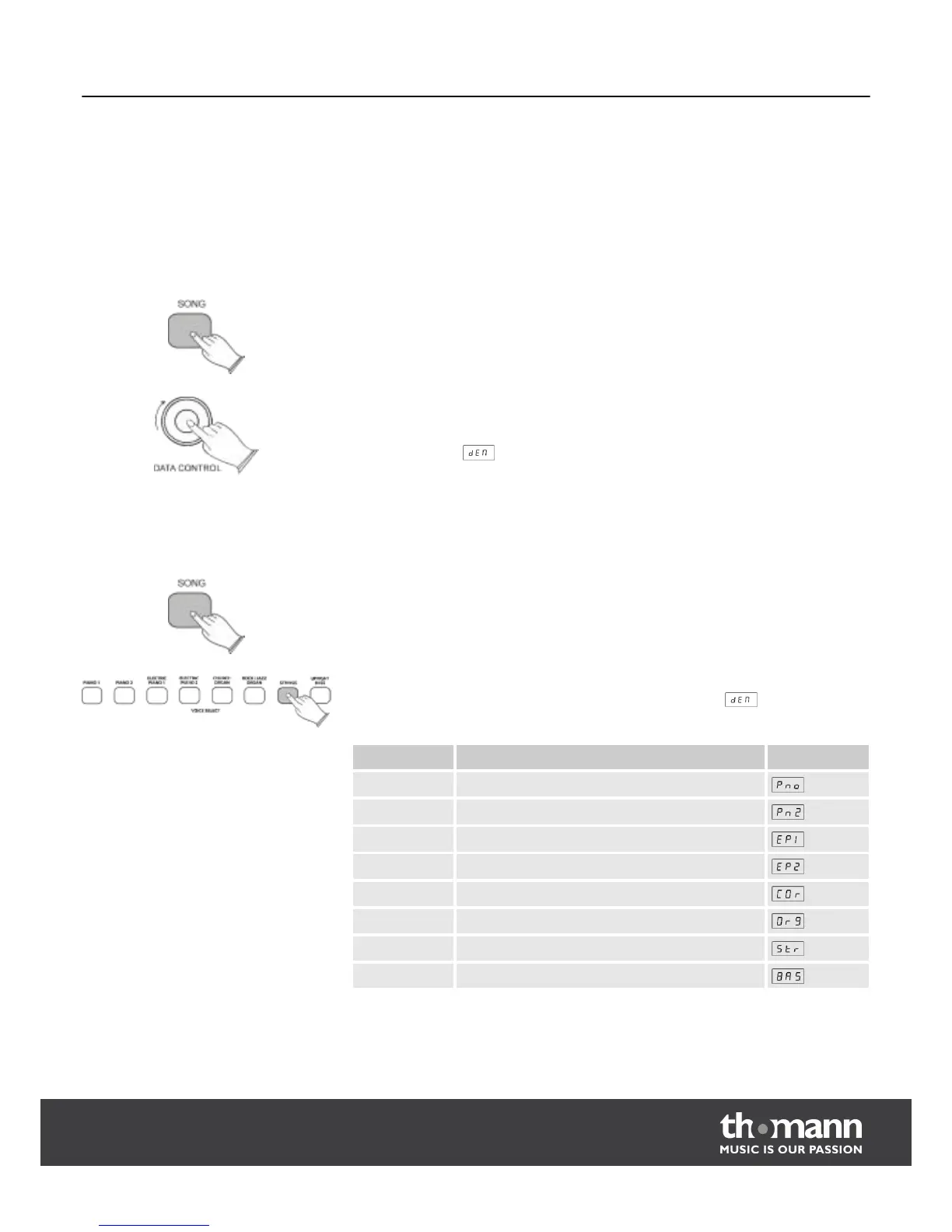
Press the [SONG] button and turn the [DATA CONTROL] knob, until the name of the
desired demo song appears in the display. Then press the [SONG] button again, to
play the song. The [SONG] button and the button for the various voices start to blink;
the display shows .
During playback you can select another demo song by pressing another voice
button.
Press the [SONG] button, to enter the demo song playback mode. The [SONG] button
lights up.
Press the [VOICE SELECT] button for the desired voice. The [SONG] button and the
respective [VOICE SELECT] button will flash; the display shows .
Demo song Voice Display
1 PIANO 1
2 PIANO 2
3 ELECTRIC PIANO 1
4 ELECTRIC PIANO 2
5 CHURCH ORGAN
6 ROCK/JAZZ ORGAN
7 STRINGS
8 UPRIGHT BASS
Select a demo song with the DATA
CONTROL knob
Select a demo song with the SONG
button
Demo songs
DP-25
13



 To Next Page