COLOUR VIDEO INTERCOM 18CM
EN
6
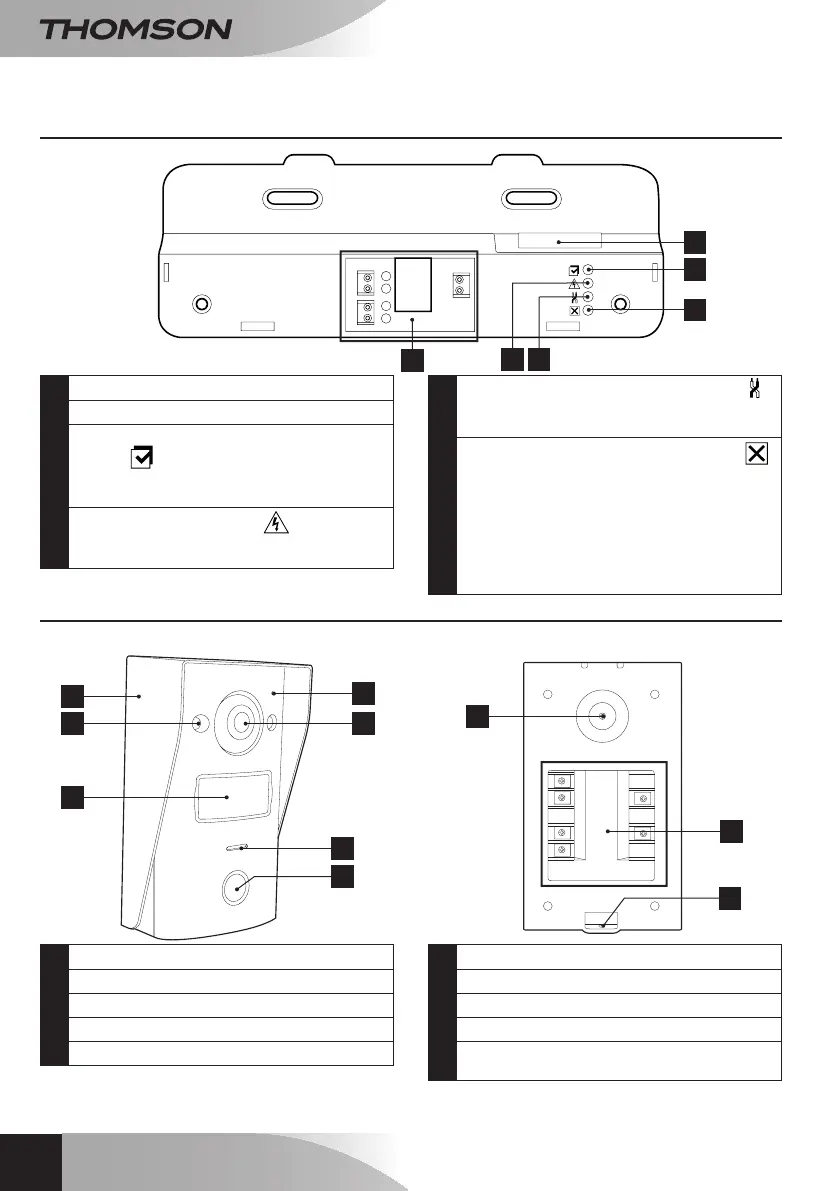
B - prOduCT dESCripTiON
3 - INTELLIGENT BRACKET
4
3
2
DC15V
1
1
3
6
4
2
5
1
Monitorconnectionterminal
2
Connectionterminals
3
Indicatorlightforconnectinganadditional
monitor
:
Red=Connectionerror
Blue=ConnectionOKormonitornotpresent
4
Powersupplyindicatorlight
:
Red=Powersupply>16V
Blue=Powersupply<16VOK
5
Intercompanelconnectionindicatorlight
:
Red=Reversepolarity
Blue=WiringOK
6
Intercompanelconnectionindicatorlight
:
Red=intercompanelnotconnected(wire
unpluggedorcut)*
Blue=connectionOK
* This is completely normal if the monitor is
used as an additional monitor on an existing
installation and no intercom panel is directly
connected to it
4 - INTERCOM PANEL
Front view
7
4
5
6
1
2
3
Front view
10
9
8
1
Wallmountfortheintercompanel
2
Infra-redLED
3
Namelabel
4
Microphone
5
Cameralens
6
Loudspeaker
7
Callbutton
8
Camerapositionadjustmentscrew
9
Connectionterminalblock
10
Screwholeforattachingtheintercompanel
tothewallmount



 To Next Page