COLOUR VIDEO INTERCOM 18CM
EN
8
C - iNSTALLATiON
4
3
2
1
2
1
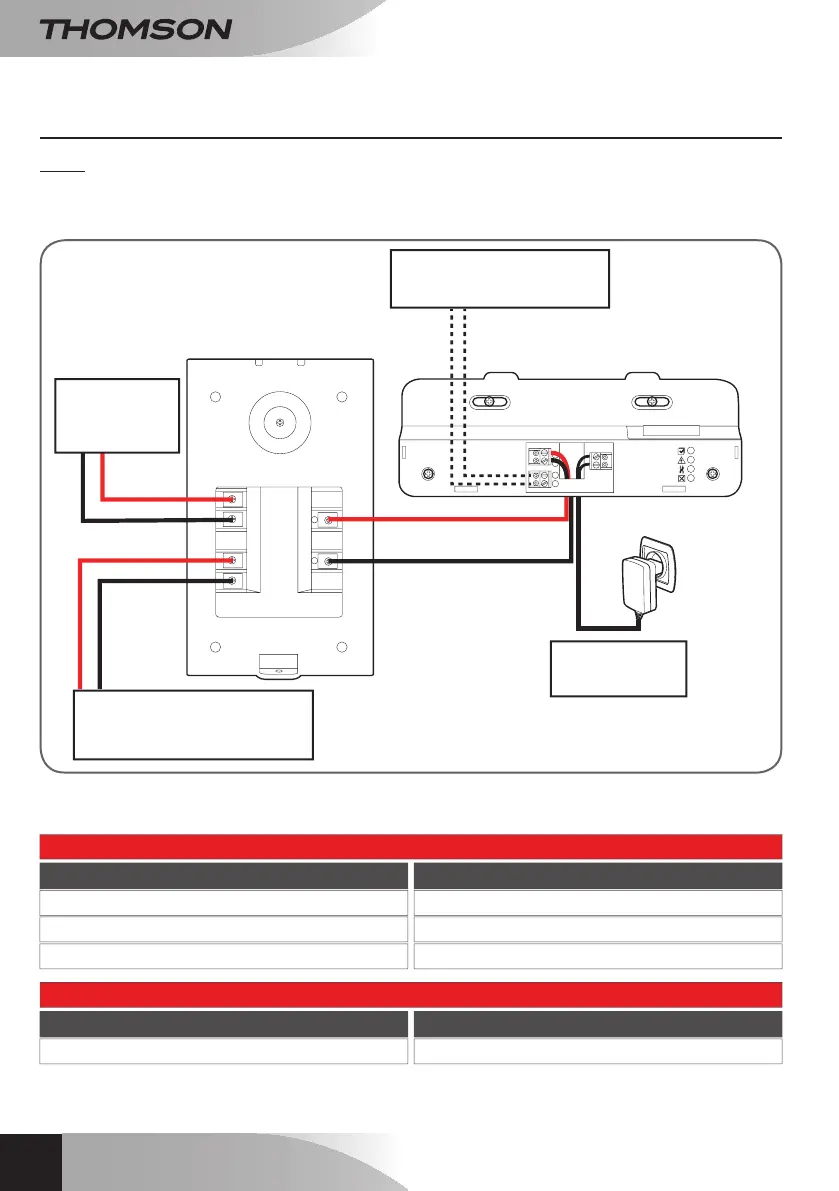
To12Velectric
strikeplate(not
included)
Todrycontactinputforopening
automatedgatedrive(not
included)
15Vdc1Amains
adaptor,included
Tooptionalmonitor(not
included,reference512265)
Thecable'slengthdetermineswhichcablesection
istobeused:
Connection from the intercom panel to the monitor
Cable length Section to use
0to25m
25to50m
50to100m
0.6mmtelephonecable
0.75mm²
1.5mm²
Connection from the dry contact (automated gate drive) to the intercom panel
Cable length Section to use
0to50m 0.75mm²
1 - CONNECTION FROM THE INTERCOM PANEL AND THE MONITOR
Notes:
• Theelectricstrikeplatemusthaveamaximumvoltageof12Vdcandamaximumpowersupplyof1A.
• Theautomatedgatedrivemustbeconnectedtoadrycontactinput(inputforkeycontact,for
example).



 To Next Page