EN
14
COLOUR VIDEO INTERCOM 18CM
F - FAq
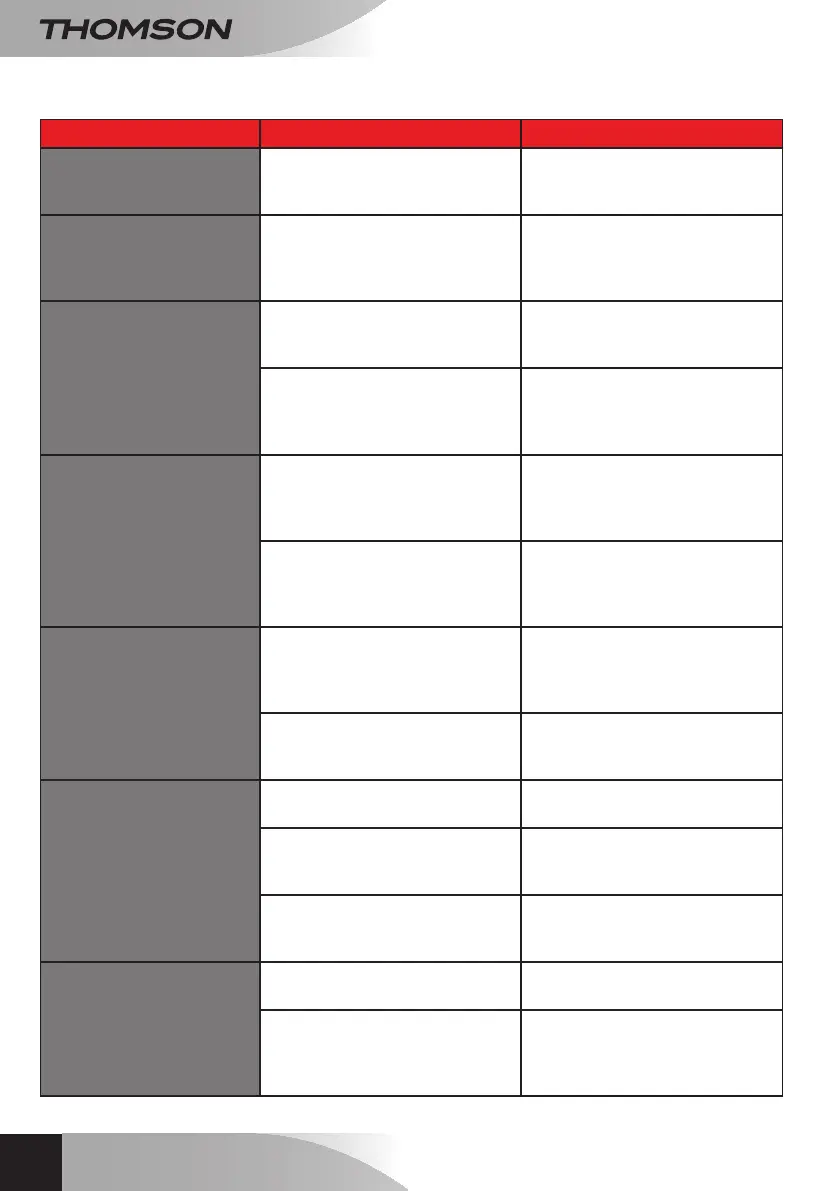
Symptoms Possible causes Solutions
The intelligent bracket is
showing an error (red light)
when the screen is lit.
Thisiscompletelynormal.
Thediagnosticsrunbytheintelligent
bracket should be relied on only
whenthescreenisdisconnected.
The monitor will not switch
on.
Theadapterisnotconnected
tothemains/themonitorisnot
insertedcorrectlyintotheintelligent
bracket.
Checkthatallpowersupplycables
arecorrectlyconnected.
No image on screen (black
or blue screen).
Theintercompanelandthe
intelligentbracketarenot
connectedcorrectly.
Removethescreenoftheintelligent
bracketandrundiagnostics.
Checktheconnections.
Thecablesectionusedisnot
suitableforthedistancebetween
themonitorandtheintercom
panel.
Checkthedistancecoveredbythe
cable section with the help of this
operatingmanual.
The image is blurred.
Thecablesectionusedisnot
suitableforthedistancebetween
themonitorandtheintercom
panel.
Checkthedistancecoveredbythe
cable section with the help of this
operatingmanual.
Thecablesthatconnectthe
intercompaneltothemonitorare
toocloseto230Vmainspower
cables.
Ifpossible,useaseparateductfor
thecablesthatconnectthemonitor
totheintercompanel.
Background noise when
talking.
Thecablesectionusedisnot
suitableforthedistancebetween
themonitorandtheintercom
panel.
Checkthedistancecoveredbythe
cable section with the help of this
operatingmanual.
The
cablesthatconnecttheintercom
paneltothemonitoraretoocloseto
230Vmainspowercables.
Ifpossible,useaseparateductfor
thecablesthatconnectthemonitor
totheintercompanel.
The electric strike plate does
not open the door.
Thecablesectionusedisnot
suitable.
Check the cable section with the
helpofthisoperatingmanual.
Theintercompanelandthestrike
platearenotconnectedcorrectly.
Check the connections between
theintercompanelandtheelectric
doorrelease.
Thestyleofelectricstrikeplate
usedisnotsuitable.
Check that the strike plate is
compatible with the specications
includedinthismanual.
The gate control does not
release the automated door.
Thecablesectionusedisnot
suitable.
Check the cable section with the
helpofthisoperatingmanual.
Theintercompanelandthe
automatedgatearenotconnected
correctly.
Check the connections and input
used for the automated gate with
thehelpoftheoperatingmanualfor
theautomatedgate.


 To Next Page
 Loading...