COLOUR VIDEO INTERCOM 18CM
11
ENEN
C - iNSTALLATiON
4 - DIAGNOSTICS AND INSTALLATION
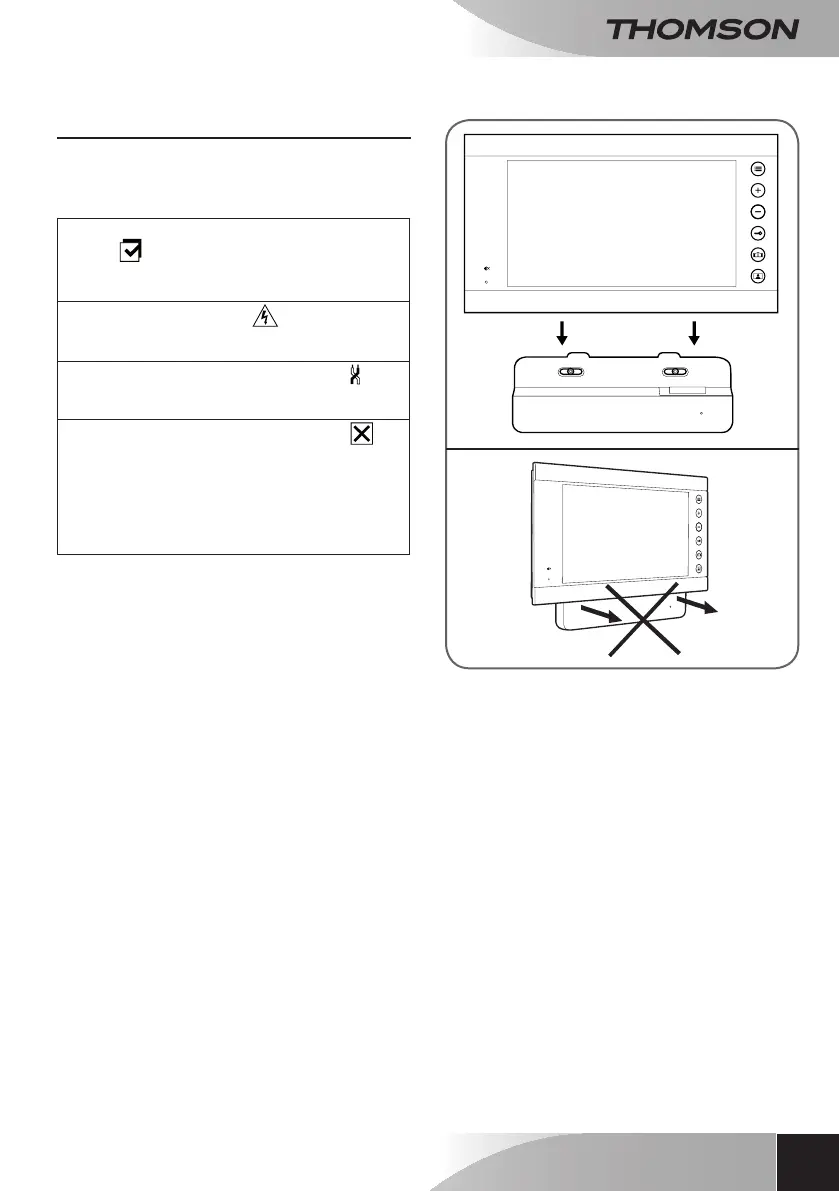
• Once the connections have been made
and before installing the monitor, check the
intelligentbracketstatus:
Indicatorlightforconnectinganadditional
monitor :
Red=Connectionerror
Blue=ConnectionOKormonitornotpresent
Powersupplyindicatorlight
:
Red=Powersupply>16V
Blue=Powersupply<16VOK
Intercompanelconnectionindicatorlight
:
Red=Reversepolarity
Blue=WiringOK
Intercompanelconnectionindicatorlight
:Red=intercompanelnotconnected(wire
unpluggedorcut)*
Blue=connectionOK
* This is completely normal if the monitor is used
as an additional monitor on an existing installation
and no intercom panel is directly connected to it
• If all the indicator lights on the intelligent
bracketareblue(withpossibleexceptiontothe
onefromtheintercompanel,seebelow),place
themonitor inits compartment.If not, check
installation.



 To Next Page