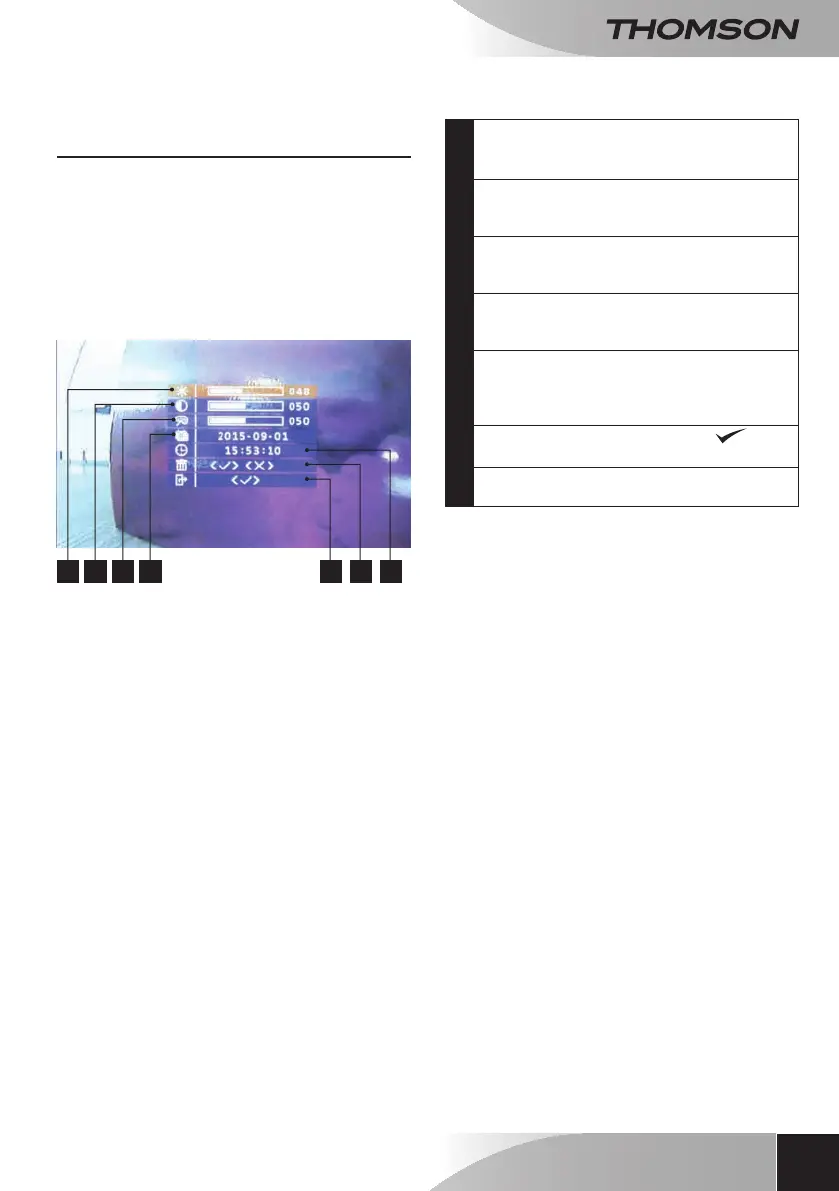
1 - SETTINGS AND FEATURES ACCESSIBLE
VIA THE MONITOR
• PresstheAnswerbutton
toilluminatethescreen.
• ThenpresstheMENUbutton
todisplaythevarioussettings.
Theproducthasapicturememoryfeature.Youcan
set thedate and time so that snapshots taken in
yourabsencewillbeautomaticallyrecordedwiththe
timeanddate.
1 2 3 4 7 6 5
1
Brightnesssetting.Pressthe+and-buttons
toadjust,thenpresstheMENUbuttonto
conrmandmovetothenextsetting.
2
Contrastsetting.Pressthe+and-buttons
toadjust,thenpresstheMENUbuttonto
conrmandmovetothenextsetting.
3
ColourSetting.Pressthe+and-buttons
toadjust,thenpresstheMENUbuttonto
conrmandmovetothenextsetting.
4
Datesetting.Pressthe+and-buttonsto
adjust,thenpresstheMENUbuttontoset
thedateandtoexit.
5
Timesetting.Pressthe+and-buttonsto
adjust,thenpresstheMENUbuttontoset
theminutes,thentoconrmandmovetothe
nextsetting.
6
TodeleteallsavedphotosSelect“
”
validatetodeleteallsavedphotos.
7
Exitmenu.Conrmusingthe
MENUbuttontoexit.
COLOUR VIDEO INTERCOM 18CM
13
ENEN
E - OpErATiON
2 - USING THE PICTURE MEMORY FEATURE
Eachpressontheintercompanelbelltriggerstheintercompaneltotakeaphoto.Asthedateandtime
appearonthephotos,youcandeterminewhocalledwhileyouwereaway.
• Brieypressthe"+"buttononthemainscreentodisplaythephotostakenbytheintercompanel.
• Usethe"+"and"-"buttonstonavigatethroughthephotos.
• Theinternalmemoryofyourvideodoorkeeperholdsupto100photos.Ifthememoryisfull,theoldest
photoswillbereplacedbythenewest.



 To Next Page