COLOUR VIDEO INTERCOM 18CM
EN
12
d - CONFigurATiON
1
2
3
3
4
5
6
7
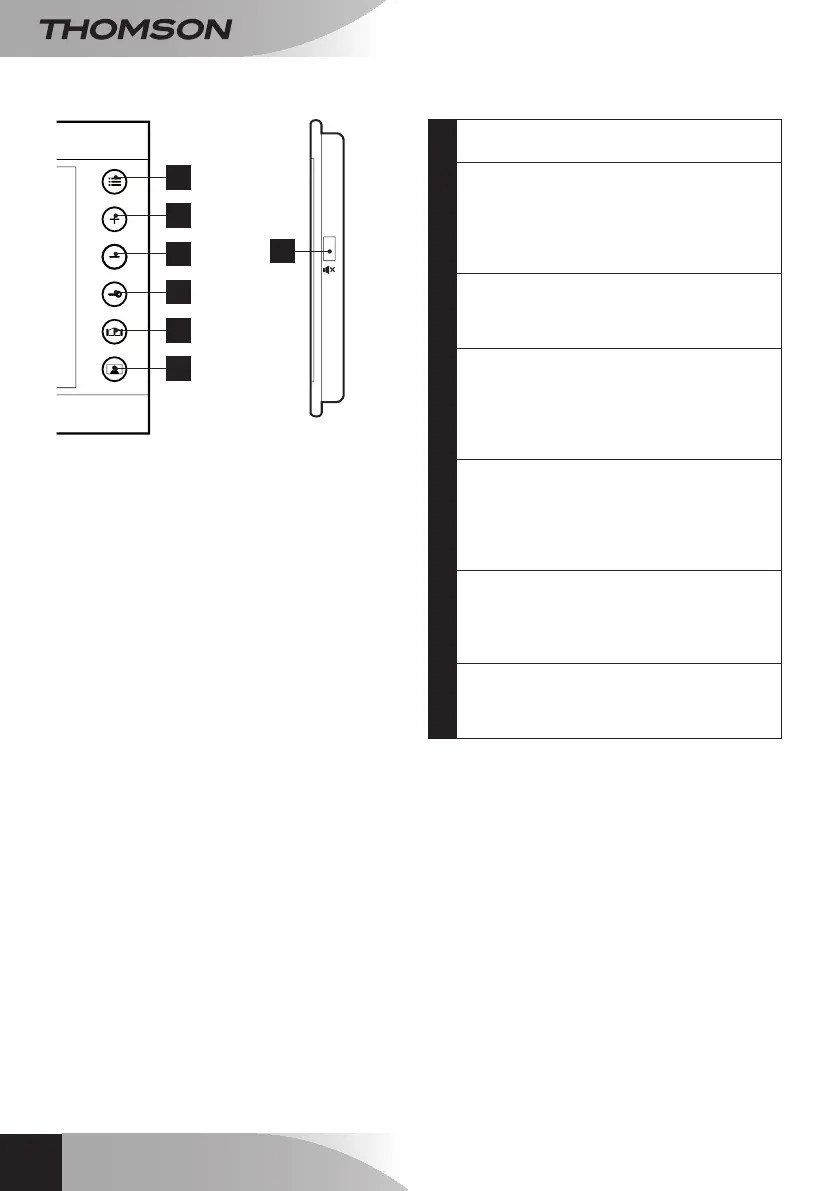
1
MENU Button:foraccessing
congurationoptions.
2
+ button/bellbutton:for navigating
congurationoptions.Fromthemainscreen,
pressandholdthisbuttontosetthebell
tone.Fromthemainscreen,pressand
releasetodisplayasnapshotofanyonewho
visitedwhileyouwereaway.
3
-button/volumecontrolbutton:for
navigatingthroughthecongurationoptions.
Fromthemainscreen,pressandholdthis
buttontosetthebellvolume.
4
Electricstrike plate control button:
ifthemonitorscreenislit,pressthisbutton
toopenanelectricstrikeplateconnectedto
theintercompanel.Communicationwiththe
intercompanelistemporarilycutoffwhilethe
instructioniscarriedout.
5
Gate control button:ifthemonitorscreen
islit,pressthisbuttononcetoopenan
automateddoorconnectedtotheintercom
panel.Communicationwiththeintercom
panelistemporarilycutoffwhilethe
instructioniscarriedout.
6
Answerbutton:you
mayspeakwithvisitors.Ifnoonerangthe
bell,pressthisbuttontoviewtheexterior.If
youarealreadytalkingtosomeone,press
thisbuttontohangup.
7
Mutebutton:mutethesoundonthe
monitor.Pressthebuttonagaintoturnthe
sound
backon.Anindicatoronthefrontof
themonitordisplaysthecurrentvolume.



 To Next Page