181
Exterior Sliding / Pivoting TV
Your recreation vehicle may be equipped with a TV located in
an exterior compartment that allows you to slide it in and out
of the compartment, along with the ability to pivot and reposi-
tion for viewing.
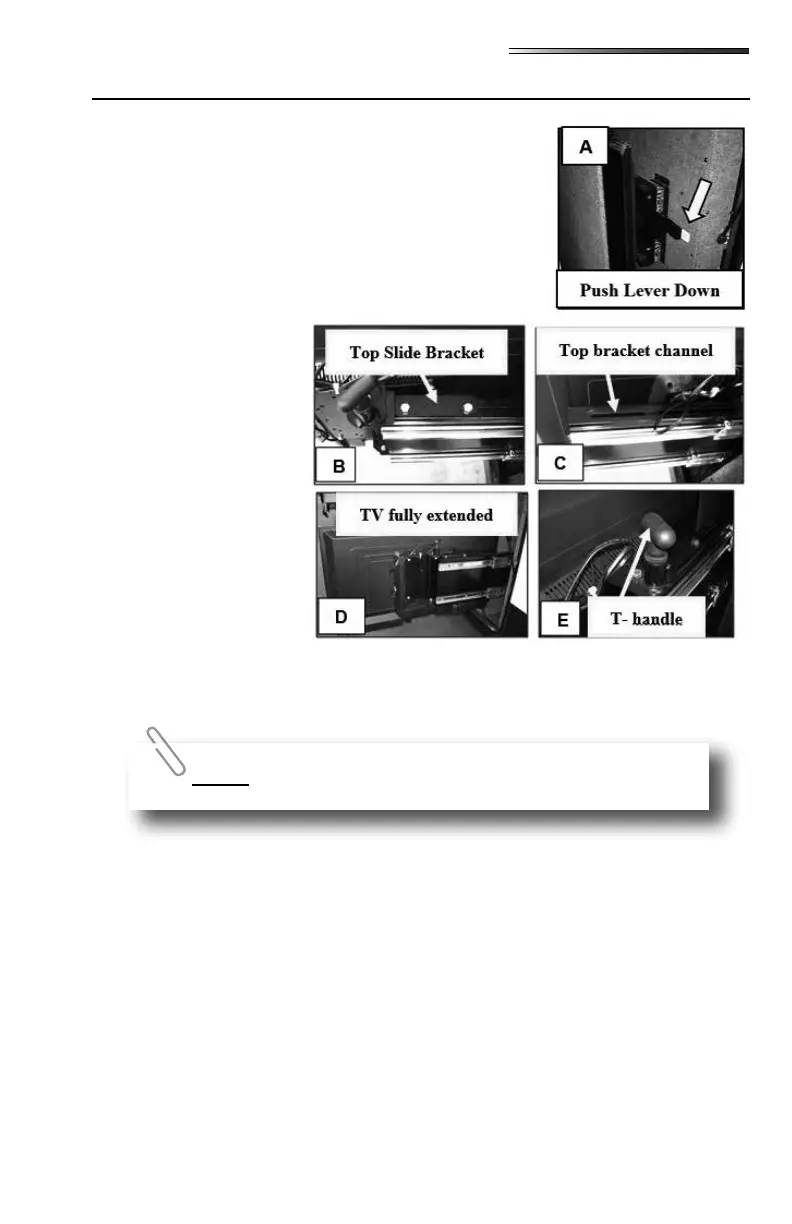
1. Push down on the yellow tipped lever to release the slid-
ing bracket.
2. Hold the yellow lever down (A) and pull the TV towards
you out of the compartment. Once you start sliding the
TV out, release the lever
and continue pulling the
TV out. Make sure the
cords do not get caught
in the mechanism as the
TV is pulled out.
3. With the silver brack-
ets (on the back of the
TV) extended, the TV
is not completely out of
the compartment. Con-
tinue pulling on the TV
until the top black slide
bracket (B) is all the
way out to the end of the
channel (C). The TV
should clear the lined
panel inside the compartment when it is completely extended (D).
4. To pivot the TV, pull up on the T-handle (E) which releases the TV to pivot freely.
1. Rotate the TV back into the storage position so the T-handle locks back in place to keep
the TV from pivoting (E).
2. Push the TV into the storage compartment taking care not to get the power cord or the
antenna cable caught in the mechanism.
3. Push it all the way back into the compartment until it stops. Firmly push it into place
until the yellow tipped lever locks it in place. You will hear it click when you have it
latched properly.
The TV does not lock into place when it is in the pivoting position.



 To Next Page