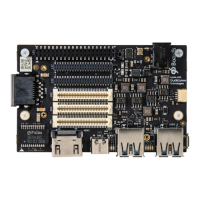
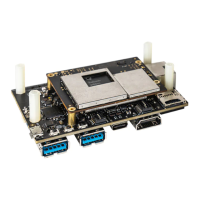
The Thundercomm EB5 Edge AI Box is a lightweight edge device designed for a wide range of AI and video decode applications, supporting device-edge-cloud synergy, remote algorithm and application deployment, FOTA (Firmware Over-The-Air) and DM (Device Management). It is suitable for complex environments such as industrial parks, urban residential areas, and shopping malls. The device acts as an edge gateway and an edge intelligent analysis device, deploying in various edge application scenarios like smart building, smart car, smart retail, smart safety supervision, smart transportation, smart manufacturing, and smart care.
Function Description:
The EB5 Edge AI Box provides a rich IO interface and flexible access to various peripherals. It is built around the Snapdragon 865 5G Mobile Platform, offering strong AI computing performance, flexible configuration, wide temperature range support, environmental adaptability, and ease of maintenance and management.
Important Technical Specifications:
- Operating System: Ubuntu 18.04
- Platform (Snapdragon™ QRB5165):
- AI Performance: 15 TOPS
- CPU: Qualcomm® Kryo™ 585 CPU, up to 2.84GHz
- GPU: Qualcomm® Adreno™ 650 GP
- DSP: Qualcomm® Hexagon™ 698 Processor
- VPU: Adreno™ 665 VPU, supporting H264 & H265 codec; video decoding up to 8k@60fps; video encoding up to 8k@30fps
- ISP: Qualcomm Spectra™ 480 image processing
- System Memory: 8GB LPDDR5(POP) RAM
- Storage: 128GB UFS3.0 on board, with expansion for SD Card and SSD
- Display: 2x HDMI out, 1080p@60fps
- USB: 4x USB 3.0 Type A, 1x USB3.1 Type C(OTG)
- Micro SD: 1x Micro SD Slot
- SIM: 1x Nano SIM card slot
- Ethernet: 2x Gigabit Ethernet (10/100M/1000M)
- COM Port: 2x RS232, 2x RS485
- CAN: 2x CAN bus
- DI/DO: 8 DI/DO (4 DI, 4 DO)
- Wireless Connectivity:
- WIFI: 802.11a/b/g/n/ac/ax, 2x2 MIMO
- 5G: M.2 5G module (optional), multimode support (2G/3G/4G/5G NR sub-6)
- Antenna: 6x Antenna connectors (2x for WIFI, 4x for 5G)
- Audio: 1x MIC, 1x Earphone
- Debug Port: 1x Micro USB (for debug)
- Input & Indicators: Power key, Reset key buttons; Power status, WIFI status, 5G status LEDs
- Others: CR2032 RTC Battery
- DC Input: 19V DC (supports 12V~24V DC)
- Waterproof: IP40 Level Design
- Dimensions: 200mm235.5mm44mm
- Net Weight: 2200g (box body only), 2638g (body and adaptor included)
- Mount: Desktop, Wall Mount
- Operation Temperature: -10-50 centigrade (tested under typical application)
- Storage Temperature: -20-70 centigrade
- Storage Humidity: 10%~90%, non-condensing
- Anti-Vibration: 0.5Grms @ 5 ~ 500 Hz, random
- Certification: CE, FCC, JATE/TELEC, RoHS/Reach
Usage Features:
- Easy to use for edge scenes:
- Real-time local data processing for immediate response.
- Low bandwidth usage by transferring only necessary information to the cloud.
- Privacy protection with options to save information locally or to the cloud, with all cloud-bound data encrypted.
- Support for standard container engines.
- Rapid deployment of third-party algorithms and applications (under development).
- 24-channel video analysis (under development):
- Supports 24-channel 1080p@30FPS decoding.
- Supports 16-channel 1080p@30FPS coding.
- Strong environmental adaptability:
- Industrial protection grade: IP40 Level design.
- Flexible Ethernet connection selection (under development):
- Supports optional 5G module.
- High reliability (under development):
- All firmware supports cluster backup.
- Supports software and hardware fault detection and alarm.
- Provides a cluster backup solution with built-in cluster backup software.
- Remote maintenance and upgrade:
- Remote viewing of IP cameras surveillance video screens connected to EB5.
- Remote configuration of IP camera parameters.
- Remote firmware upgrade for EB5.
- Power Indicator/Button:
- Supports power-on startup.
- A brief press of the button when powered on initiates a safe power-down process.
- A long press (10 seconds) when powered on forces a power-down.
- A brief press when powered down initiates a power-up process.
- The button serves as a dual-functionality pushbutton for both Reset and Power up/Power down. A minimum 250ms press powers the module, while a 10-second press forces a Reset.
- LED indicators: Green (bright) for working, Green (flashing) for electric process, Green (put out) for complete operation.
- Wi-Fi Light (under development):
- LED indicators: Green (bright) for working, Red (flashing) for connection broken, Lights extinguished for WIFI off.
- 5G Light (under development):
- LED indicators: Green (bright) for working, Red (flashing) for connection broken, Lights extinguished for 5G off.
- Front View Connectors:
- Type-C: For ADB debugging (behind baffle).
- Micro USB: For UART debugging Port (behind baffle).
- Micro SD: For ADB debugging (behind baffle).
- SIM Card: For storage extension (behind baffle).
- MIC: 3.5 inch MIC input interface.
- Earphone: 3.5 inch Earphone output interface.
- Rear View Connectors:
- GND: Protective ground wire connection.
- POWER Connector: DC JACK+12V to +24V DC power input.
- Type-A USB 3.0 Connector: 4 vertical USB 3.0 Type-A connectors, 1A current limit per connector, 5Gbps capable.
- HDMI Connector: Outputs video via HDMI 1.4 capable connector.
- GE Connector: 2x RJ-45 Ethernet connectors for internet communication, connected through a PCIe Gigabit Ethernet PHY to a PCIe switch.
- Phoenix Terminal connector: For smoke detector, infrared detector, access control, alarm, and other alarm output equipment. Requires grounding of both the input device and the EB5.
- Phoenix Terminals: 3 Phoenix terminals for CAN/RS232/RS485/DI/DO.
- Phoenix Terminal 1 (IN): CAN1.L, DI1, CAN1.H, DI2, GND(ISO) (x2), CAN2.H, DI3, CAN2.L, DI4.
- Phoenix Terminal 2 (OUT): DO5, DO1, DO6, DO2, GND(ISO) (x2), DO7, DO3, DO8, DO4.
- Phoenix Terminal 3 (RS485/RS232): RS232(1) TX, RS232(2) TX, RS232(1) RX, RS232(2) RX, GND(RS232) (x2), RS485(1) D-, RS485(2) D-, RS485(1) D+, RS485(2) D+.
- Antenna Connectors: 6x SMA Antenna Connectors (optional) for WiFi and M.2 3052 B-Key (5G).
Maintenance Features:
- Safety Precautions: Adherence to local laws and regulations, basic installation requirements, grounding requirements, operator safety guidelines, and equipment handling instructions.
- Safety Signs: Includes warning signs (improper operation may result in damage or injury), external ground marking (for reliable grounding), internal ground mark (for grounding internal components), and antistatic mark (for electrostatic sensitive areas, requiring anti-static measures).
- Electrical Safety: Warnings regarding high voltage power supply, thunderstorm weather (unplug AC power, avoid fixed terminals/antenna connectors), big leakage current (grounding before power-on), power cord handling (do not install/remove live, turn off switch, verify labels), and fuse replacement (use same model/specification).
- Electrostatic Discharge (ESD) Protection: Instructions for wearing anti-static wristbands and gloves to prevent damage to sensitive components.
- AC Power Adapter: Use only the provided adapter (19V / 6.32A, 120W) with a grounding wire.
- Battery Disposal: Risk of explosion if replaced with an incorrect type; recycle used batteries according to local environmental regulations.
- Medical Device Interference: Maintain a separation distance of 20cm (8 inches) from pacemakers, hearing aids, or other medical devices.
- Modifications: Unauthorized modifications to wireless solution, thermal solution, device components, or enclosure will violate regulatory compliance and may induce safety hazards.
- Warranty & Product Support Service:
- Customer Support: Available via email (service@thundercomm.com) and a customer service platform (to be opened in August).
- Warranty Period: One year from the date of purchase.
- Scope of Warranties: Covers repair or replacement for products failing under proper operating conditions within the warranty period. Excludes damages from inappropriate transport, bad usage, neglect, dirt, external forces (lightning, surges), and corrosion.
- Reset Button: Restoring factory settings will cause business interruption; use with caution.

 Need help?
 General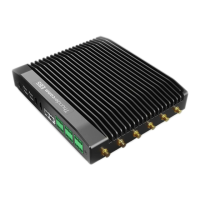

 To Next Page