Thundercomm EB5 Edge AI Box Hardware User Manual
- 15 -
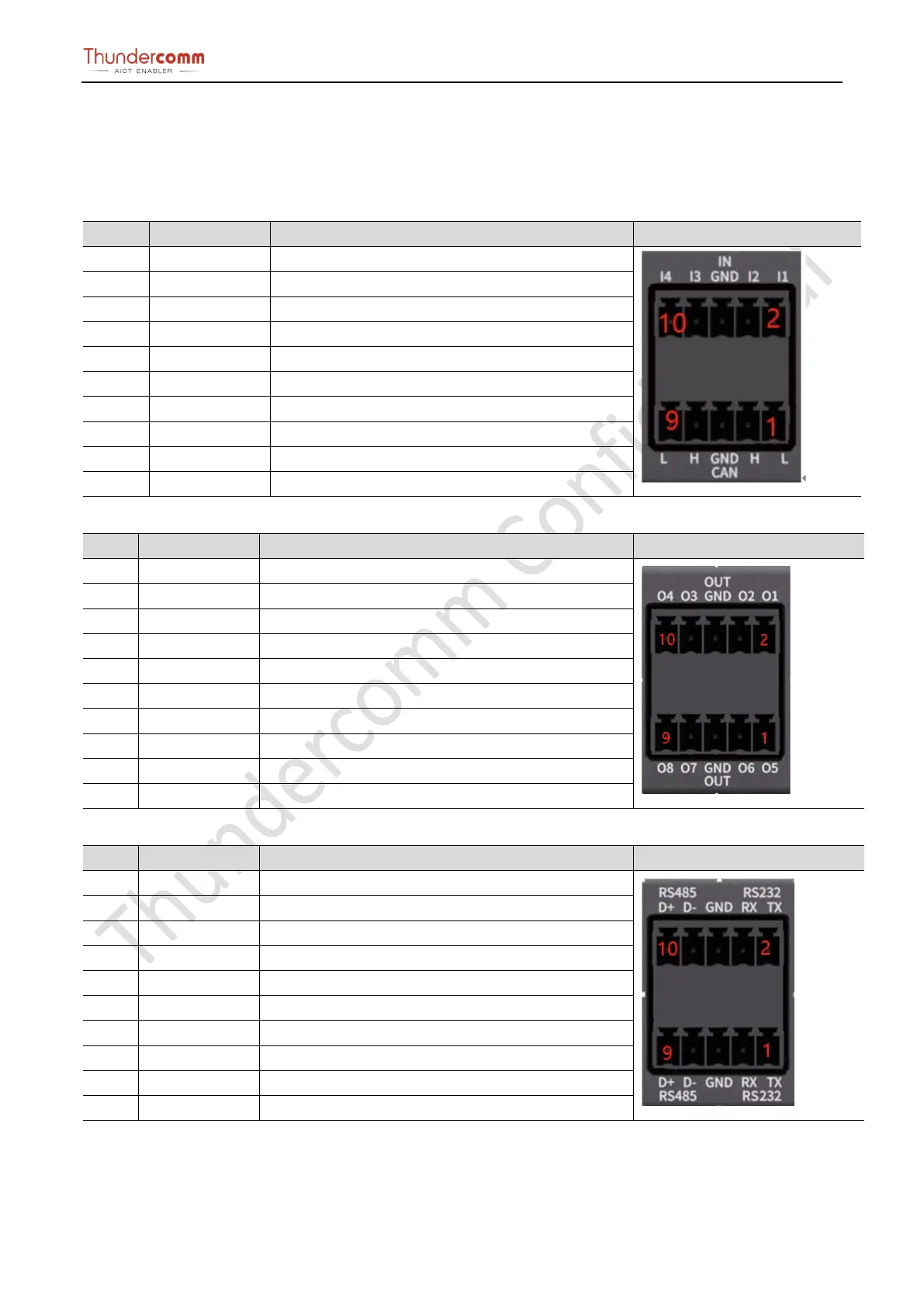
Phoenix terminal
Description
The Edge box implements 3 Phoenix terminals for CAN/RS232/RS485/DI/DO
Table 3-6. Phoenix terminal 1 description
DI work with GND, Short with GND or open.
DI2 DI work with GND, Short with GND or open.
GND(ISO) GND work with DI signal.
6 GND(ISO) GND work with DI signal
7 CAN2.H CAN interface 2 H level.
8 DI3 DI work with GND, Short with GND or open.
CAN2.L CAN interface 2 L level.
DI work with GND, Short with GND or open.
Table 3-7. Phoenix terminal 2 description
DO5 work with DO6, two pins are short and open
DO1 work with DO2, two pins are short and open
DO5 work with DO6, two pins are short and open
DO2 DO1 work with DO2, two pins are short and open
GND(ISO)
6 GND(ISO)
7 DO7 DO7 work with DO8, two pins are short and open
8 DO3 DO3 work with DO4, two pins are short and open
DO8 DO7 work with DO8, two pins are short and open
DO3 work with DO4, two pins are short and open
Table 3-8.Phoenix terminal 3 description
RS232 output signal of channel 1
RS232 output signal of channel 2
RS232 input signal of channel 1
RS232(2) RX RS232 input signal of channel 2
GND(RS232) RS232 GND signal.
6 GND(RS232) RS232 GND signal.
7 RS485(1). D- RS485 D- interface, work with D+ of channel 1
8 RS485(2). D- RS485 D- interface, work with D+ of channel 2
RS485(1). D+ RS485 D+ interface, work with D- of channel 1
RS485 D+ interface, work with D- of channel 2


 To Next Page