EasyManua.ls Logo

Timex TM80 - Clock Radio / Digital Audio Player - User Manual

Timex TM80 - Clock Radio / Digital Audio Player
14 pages
Print Icon
To Next Page IconTo Next Page
Loading...
TM80 IB
Jan 24, 2007
Color: Black
For additional information, online
registration, and exclusive special
offers please visit our website:
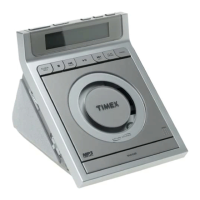
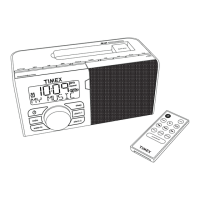
Model TM80
MP3 Player
Clock Radio
NOTE:
SD card/
Flash Drive
not included

Questions and Answers

Timex TM80 - Clock Radio / Digital Audio Player Specifications

General IconGeneral
BrandTimex
ModelTM80 - Clock Radio / Digital Audio Player
CategoryClock Radio
LanguageEnglish

Summary

FCC Information

Consumer Guide to Product Safety

IMPORTANT SAFETY INSTRUCTIONS

Detailed safety and operating instructions for proper use and to avoid hazards.

Controls and Indicators

Top Panel Controls

Identifies and describes controls and indicators located on the top panel of the unit.

Front Panel Controls

Identifies and describes controls and indicators located on the front panel of the unit.

Back Panel Controls

Identifies and describes controls and indicators located on the back panel of the unit.

Display Indicators

Explains the various icons and information displayed on the unit's screen.

Quick start

Power Connection

Instructions for connecting the AC power adapter to the unit and a wall socket.

Setting Time

Steps for setting the time zone and adjusting the clock, including DST.

Setting Alarms

Guide to setting the alarm time and selecting the wake-up source.

Playing Sound Files

Instructions for inserting and playing MP3 or WMA files from a USB flash drive or SD card.

Radio Operation

Steps for tuning and listening to the radio, including preset station setup.

Setting Up the TM80

Setting Time Zone and DST

Procedure for setting the time zone and adjusting for Daylight Saving Time.

Setting Time and Calendar

Detailed steps for setting the current time, year, and date.

Using the Alarms

Alarm Setting and Activation

How to set alarms and select the wake-up source, and manage their status.

Resetting Alarm for Next Day

How to reset the alarm for the following day after it sounds.

Snooze Function

Instructions for activating the snooze function when an alarm sounds.

Sure Alarm Feature

Explanation of the sure alarm feature, including backup battery operation.

Reviewing and Managing Alarms

How to check set alarm times and activate or deactivate the alarm function.

Listening to MP3;WMA Files

Inserting Media

Step for inserting the storage media containing MP3 or WMA files.

Playback Controls

How to start, pause, resume, and adjust volume for audio files.

Navigation and Modes

How to navigate tracks and select playback modes like Repeat or Random.

EQ Settings

How to access and adjust equalizer settings for audio playback.

Source Selection

How to switch between audio sources when both SD card and Flash Drive are inserted.

Powering Off Unit

Instructions on how to power off the unit after listening.

Folder Navigation

How to navigate and select music or subfolders within the file structure.

Listening to Other Portable Audio Devices

Connecting External Devices

How to connect an external audio device using the Line-in Jack.

Activating Line-in Mode

How to activate Line-in mode and begin playback from an external device.

Device Operation and Volume

How to adjust volume for the external audio source on the unit and device.

Turning Off Unit and Device

Steps to properly turn off the unit and the connected external device.

Listening to Radio

Antenna Setup

Guidance on positioning the unit for optimal AM and extending the FM antenna.

Tuning and Presets

How to select radio bands, tune stations, and set up presets.

Radio Power Off

Instructions on how to power off the radio function.

Sleep Operation

Entering Sleep Mode

How to activate sleep mode and the appearance of the Sleep Icon.

Adjusting Sleep Timer

How to set the sleep timer duration from various increments.

Sleep Volume Control

How to adjust the volume specifically for sleep mode.

Stopping Sleep Mode

How to manually turn off the sleep function.

Dimmer Operation

Adjusting Display Brightness

How to control the brightness of the LCD display.

Remote Control

Remote Control Functions

Overview of remote control functions and aiming instructions.

Replacing Remote Battery

Steps for replacing the battery in the remote control unit.

Clock Battery Backup

Backup Battery Purpose

Explanation of the role of backup batteries for power failures.

Battery Replacement Indicators

Indicators that signal the need to replace backup batteries.

Battery Replacement Procedure

Procedure for accessing and inserting new backup batteries, noting polarity.

Maintenance

Unit Placement

Guidance on optimal placement to avoid heat and sunlight.

Furniture Protection

Advice on protecting furniture surfaces when placing the unit.

Cleaning Instructions

Recommended method for cleaning the unit safely.

Troubleshooting

No Power Issue

Troubleshooting steps for when the unit does not power on.

SD Card;Flash Drive Docking

Solutions for problems with inserting or connecting SD cards or flash drives.

Low Battery Indicator

Diagnosing and resolving issues related to the low battery indicator.

Distorted Sound

Troubleshooting steps for distorted audio playback.

Remote Control Not Working

Solutions for when the remote control is unresponsive.

Song File Playback Issues

Resolving issues with playing MP3 or WMA files on the unit.

Unit Unresponsiveness

Steps to reset the unit in case of unexpected performance issues.

Warranty Information

Obtaining Service

Details on how to obtain warranty service or repair.

Pre-Service Checks

Recommendations for troubleshooting before sending the unit for service.

Preparing Unit for Service

Numbered steps for preparing the unit for return for service.

Service Contact Information

Address and department for sending the unit for warranty service.

Warranty Limitations

Important notes and limitations regarding warranty coverage and validity.

Related product manuals