20
Date of Origin – 02/24/11
Updated – 02/03/20
Incremental Operation
• To inch the tarp in either direction, press then release the desired directional button on the keypad or remote for
less than 1 – 1 ½ seconds intermittently to inch the tarp in that direction.
Press and Hold operation
• Press and hold the desired directional button on the remote for more than 2 ½ seconds or until the status light turns
from solid green to solid white on the front of the trailer. The tarp will continue to travel in that direction until you
release the button.
PROGRAMMING REMOTE TO WORK WITH
THE THUNDER ELECTRIC TARP SYSTEM
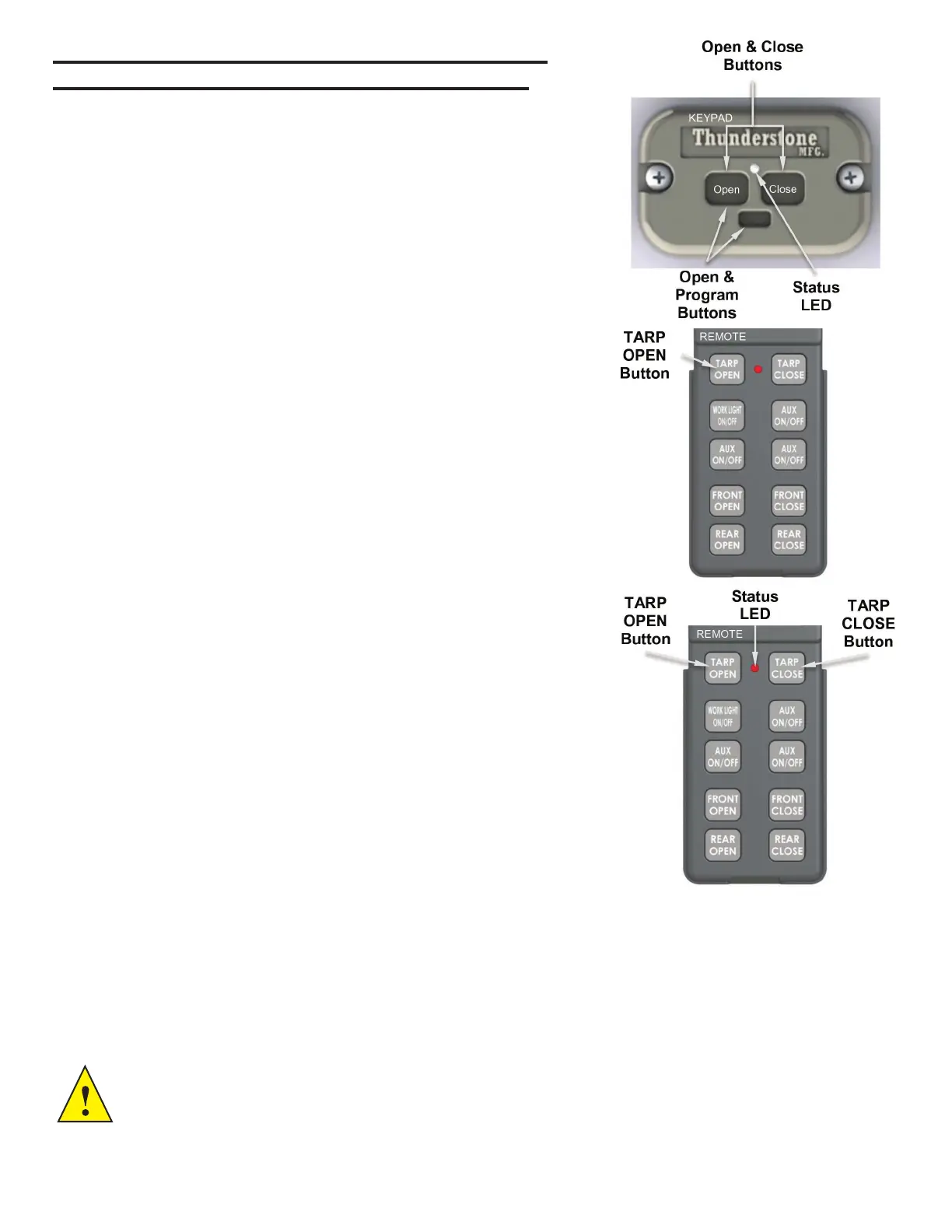
1. Power on the keypad controller on the front of the trailer by holding the “Open”
and “Close” buttons on the keypad simultaneously for 5 seconds or until the
white light illuminates to indicate the system is active.
2. Open the lid on the ip style remote and observe the buttons illuminate
indicating the remote is active.
3. Repeat step 2 for each remote to be programmed. Up to four remotes can be
programmed. Have all remotes ready for steps 4 & 5. Ignore if only one remote
is to be programmed.
4. Press and hold the small Program & “Open” buttons on the keypad mounted
on the trailer simultaneously until the light turns green. Release the buttons
which will cause the status LED to quickly ash red/orange.
5. Press and hold the “TARP OPEN” button on the remote for 2 seconds OR
until the red/orange ashing light momentarily turns white on the keypad, then
release the button. Keypad light should then continue blinking red/orange.
6. Repeat step 6 for up to four remotes to be programmed. Ignore if only
programming one remote.
7. Once all remotes are programmed press and release the program button to
exit programming mode or keypad will also time-out after 10 seconds.
8. The keypad status LED should blink two sets of red indicating the remote(s)
have been saved to memory.
Operating Remote with the Thunder Electric Tarp System
Powering on or off the electric tarp system.
• Open the lid on the remote and observe the buttons illuminate indicating the
remote is active.
• Press and hold the “TARP OPEN” and “TARP CLOSE” buttons simultaneously on
the remote for 3-5 seconds or until the keypad status LED on the front of the trailer
has illuminated.
• Repeat the steps above to turn off the tarp system.
One Touch Operation - The one touch function is fully automated. The system will
stop when fully opened or closed.
• Press and hold the desired directional button on the remote for 1 ½ seconds or
until the keypad status light turns solid green on the front of the trailer. Release
the button and the keypad status light will start ashing green indicating one touch
operation. The tarp will travel in that direction automatically and stop when it is fully
open or closed.
CAUTION! - When any button on the remote is pressed, the status LED will ash rapidly indicating it is transmitting
a signal. The status LED on the remote will ash continuously when the remote batteries have 25% charge left. Never
travel with the tarp in a partially covered position. The trailer should always be covered when traveling. Always close
the remote lid when not in use to prevent accidental button presses that can cause unwanted operation of the tarp or
trap systems. When ip lid is in the closed position the remote is deactivated.


 To Next Page