10
Item Description
Widgets
Add customizable quick access to app functions on your
phone’s Home screen.
App icons Add shocuts to your favorite apps to the home screen.
Back buon Tap to return to the previous screen.
Home buon Tap to display the main Home screen.
Recent Apps
buon
• Tap to display a list of recently used apps.
• Double-tap to swap between your last two used apps.
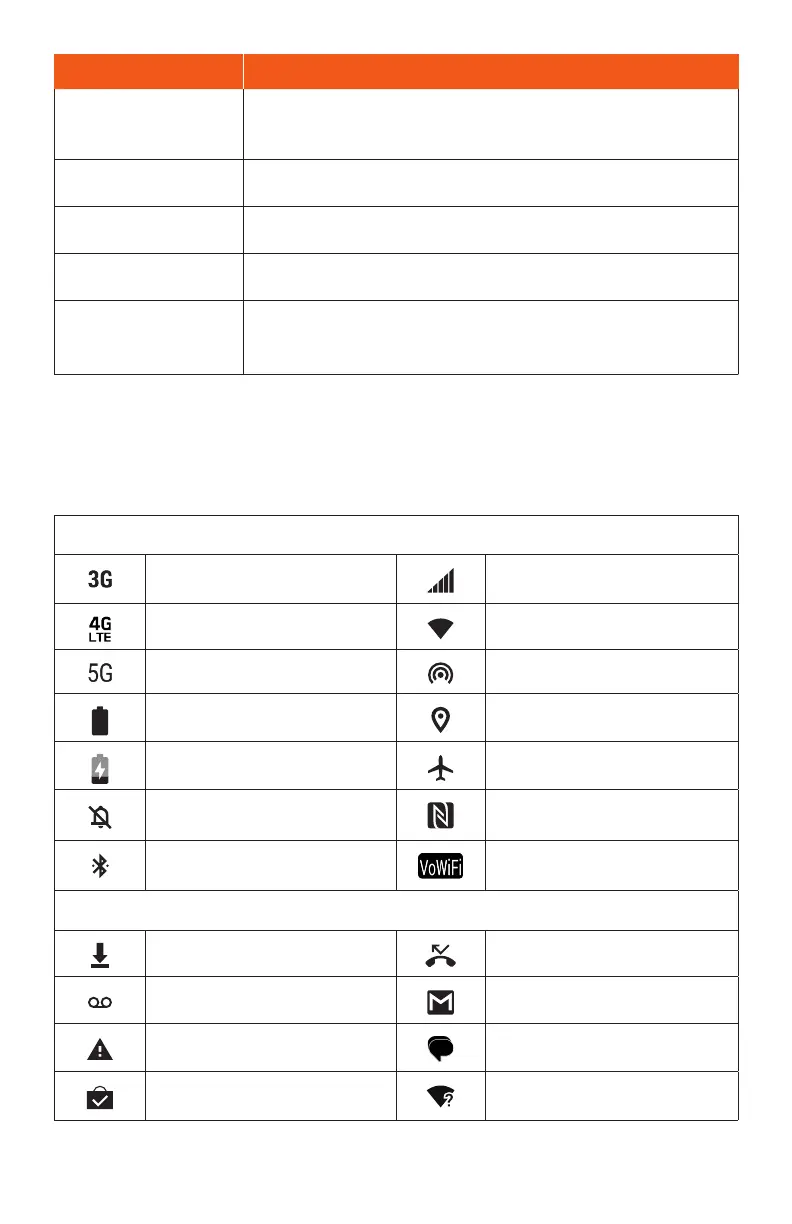
Status bar
The Status bar at the top of the Home screen provides phone and service status
information on the right side and notication ales on the le.
Status icons (Right side)
3G data service Network (full signal)
4G LTE data service Wi-Fi
®
enabled
5G data service Hotspot on
Baery (full charge) GPS in use
Baery (charging) Airplane mode enabled
Mute on NFC™ enabled
Bluetooth® connected Wi-Fi® Calling enabled
Notication icons (Le side)
Download Missed call
New voicemail New Email
Warning New text or MMS message
Update successful Wi-Fi network available
Note: Not all status and notications icons are listed on the table above.


 To Next Page