18
Apps and enteainment
The topics in this section will explore the features that make your phone so much
more than a phone, from the BoostMax Audio™ to camera, photos, and more.
BoostMax Audio
With BoostMax Audio, every beat, note, and sound will come alive with unparalleled
richness, depth, and clarity. Whether you’re an avid music lover, a dedicated gamer,
or a movie enthusiast, our cuing-edge technology will transpo you into a world
of immersive sound like never before.
To access BoostMax Audio, you can choose one of the following ways:
• From the Home screen, tap BoostMax Audio .
• From the Home screen, swipe up to access Apps and tap BoostMax Audio .
• From the Home screen, swipe up to access Apps and tap Seings > Sound &
vibration > BoostMax Audio.
Aer phone’s initial setup, a BoostMax Audio popup window will appear on top of
the Home screen, you can tap TRY IT NOW to access BoostMax Audio application.
To quickly turn on or turn o the BoostMax Audio, swipe down on the status bar
twice to access Quick Seings Panel, then tap BoostMax Audio.
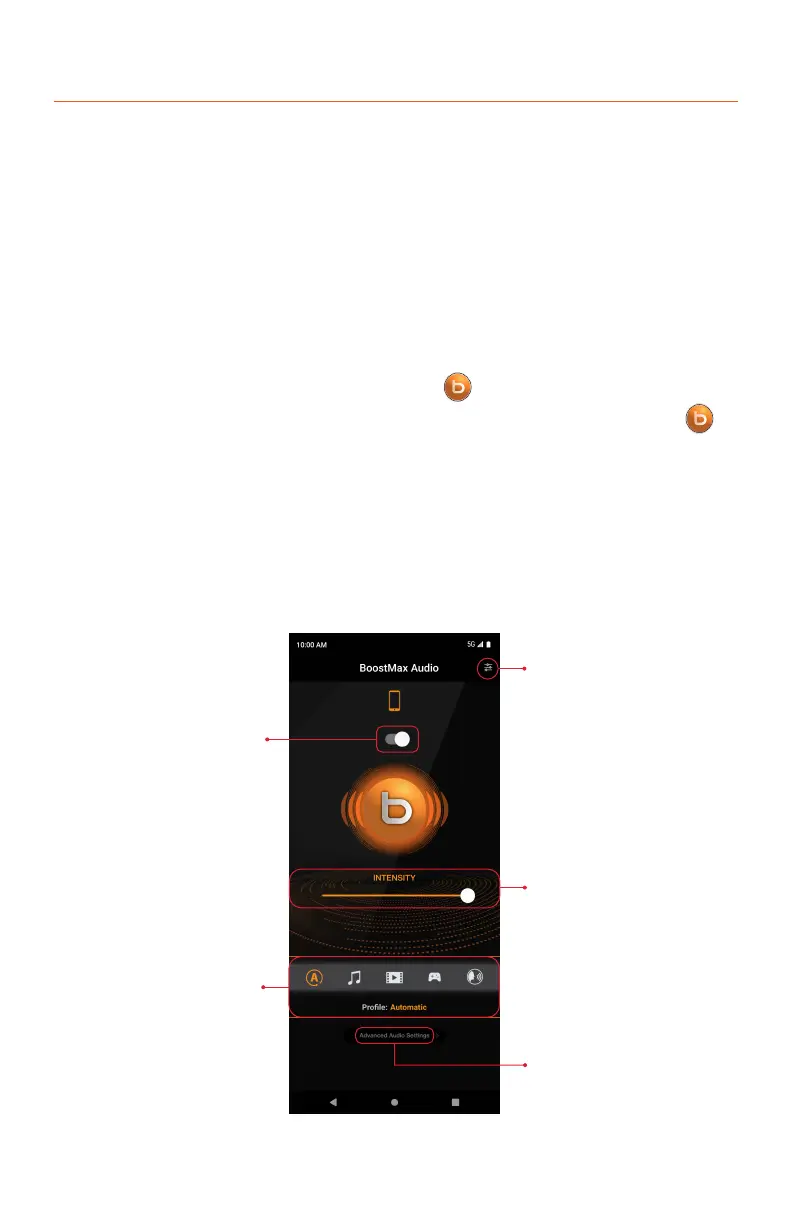
Restore Seings/About
Intensity Slider
Advanced Seings
Sound Prole Selection
ON/OFF



 To Next Page