5
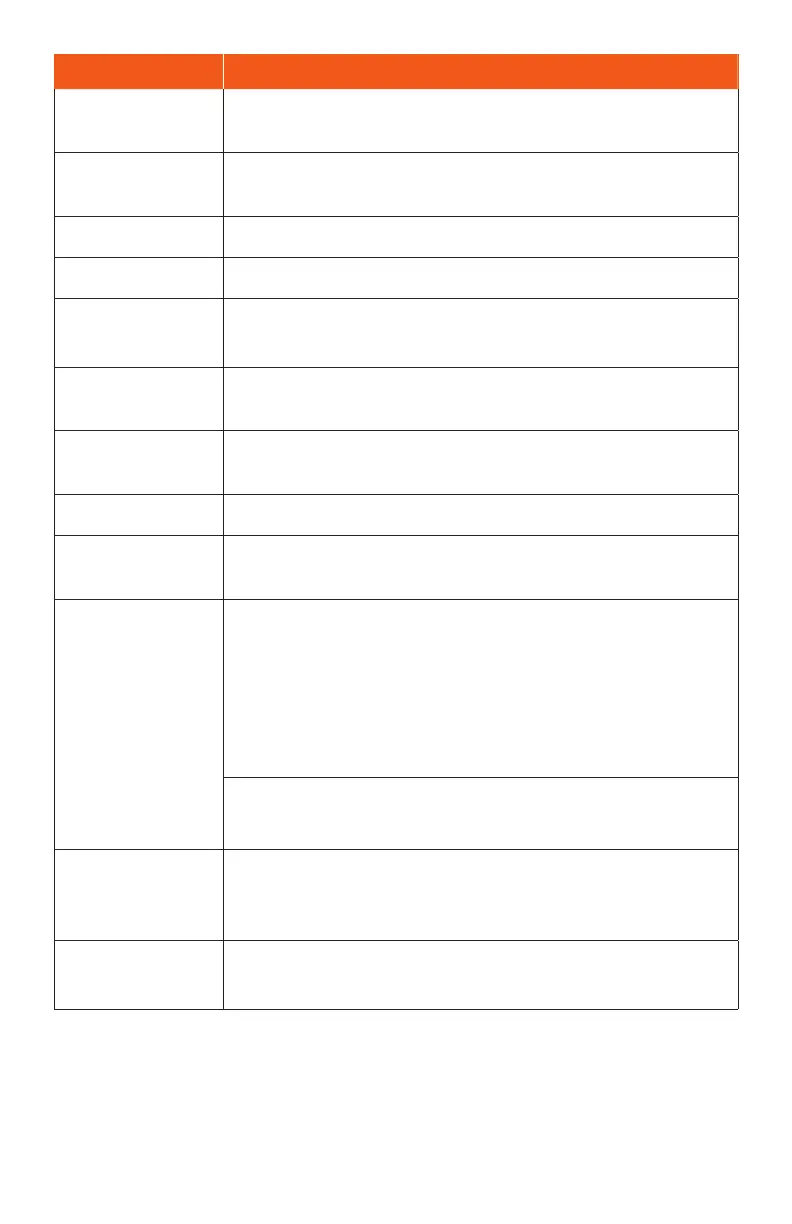
Pa Description
Headset po
Plug in a headset (sold separately) to listen to music or for
convenient, hands-free conversations.
SIM and
microSD™ tray
Inse your Nano SIM card and microSD (sold separately) for
service and additional storage.
Receiver Hear the caller and automated prompts.
Front camera Take pictures and record videos while facing the screen.
Touch screen
• View information needed to operate your phone.
• Access your phone’s features and applications.
Microphone
Transmit your voice electronically for a call, voice recording,
or Google Assistant.
USB Type-C
Connect the USB cable (included) for charging, or connect
other accessories.
Speaker Listen to calls, automated prompts, and music.
Volume keys
Adjust the volume for ringtones, media, notications, and
system sounds.
Power key
Power key
• Press to turn the screen on or o.
• Press and hold to turn the phone on.
• Press along with the Volume up key to turn the phone o.
• Press along with the Volume down key to take a
screenshot.
Fingerprint sensor
Unlock your phone with a touch of your nger.
Rear cameras
• Take pictures and record videos with a quad-lens camera.
• Use features such as the beauty mode, slow motion, time
lapse, panorama mode, and more.
Flash
• Brighten photos taken indoors or at night.
• Use as a ashlight to see in dark areas.
CAUTION! Inseing an accessory into the incorrect po may damage the phone.


 To Next Page