[] Programming Specialty Breads-Raisin Bread, Nut Bread, etc.
NOTE : SEE COOKBOOK GUIDE FOR RECIPES.
r
[
[
Prima_ry Kneading ]
Rest
J
[ Secondary Kneading J
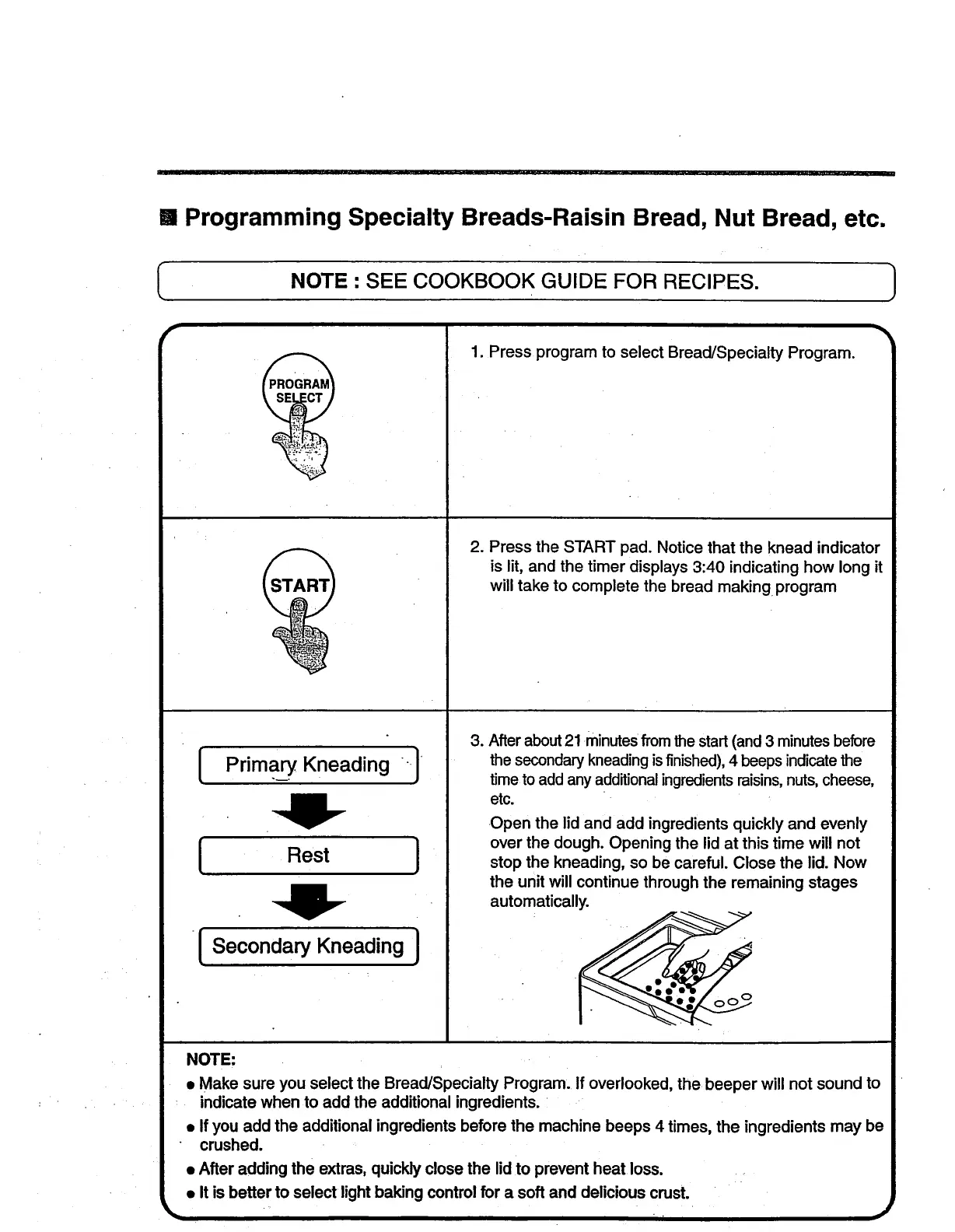
1. Press program to select Bread/Specialty Program.
2. Press the START pad. Notice that the knead indicator
is lit, and the timer displays 3:40 indicating how long it
will take to complete the bread making program
.
After about 21 minutes from the start (and 3 minutes before
the secondary kneading is finished), 4 beeps indicate the
time to add any additional ingredients raisins, nuts, cheese,
etc.
Open the lid and add ingredients quickly and evenly
over the dough. Opening the lid at this time will not
stop the kneading, so be careful. Close the lid. Now
the unit will continue through the remaining stages
automatically.
NOTE:
• Make sure you select the Bread/Specialty Program: If overlooked, the beeper will not sound to
indicate when to add the additional ingredients. •
• If you add the additional ingredients before the machine beeps 4 times, the ingredients may be
crushed.
• After adding the extras, quickly close the lid to prevent heat loss.
• It is better to select light baking control for a soft and delicious crust.
• _1 I



 To Next Page