[] Control Panel
r
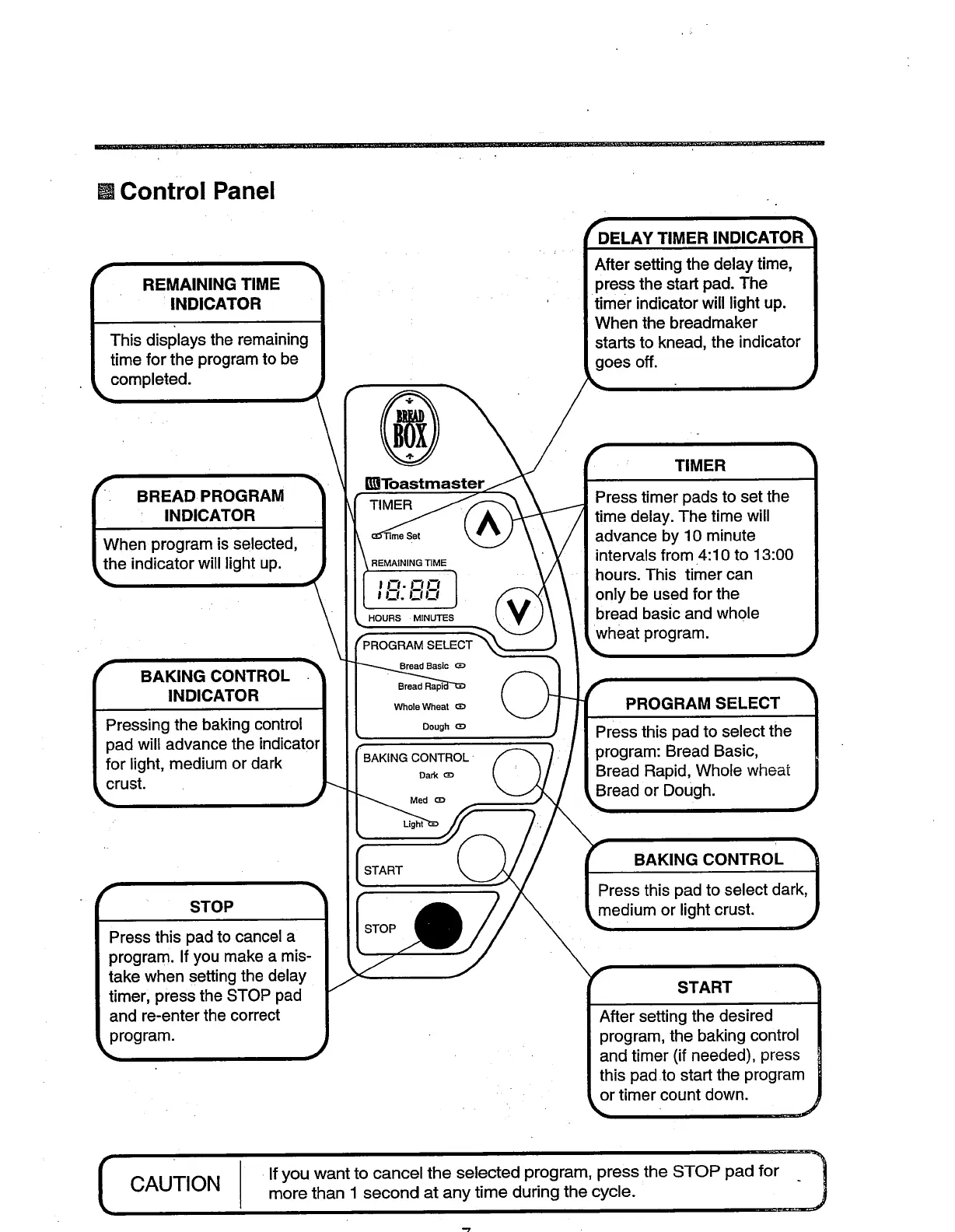
• REMAINING TIME |
INDICATOR /
This displays the remaining I
time for the program to be |
completed, n
__W BREAD• PROGRAM "_
INDICATOR
hen program is selected,
e indicator will light up. _,
BAKING CONTROL
INDICATOR
g the baking control
pad will advance the indicator
for light, medium or dark
crust.
STOP
Press this pad to cancel a
program. If you make a mis-
take when setting the delay
timer, press the STOP pad
and re-enter the correct
program.
I_Toastmaster
TIMER
Set
REMAINING TIME
I'-'"'-"-'1
I-r. FrFr
HOURS MINUTES
=LAMSELECT
(3D
Whole Wheat _D
Dough _D
Dark aD
Med aD
kight_
START
rDELAY TIMER INDICATOR _
After setting the delay time,
_ress the start pad. The
timer indicator will light up.
When the breadmaker
starts to knead, the indicator
goes off.
TIMER
Press timer pads to set the
time delay. The time will
advance by 10 minute
intervals from 4:10 to 13:00
hours. This timer can
only be used for the
bread basic and whole
wheat ram.
PROGRAM SELECT
Press this pad to select the
program: Bread Basic,
Bread Rapid, Whole wheat
Bread or Dough.
BAKING CONTROL
Press this pad to select dark,
medium or light crust.
START
After setting the desired
program, the baking control
and timer (if needed), press
this pad to start the program
or timer count down.
J
CAUTION
I If you want to cancel the selected program, press the STOP pad for
more than 1 second at any time during the cycle.





 To Next Page