, i ¸
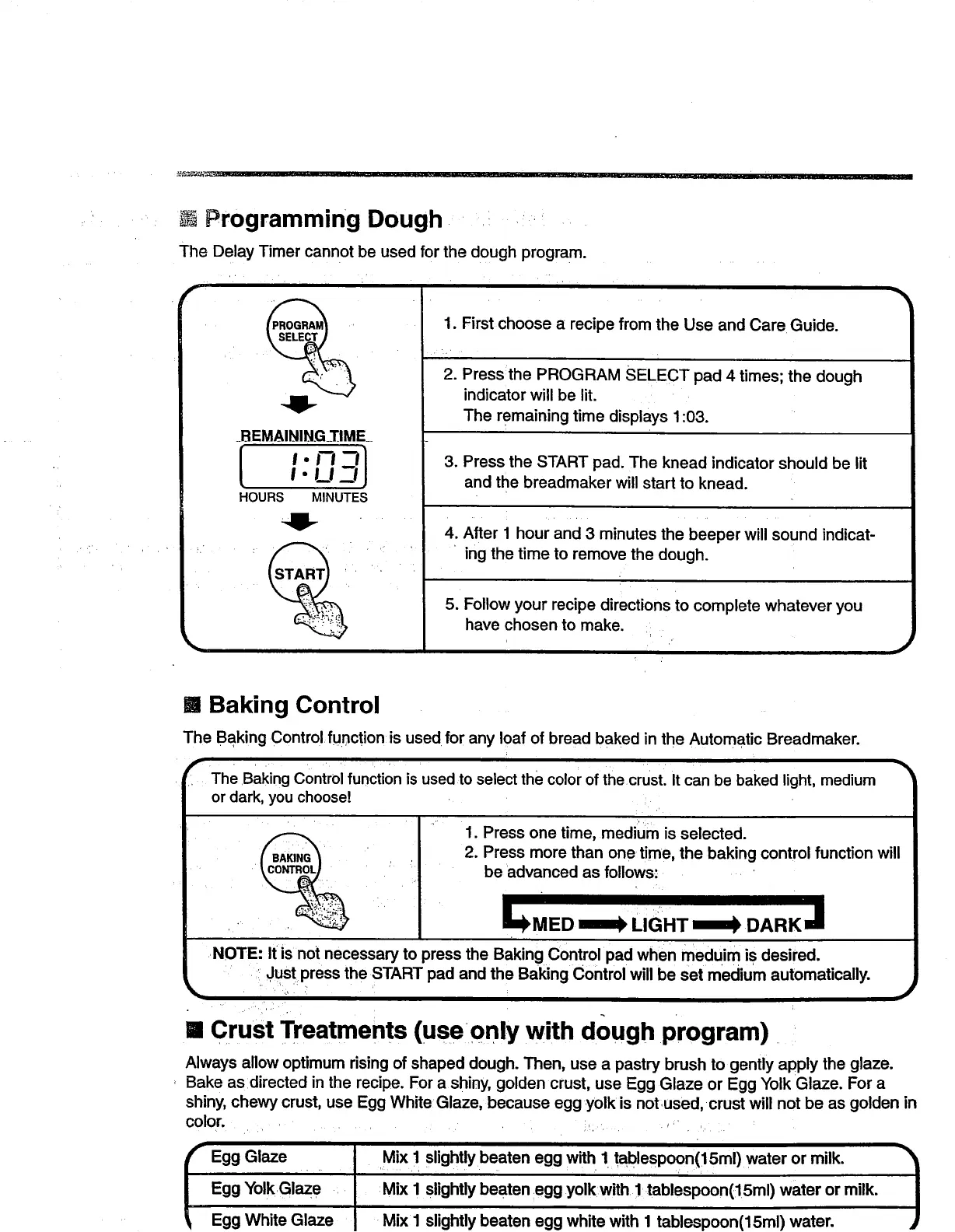
Programming Dough ,. ,.
The Delay Timer cannot be used for the dough program.
_BEMAINING_TJME_
nnl
HOURS MINUTES
1. First choose a recipe from the Use and Care Guide.
2. Press:the PROGRAM SELECT pad 4 times; the dough
indicator will be lit.
The remaining time displays 1:03.
3. Press the START pad. The knead indicator should be lit
and the breadmaker will start to knead.
4. After I hour and 3 minutes the beeper will sound indicat-
ing the time to remove the dough.
5. Follow your recipe directions to complete whatever you
have chosen to make.
'r
)
[] Baking Control
The Baking Control function is used for any loaf of bread baked in the Automatic Breadmaker.
The Baking Control function is used to select the color of the crust. It can be baked light, medium
or dark, you choose!
,L
1. Press one time, medium is selected.
2. Press more than one time, the baking control function will
be advanced as follows:
J
°'az°I'v"xl "0"t"b°atene"w't" 1
Egg YolkGlaze Mix I slightly beaten egg yolk with I tablespoon(15ml) water or milk.
Egg White Glaze Mix1 slightly beaten egg white with I tablespoon(15ml) water.
Always allow optimum rising of shaped dough. Then, use a pastry brush to gently apply the glaze.
Bake as directed in the recipe. For a shiny, golden crust, use Egg Glaze or Egg Yolk Glaze. For a
shiny, chewy crust, use Egg White Glaze, because egg yolk is notused, crust will not be as golden in
color.. ....... ;.: r . ....
[] Crust Treatments (use only with dough program)
NOTE: It is not necessary to press the Baking Control pad when rnedui m is desired.
Just press the START pad and the Baking Control will be set medium automatically.
1



 To Next Page