2 Tone Commander 8810 User Guide
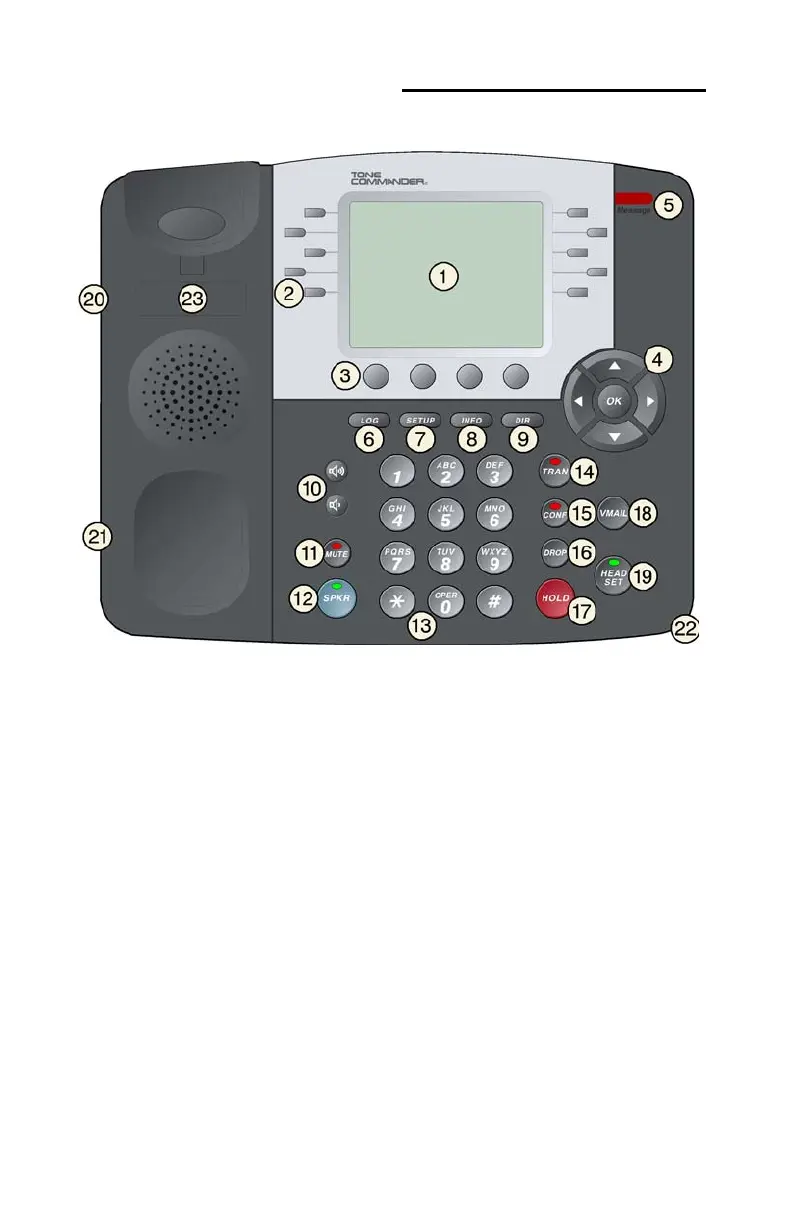
Controls and Indicators
1) Display – shows the multifunction key labels, call states, caller ID,
dialed digits, network call control messages, and elapsed time
during calls. When not on a call, the date, time of day, and softkey
options are displayed. The display is described in detail on page 5.
The viewing is primarily set by selecting the high or low base
mounting position (page 22). Viewing angle display clarity can be
altered by adjusting the display contrast (page 49).
2) Multifunction Keys – select call appearances, activate network
features, or dial personal speed dial numbers. Red and green
indicators on the keys show call appearance and feature status.
The optional 8030X Button Expansion Module provides 30
additional multifunction keys.



 To Next Page